


Code review is the part of shipping software that everyone respects and almost no one enjoys. Claude Code’s code review feature takes the repetitive burden off your team by running a fleet of specialized agents over every pull request and posting inline findings as comments on the exact lines that need attention. This guide walks through how the feature works, how to set it up, how to tune it with REVIEW.md, and how to run the local /code-review command for diffs that never touch GitHub.

Code Review: What You’ll Learn
This guide covers both halves of Claude Code’s code review offering: the hosted GitHub App that reviews pull requests in the cloud, and the local /code-review command that inspects diffs in your terminal. By the end you will know how to install the app, write a REVIEW.md that matches your standards, read the severity markers, and fold the workflow into your existing process.
What Is Claude Code Code Review
Claude Code code review is a research preview feature for Team and Enterprise subscriptions. It is not available for orgs configured with Zero Data Retention. The feature does one thing well: it analyzes a GitHub pull request and posts findings as inline comments on the specific lines that need a second look.
Behind that simple description sits a fleet of specialized agents. Each agent is tuned to look for a particular class of problem. One agent hunts logic bugs, another watches for insecure data handling, another checks that new API routes have tests, and so on. The agents run in parallel on Anthropic’s infrastructure, which means a large pull request does not queue behind a tiny one. They all work at the same time.
Crucially, Claude Code code review does not approve or block pull requests. The check run it populates is always neutral. Branch protection rules never fire from this tool alone. If you want to gate merges on findings, you read the severity counts in your own CI and enforce them there. This keeps the human reviewer in the loop as the decision maker.
The feature is designed to fit into an existing code review culture rather than replace it. Your senior engineers still own the architectural call. Claude handles the repetitive, line-level scrutiny that drains focus: off by one errors, unchecked return values, missing tenant scoping on a new query, log lines that leak personally identifiable information. Reviewers get to spend their attention on the parts that actually need a human.
How a Review Actually Runs
Every code review starts with a trigger. The available triggers depend on how each repository is configured during setup. A review can fire once when a pull request is opened, on every push to an existing pull request, or only when someone manually requests one. Most teams enable the first two and reserve manual triggers for drafts.
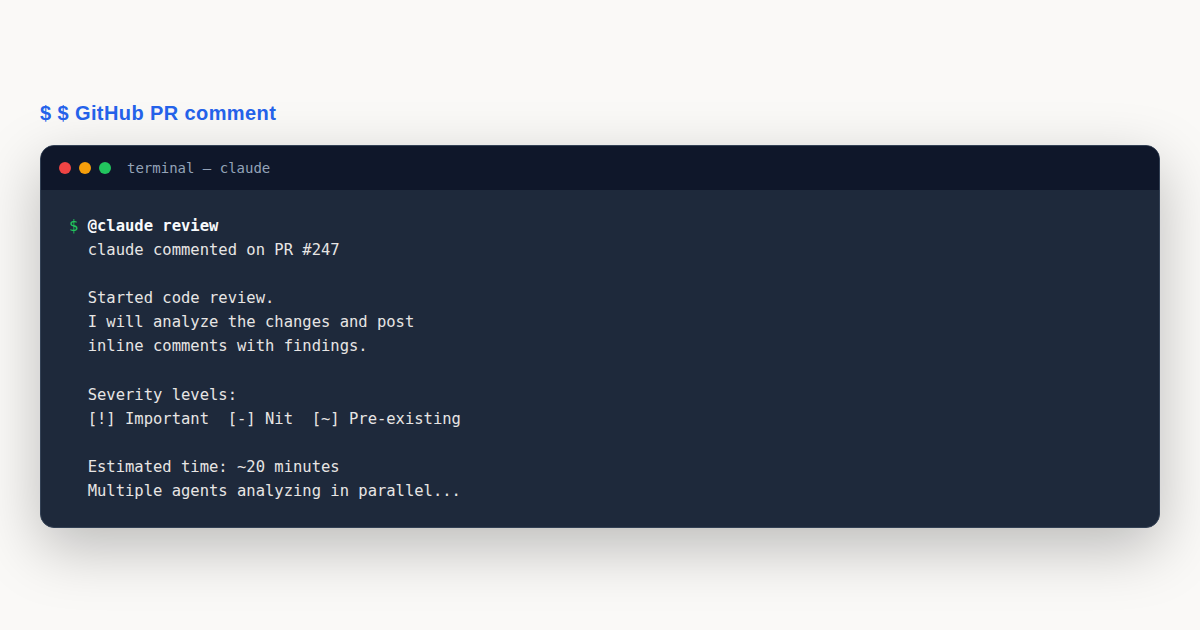
Regardless of trigger, a review always runs when someone types @claude review as a new top level comment on the pull request. This is the universal escape hatch. It works in any mode the app is configured for, and it is the fastest way to ask for a fresh pass after you push a fix.
Once a review starts, the system gathers the diff and the surrounding code. Surrounding code matters. An agent does not just see the changed lines. It sees the functions those lines live in, the types they reference, and the callers upstream. This context window is what separates a useful review from a noisy one. A change that looks wrong in isolation often reads as correct once you see the five lines above it.
Each agent produces candidate findings. Before anything reaches the pull request, a verification step filters false positives. The agents are encouraged to prove their claims by pointing at a file and line. Findings that cannot be grounded get dropped. The surviving findings are then deduplicated, because two agents often catch the same issue from different angles, and ranked by severity.
Output lands in two places. Inline comments appear on the specific lines in the Files changed tab, and a summary comment lands on the pull request conversation. The whole pass completes in about twenty minutes on average, scaling with pull request size. A tiny typo fix might finish in five. A sprawling thousand line refactor might take forty. Either way, it is faster than a tired human at the end of a Friday.
The summary comment is worth reading in full even when the inline comments look manageable. Findings that cannot be pinned to a specific line, often architectural observations or cross file patterns, live in the summary under an “Additional findings” heading. Teams that only scan inline comments miss this section and miss the higher level feedback the agents worked hardest to produce.
One subtle behavior worth knowing: the agents are aware of what changed versus what was merely touched. If a pull request reformats a file without changing logic, the code review will not flood you with findings about the reformatted lines. It focuses on net new code and meaningful edits. This keeps noise low on mechanical changes like import sorting or lint auto-fixes.
Severity Levels and What They Mean
Every finding from a code review carries one of three severity markers. Learning to read these markers is the single biggest unlock for getting value from the tool. If you treat them all the same, you will either merge bugs or burn out on noise.
Important, marked red
An Important finding is a real bug that should be fixed before merging. Incorrect logic, an unscoped database query, a migration that breaks rollback, personally identifiable information ending up in a log. These are the findings worth holding a pull request for. If your team reads only one severity, read this one.
Nit, marked yellow
A Nit is a minor issue worth fixing but not worth blocking on. Naming suggestions, style notes, a cleaner way to write a loop, a doc string that would help the next reader. Nits are useful when you have time, ignorable when you do not. REVIEW.md, covered later in this guide, lets you cap how many nits appear per review so they never drown out the signal.
Pre-existing, marked purple
A Pre-existing finding is a bug that lives in the codebase already and was not introduced by this pull request. Claude surfaces these as a courtesy. You might choose to fix the nearby bug while you are in the file, or you might file a ticket and leave it for later. The point of the purple marker is that the author of the pull request is not on the hook for it.
The check run output ends with a machine readable severity count on its last line. That line is what your own CI can parse if you want to gate merges. A common policy is: block if Important is greater than zero, otherwise allow. You own that decision, not Claude.
Setting Up the GitHub App
Installing the code review feature takes about five minutes if you have the right roles. You need Owner or Primary Owner access on the Claude account, and admin access on the GitHub organization that owns the repositories you want covered.
Start at claude.ai/admin-settings/claude-code. There you will find a Setup button that kicks off the GitHub App installation flow. This is the standard OAuth style install where GitHub asks which organization the app should live in and which permissions it receives.
The app requests three permissions: Contents (read and write), Issues (read and write), and Pull requests (read and write). Contents read access lets the agents fetch the source files around a diff. Write access lets it post inline comments. Pull requests access is what makes the @claude review command work.
After the app lands in your organization, you pick the repositories it should cover. You can start with one pilot repo, prove the value, then expand. The final step is choosing the trigger mode per repository. The three options are once after pull request creation, after every push, or manual only. Most teams start with “once after creation” and graduate to “every push” once they trust the noise level.
One detail worth knowing: the GitHub App runs entirely on Anthropic infrastructure. Nothing executes inside your build system, and nothing runs on your developers’ machines. The agents read code from GitHub through the app’s API token and post findings back through the same channel. There is no agent binary to install.
Triggering Reviews Manually
Even with automatic triggers off, you can request a code review on demand. The command lives in the pull request comment box, and it must be the first thing in a new top level comment. Two forms exist.
@claude review starts a review and also subscribes the pull request to push-triggered reviews going forward. Use this when you want ongoing coverage on a long lived branch. Every subsequent push will trigger a fresh pass until the pull request merges or closes.
@claude review once runs a single review without subscribing. Use this on a draft you are still shaping, or when you want a sanity check before turning on automatic triggers. The command does not change the repo’s configured trigger mode. It only affects the current pull request.
A few requirements apply. The command must be at the start of a top level pull request comment, not a reply. The requester must be an owner, member, or collaborator on the repository. The pull request must be open. Manual triggers do work on drafts, which is handy for catching issues early. Random outside contributors cannot summon a review on your repo, which keeps the billing predictable.
Customizing Reviews with CLAUDE.md
Your repository probably has a CLAUDE.md already. The code review feature reads it as project context. This is where you describe architecture decisions, conventions, and the shape of the codebase. Claude treats this file as background knowledge when judging whether a change makes sense.
There is a subtle bidirectional behavior here that teams often miss. If a pull request makes a statement in CLAUDE.md outdated, Claude flags that the docs need updating. Imagine your CLAUDE.md says “all rate limiting lives in middleware.ts” and a pull request adds rate limiting inside a route handler. Claude will flag both the architectural drift and the doc that now lies.
Newly introduced violations of CLAUDE.md rules are tagged as nits rather than important findings. The assumption is that conventions documented in CLAUDE.md are style level concerns unless they intersect with correctness. If a convention is actually load bearing, say so explicitly in REVIEW.md, covered next.
Writing REVIEW.md
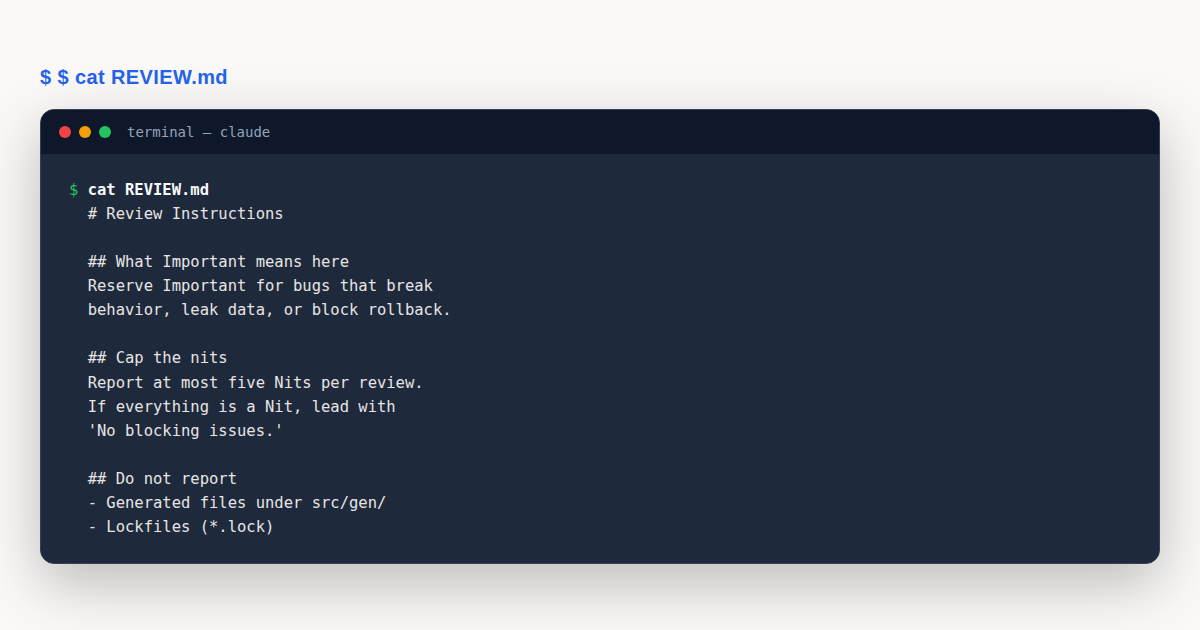
REVIEW.md is a file you drop at the root of your repository. It is the most powerful customization lever in the code review feature. Where CLAUDE.md is read as context, REVIEW.md is pasted verbatim into every agent’s system prompt as the highest priority instruction block.
That word verbatim matters. The file is not parsed. Import syntax like @path/to/file is not expanded. Files referenced by path are not read. Whatever lands in REVIEW.md is exactly what each agent receives, character for character. Keep the file self-contained.
What you can tune in REVIEW.md breaks down into a handful of categories.
Redefine severity
The default Important marker is broad. Your repo might have a stricter definition. A payments service might say Important means anything that could move money incorrectly, leak card data, or break a reconciliation job. A marketing site might say Important means the page will not render. Put your definition in REVIEW.md.
Cap the nits
Without a cap, an enthusiastic code review can produce twenty nits on a large pull request. That noise buries the one important finding. A common line is “report at most five nits per review” with the instruction to fold extras into a summary tally.
Skip rules
Generated code, lockfiles, and vendored dependencies rarely benefit from review. List the paths and categories to skip. This speeds up the review and removes findings your team will dismiss anyway.
Repo-specific checks
Every codebase has invariants that a generic reviewer would not know about. “New API routes must have an integration test.” “Log lines must not include email addresses.” “Database queries must be scoped to the caller’s tenant.” These belong in REVIEW.md.
Verification bar
You can raise the bar for what counts as a finding. “Behavior claims need a file:line citation” forces the agents to ground every claim. This slashes false positives.
Convergence on re-review
On a long lived pull request with push triggers, you do not want new nits appearing on every pass. A line like “after the first review, suppress new nits unless they flag a correctness issue” keeps the second and third passes focused.
Summary shape
You can ask for the summary comment to open with a one line tally. “Two important, four nits, one pre-existing.” That single line saves reviewers from scrolling to count.
Here is a full REVIEW.md example you can copy and adapt. It is the one from the official documentation, included verbatim so you can see exactly what the agents will receive.
# Review instructions

## What Important means here
Reserve Important for findings that would break behavior, leak data,
or block a rollback: incorrect logic, unscoped database queries, PII
in logs or error messages, and migrations that aren't backward
compatible. Style, naming, and refactoring suggestions are Nit at
most.

## Cap the nits
Report at most five Nits per review. If you found more, say "plus N
similar items" in the summary instead of posting them inline. If
everything you found is a Nit, lead the summary with "No blocking
issues."

## Do not report
- Anything CI already enforces: lint, formatting, type errors
- Generated files under `src/gen/` and any `*.lock` file
- Test-only code that intentionally violates production rules

## Always check
- New API routes have an integration test
- Log lines don't include email addresses, user IDs, or request bodies
- Database queries are scoped to the caller's tenant
That file is short on purpose. REVIEW.md grows over time as you learn what the agents get wrong. Start small, read the findings over your first ten pull requests, then add a line for each recurring false positive. The file becomes a living record of your team’s review standards.
Rate and Reply to Findings
Every inline comment from a code review has a thumbs up and thumbs down button. Anthropic collects this feedback after the pull request merges and uses it to improve the agents. Treat the buttons as free quality signaling. If a comment caught a real bug, thumbs up. If it wasted your time, thumbs down. The signal compounds over months.
Replying to a comment does something different from what people expect. Typing a reply does not summon Claude to continue the conversation in that thread. The agents do not chat. If you disagree with a finding or you have fixed the underlying issue, the way to resolve it is to push a new commit.
On a push-triggered pull request, the next push starts a fresh review and that fresh review resolves the threads from the previous pass. If you want a fresh pass without pushing, type @claude review once as a new top level comment. This is the cleanest way to ask “did I actually fix everything?” without manufacturing a no-op commit.
Reading the Check Run Output
Every code review populates a check run titled “Claude Code Review” on the GitHub Checks tab. The check run body contains the summary, the severity tally, and any additional findings that did not map to a specific line. The last line is a machine readable severity count for CI consumption.
The check run status is always neutral. It never shows as success or failure in the GitHub UI. This is deliberate. Claude Code code review is an advisor, not a gatekeeper. Branch protection rules built around required checks will not engage with this check run.
If you do want to gate merges on findings, you write a small job in your own CI that reads the check run’s last line and exits non-zero when the Important count is above your threshold. This is where the feature pairs naturally with a continuous integration pipeline. For the pipeline mechanics, see our companion guide on Claude Code GitHub Actions, cross-linked at the end of this post.
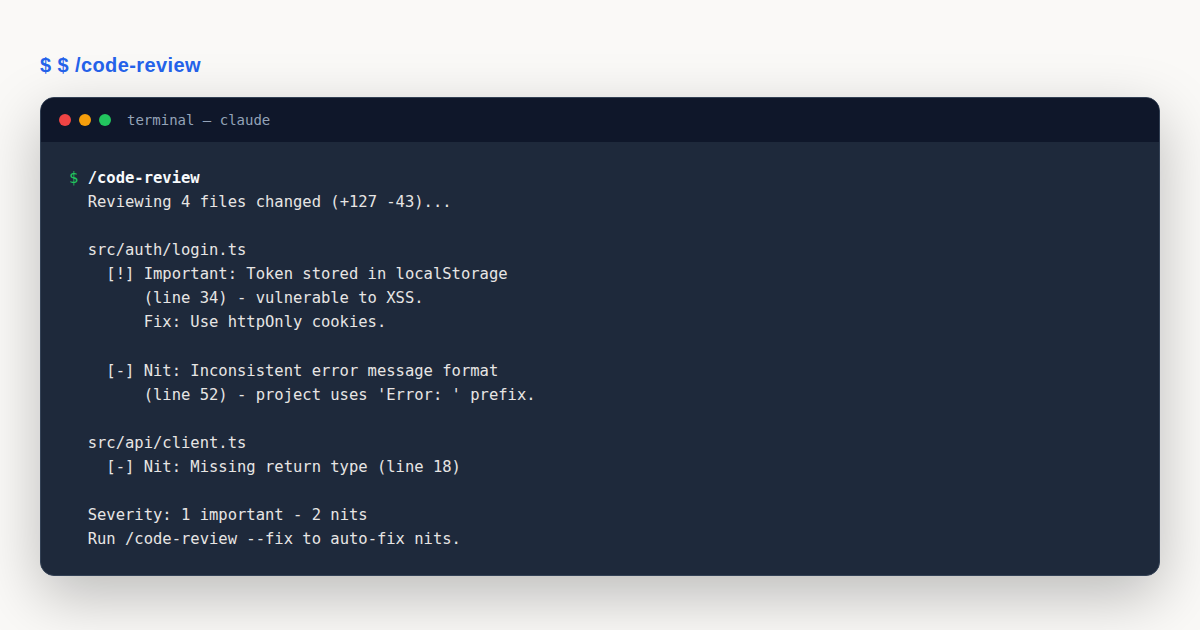
Reviewing a Diff Locally with /code-review
Not every change goes through GitHub. Maybe you are polishing a branch before opening a pull request. Maybe you are working in a repo that does not have the app installed. Maybe you just want a quick read on your in-progress work without the round trip to the cloud. The /code-review command handles all of these cases.
The command runs inside the Claude Code terminal. It reviews the diff in place and reports findings to stdout. No GitHub App, no inline comments unless you ask for them. The default scope is your branch’s commits ahead of upstream plus any uncommitted changes in the working tree. This means it catches the work you have not even committed yet, which is the best time to catch a bug.
Starting with version 2.1.151, /code-review also reports reuse, simplification, and efficiency cleanups in addition to correctness bugs. If you have copy pasted a block that should have been a helper, the command will point at the duplication. If a loop can collapse into a single expression, it will suggest the rewrite.
Useful flags
--comment posts the findings as inline comments on an open pull request. Use this when you want the cloud style review output from a local run. --fix applies the findings directly to your working tree. Use this when you trust the suggestions and want to skip the manual edit step.
You can pass a target to scope the review. A file path reviews one file. A pull request number reviews that pull request. A branch name or a ref range reviews the span between two refs. This flexibility lets you review a colleague’s branch before they open a pull request, or audit a range of commits between releases.
Ultra review
/code-review ultra --fix runs a deeper pass in the cloud. Think of it as the heavy version of the command. It takes longer and costs more tokens, but it catches subtler issues. Reserve it for high stakes changes like security sensitive code or a large refactor.
A note on naming history. Before version 2.1.147, this command was called /simplify. From version 2.1.154 onward, /simplify runs a separate cleanup-only review that skips correctness findings. If you are on an older Claude Code, the command you want is /simplify. On current builds, use /code-review for the full pass.
Pricing and Cost Management
The cloud code review feature is billed by token usage. A typical review averages between fifteen and twenty five dollars, though small pull requests cost less and huge refactors cost more. Billing is separate from your plan’s included usage. Reviews draw down usage credits rather than eating into the allowance your developers consume when they run Claude Code interactively.
Trigger mode has the biggest effect on cost. “Once after pull request creation” charges you exactly one review per pull request. “After every push” can multiply that by the number of pushes, which adds up fast on an active branch. Manual mode costs nothing until someone types the @claude review command.
A monthly spend cap lives at claude.ai/admin-settings/usage. When the cap is reached, the code review feature posts a single explanatory comment on the pull request and skips the review. Reviews resume automatically at the start of the next billing period. No one gets paged, nothing breaks.
For local reviews, the cost story is simpler. /code-review uses the same token billing as any other Claude Code command. Ultra review costs more because it runs in the cloud, but it is still metered by tokens. None of these local commands draw from the separate usage credits that the GitHub App uses.
Cloud Review vs Local Review
The two halves of Claude Code code review overlap in spirit but differ in practice. Knowing when to reach for each one keeps your costs down and your feedback loop tight.
The cloud review, run through the GitHub App, is the heavyweight. It spins up a full fleet of agents on Anthropic infrastructure, each with a wide context window and the full pull request diff plus surrounding code. It posts inline comments others can see, tracks severity across pushes, and feeds the check run your CI can read. Use it when the change is ready for other humans to look at.
The local /code-review command is the lightweight. It runs in your terminal against whatever diff you point it at, including uncommitted changes no one else has seen. It is faster, cheaper, and more private. No findings leave your machine unless you explicitly pass --comment. Use it during the messy middle of a change, when you are still shaping the code and do not want premature eyes on it.
A common cadence is local first, cloud second. Run /code-review before you push to catch the embarrassing stuff. Then open the pull request and let the cloud review do the deeper pass. This ordering means the cloud review starts from a cleaner baseline and spends its tokens on subtler issues rather than re-flagging the typos you already fixed.
What Makes a Good CLAUDE.md for Review
Since the code review feature reads your CLAUDE.md as context, the quality of that file directly shapes the quality of findings. A vague CLAUDE.md produces vague reviews. A specific one produces specific reviews.
Good CLAUDE.md entries name the load bearing decisions. “All database access goes through the repository layer in src/repos/. Controllers never touch the ORM directly.” That single sentence tells the agents where to look for a violation. Compare it to a vague entry like “we follow clean architecture” which tells the agents almost nothing.
Good entries also name the exceptions. “The health check endpoint at /healthz bypasses the repository layer intentionally because it must not depend on the database.” Without that note, every code review will flag the health check as a violation. With it, the agents learn the exception and move on.
Keep CLAUDE.md short enough that a new contributor can read it in ten minutes. A file that tries to document everything documents nothing, because no one reads it. Aim for the decisions a new hire would get wrong on their first day without being told. Those are the decisions worth writing down.
The Writer and Reviewer Pattern
A natural workflow emerges once both sides of Claude Code are in play. You write code with Claude Code in your terminal, iterating on the implementation, asking it to refactor, asking it to write tests. When the change feels ready, you run /code-review locally to catch what you missed. You fix anything real, then push and open a pull request.
At that point the GitHub App takes over. A cloud code review runs on the full pull request, with more compute and a wider context window than the local command can afford. Findings land as inline comments. You address them, push again, and the next push triggers another pass that confirms the fixes.
What you get is a writer and reviewer pattern that does not burn your teammates’ patience on the easy stuff. A human reviewer coming in after Claude has already caught the off by one errors and the missing test can spend their time on the architectural questions. Does this abstraction belong here? Is this the right boundary between these two modules? Those are the conversations code review should be about.
Troubleshooting Common Issues
Even with a clean setup, things occasionally go sideways. Most problems fall into three buckets: failed reviews, spend cap issues, and missing findings.
Failed or timed out reviews
If a code review fails or times out, the check run shows an error message in the GitHub Checks tab. To retrigger, type @claude review once as a new top level comment, or push a new commit if the repo is in push-trigger mode. The Re-run button in the GitHub Checks tab does NOT retrigger Claude. That button only re-runs the GitHub Actions workflow, which is a separate system.
Spend cap reached
When the monthly spend cap is hit, the next review attempt posts a single comment explaining that the review was skipped. Reviews resume at the start of the next billing period. If this happens often, either raise the cap or switch busy repositories to a cheaper trigger mode.
Findings not showing up
If you expected findings but see none, check three places. First, open the check run Details in the GitHub Checks tab. Second, look at the Files changed tab for inline comments on specific lines. Third, scroll the review body for an “Additional findings” section that lists findings which could not be mapped to a specific line. Findings are never silently dropped. They are always in one of these three places.
For the full and authoritative detail on any of these topics, see the official code review documentation on code.claude.com. This guide is a practical walkthrough; the docs are the source of truth.
A Worked Example: Reviewing a New API Route
To make this concrete, let us walk through a single pull request from open to merge. Imagine a team adding a new endpoint to a customer facing API. The endpoint returns a user’s recent orders. The author writes the route, adds a unit test for the happy path, and opens a pull request.
The repository has the GitHub App installed in “once after creation” mode. The moment the pull request opens, a code review starts in the cloud. Eighteen minutes later, three findings appear.
The first finding is marked Important, red. The new route executes a database query without scoping it to the tenant of the requesting user. In a multi-tenant system this is a data leak. The inline comment points at the exact line, explains the risk, and links to the project’s existing tenant scoping helper. This is a real bug. The author would have caught it in human review too, but probably not at nine in the evening when they opened the pull request.
The second finding is marked Nit, yellow. The error response for a missing user returns a 404 with an empty body. The team’s convention, documented in REVIEW.md, is that all error responses carry a JSON envelope with a stable error code. The inline comment quotes the relevant line from REVIEW.md and suggests the rewrite.
The third finding is marked Pre-existing, purple. A helper function the route calls has a subtle null handling bug that predates this pull request. Claude flags it as a courtesy and explicitly notes it is not the author’s responsibility. The author files a ticket and moves on.
The author reads the summary, addresses the Important finding first, and adds the JSON envelope from the Nit. They push the fix. Because the pull request is in push-trigger mode for this session, thanks to an earlier @claude review command, the push starts a fresh pass. Twelve minutes later the new review resolves the two threads and posts no new findings. The summary opens with “No blocking issues.”
Before merging, the author runs /code-review locally on the final diff. The local pass catches a duplication: the new route repeats five lines of logging setup that already live in a helper. The author runs /code-review --fix and the command rewrites the route to call the helper. One more push, one more cloud review, and the pull request is clean.
The human reviewer arrives. They skim the closed findings, glance at the final diff, and focus their comment on whether the route belongs in the orders controller or deserves its own module. That is the right conversation. The line level scrutiny already happened, twice, and the author did not have to wait on a teammate to catch a tenant scoping bug.
This is what a healthy code review loop looks like with Claude in the mix. The feature does not replace the human. It clears the underbrush so the human can do the interesting part.
Notice the cost shape of this example. One cloud review fired automatically on pull request creation. A second fired on the first fix push. A third fired after the duplication cleanup. Three reviews at roughly twenty dollars each is sixty dollars for a pull request that shipped without a data leak. Compare that to the cost of a leaked tenant dataset reaching a customer, and the math writes itself.
Also notice what did not happen. No one waited overnight for a reviewer in a different timezone to wake up and catch the scoping bug. No one shipped a hotfix on a Saturday. The feedback loop closed inside the same working day, and the human reviewer spent their five minutes on the architectural question instead of the line by line read.
Code Review: Common Mistakes to Avoid
Teams new to Claude Code code review tend to hit the same handful of pitfalls. Each one is easy to avoid once you know it exists.
- Skipping REVIEW.md entirely. Without a REVIEW.md, the agents apply default heuristics that will not match your repo’s conventions. Fix: drop the example file from this guide into your repo root and adapt the severity definition and skip rules on day one.
- Expecting the check run to block PRs. The check run is always neutral and never engages branch protection. Fix: if you want to gate merges, write a CI job that parses the severity count and exits non-zero when Important is above zero.
- Replying to comments expecting a response. Replies do not summon Claude. Fix: push a new commit to trigger a fresh pass, or type
@claude review oncefor a fresh pass without pushing. - Enabling every-push mode on a busy repo without a spend cap. A long lived pull request with twenty pushes can rack up twenty reviews before you notice. Fix: set a monthly spend cap first, then graduate from “once after creation” to “every push” only when you trust the noise level.
Code Review: Best Practices
- Start with one pilot repo in “once after creation” mode before rolling the GitHub App across your organization.
- Write REVIEW.md on day one and revisit it after every ten pull requests to tighten definitions and skip rules.
- Cap nits at five per review so the Important findings stay visible in the summary.
- Run
/code-reviewlocally before pushing to catch issues early, then let the cloud review do the deeper pass. - Use the thumbs up and down buttons on every comment to feed signal back into the agents and improve future reviews.
Rolling Out Code Review Across a Team
Adoption matters as much as configuration. A code review feature that one engineer loves but the rest of the team ignores delivers no value. A phased rollout keeps skepticism low and trust high.
Start with a single pilot repository, ideally one with active pull requests and a maintainer who volunteered. Configure it in “once after creation” mode so the cost is predictable. Let it run for two weeks. Collect the findings, sort them into caught real bugs versus noise, and tune REVIEW.md to suppress the noise. The pilot is as much about calibrating REVIEW.md as it is about proving the feature.
Once the pilot repo produces findings the team trusts, expand to a second and third repo. Resist the temptation to enable every push mode on day one. Every push multiplies cost and can overwhelm a team still learning to read the severity markers. Graduate to push triggers only after the team has internalized what a yellow Nit means versus a red Important.
Share the wins. When a code review catches a data leak before merge, mention it in the team channel. When a REVIEW.md tweak cuts nit volume in half, mention that too. The feature earns its budget through visible saves, and visibility is something you manufacture deliberately in the first month.
Code Review: Frequently Asked Questions
Does Claude Code code review block pull requests?
No. The check run is always neutral and never engages branch protection. To gate merges, parse the severity count in your own CI and enforce the policy there.
How long does a typical code review take?
About twenty minutes on average, scaling with pull request size. A small typo fix may finish in five minutes. A large refactor can take forty. Reviews run in parallel on Anthropic infrastructure.
What is the difference between CLAUDE.md and REVIEW.md?
CLAUDE.md is read as project context. REVIEW.md is injected verbatim into every agent’s system prompt as the highest priority instruction block. Use REVIEW.md for severity rules and skip lists.
Can I run a code review without the GitHub App?
Yes. The /code-review command reviews diffs in your terminal with no app required. Use --comment to post findings to a pull request, or --fix to apply them locally.
How is code review billed?
Cloud reviews are billed by token usage, averaging fifteen to twenty five dollars each, drawn from separate usage credits. A monthly spend cap at the admin settings page controls total cost.
Code review with Claude Code splits cleanly into two halves: the GitHub App for cloud reviews on pull requests, and the /code-review command for local passes on diffs. Tune both with a REVIEW.md that encodes your standards, read the severity markers correctly, and the feature clears the line level scrutiny so your human reviewers can focus on architecture.