


Prompt caching is the single biggest lever for cutting Claude Code costs on long sessions. It lets the API skip reprocessing your entire conversation history on every turn, billing you roughly one tenth the normal input rate for repeated prefixes. This guide covers how the cache is organized, the eight actions that invalidate it, the eight actions that preserve it, and how to read the token counts that tell you whether prompt caching is actually working.

Prompt Caching: What You’ll Learn
Prompt caching can feel invisible because it happens inside the API, not in your terminal. You never see a “cache hit” message flash by. The only visible evidence is the token breakdown that /cost reports. This guide makes the invisible visible so you can reason about the cache the same way you reason about any other tool in your workflow.
By the end, you will know the three layers the cache is organized into, which eight actions wipe the cache, which eight actions leave it untouched, how to read the two token count fields, and how to structure a session for maximum cache hits. The system rewards predictable behavior and punishes unnecessary changes. Once you internalize the rules, lower bills follow naturally.
What Is Prompt Caching?
The mechanism is straightforward: the Claude API avoids reprocessing the beginning of your conversation on every turn through prompt caching. Instead of reading your full system prompt, tool definitions, CLAUDE.md contents, and entire message history from scratch each time you press Enter, the API matches the start of each new request against content it already processed recently.
The match is exact. The API compares the prefix of your new request byte for byte against what it cached. If the first several thousand tokens are identical to a previous request, those tokens are served from the cache at roughly ten percent of the standard input price. If even one character changes anywhere in that prefix, everything after the change point gets recomputed from scratch.
There is no per file or per segment caching. The API does not cache your CLAUDE.md separately from your tool definitions or your messages. It caches one continuous prefix. This is the most important conceptual point about the cache: it is a single prefix match, not a collection of independent cached parts.
Think of it like a streaming video buffer. The buffer holds everything you already watched. If you skip backward to a point already in the buffer, playback is instant. If you change the video, the buffer flushes and must refill. Prompt caching works the same way. Stable prefixes stay buffered. Changes flush the buffer downstream of the change.
How the Cache Is Organized: Three Layers
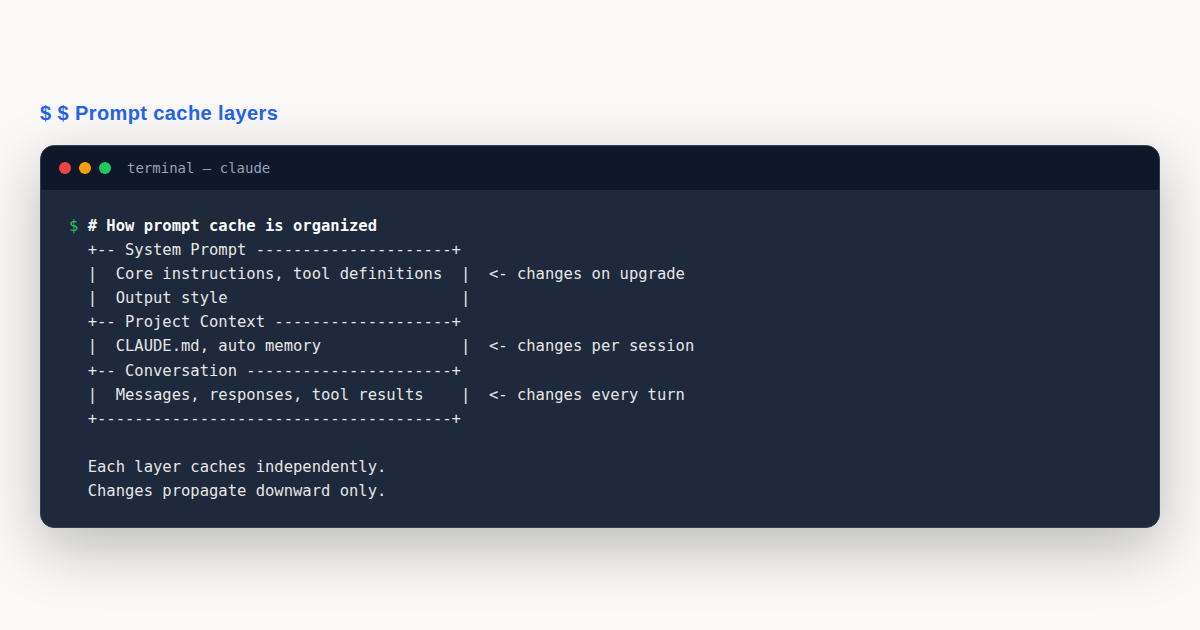
Every request Claude Code sends to the API is ordered so that rarely changing content comes first and frequently changing content comes last. This ordering is what makes prompt caching effective. The three layers, from most stable to most volatile, are the system prompt, the project context, and the conversation.
Layer 1: System Prompt
The system prompt contains core instructions, tool definitions, and output style settings. This layer changes only when tool definitions change or when Claude Code itself is upgraded to a new version. Because it sits at the very front of every request, the system prompt is the most cache friendly layer. Once cached, it stays cached for the life of the session unless something explicitly invalidates it.
The system prompt is also the largest layer. Tool definitions alone can consume thousands of tokens. This is why the cache has such a dramatic effect on cost: the biggest, most expensive layer is also the most stable, so it almost always hits the cache.
Layer 2: Project Context
The project context layer holds your CLAUDE.md file, auto memory, and any unscoped rules. This layer is read once at session start and again after /clear or /compact. It changes less often than the conversation but more often than the system prompt.
Because project context sits between the system prompt and the conversation, it acts as a bridge. If project context changes, the conversation layer after it must recompute. If it stays stable, the system prompt before it remains cached and only the conversation layer grows. The cache depends on this layer staying put.
Layer 3: Conversation
The conversation layer is your messages, Claude’s responses, and tool results. It changes every single turn. Each new turn appends to the end, so the prefix up to the previous turn still matches the cache. This is why caching works at all on a growing conversation: the old turns are a stable prefix for the new ones.
The conversation layer is where cache misses are most visible. Every turn adds tokens, but only the new tokens are uncached. The previous turns are served from cache at the reduced rate. Over a long session, the savings compound dramatically.
Beyond the Prefix: Model and Effort
Two things are not part of the prompt text but are part of the cache key. The model itself has its own cache. If you switch from Sonnet to Opus, the entire prefix must be recomputed because Opus has never seen Sonnet’s cache. The effort level also has its own cache for the same model. Changing effort invalidates just like changing model.
This means prompt caching rewards picking a model and effort level at the top of your session and sticking with them. Save /compact for natural break points. The fewer mid task changes you make, the higher your cache hit rate will be.
Where the Cache Lives
Cache storage depends on how you authenticate. The table below shows where cached content resides for each common setup. Knowing this helps you understand data residency and why cache behavior may differ across auth methods.
| Auth Method | Cache Location |
|---|---|
| API key | Anthropic infrastructure |
| Claude subscription | Anthropic infrastructure |
| Claude Platform on AWS | Anthropic infrastructure |
| Amazon Bedrock | Your cloud provider (AWS) |
| Google Cloud Agent Platform | Your cloud provider (GCP) |
| Microsoft Foundry | Anthropic infrastructure |
| Custom ANTHROPIC_BASE_URL / LLM gateway | Wherever requests are forwarded |
If you use a custom gateway, caching behavior depends on what that gateway does with requests. Some gateways strip headers or rewrite payloads in ways that break the prefix match. If your cache hit rate is unexpectedly low on a gateway, check with your infrastructure team about caching passthrough.
A Worked Example: High Cache Hits vs Cache Misses
To see prompt caching in action, consider two developers working on the same feature. Both run sessions of roughly the same length, but their habits produce wildly different costs. The difference is entirely in how well they preserve the cache prefix.
The Disciplined Session
Developer A starts Claude Code, picks Sonnet at effort level medium, and begins work. She reads three files, asks Claude to implement a function, reviews the output, asks for a test, reviews that, and asks for a refactor. She never switches models, never changes effort, and never compacts mid task. Over twenty turns, her session grows to 40,000 tokens of conversation.
On each turn, the system prompt, project context, and all previous turns are served from cache. Only the newest turn’s tokens are billed at full input rate. Her /cost output shows cache_read_input_tokens at roughly 38,000 and cache_creation_input_tokens at about 2,000 per turn. The cache read tokens cost one tenth the standard rate. The cache is doing its job.
Halfway through, Developer A realizes she wants to check something in a different model. Instead of switching mid task, she finishes her current unit of work, then opens a new session for the model switch. The original session’s cache stays intact until she exits. Her total cost for the session is a fraction of what it would be without the cache.
The Chaotic Session
Developer B starts the same task but with different habits. He begins on Sonnet, switches to Opus after three turns to “see if it’s smarter,” switches back to Sonnet two turns later, changes effort from medium to high, compacts because the context feels long, connects an MCP server to try a tool, disconnects it, and upgrades Claude Code mid session because a notification appeared.
Each of those actions invalidated the cache. After each invalidation, the next request had to reprocess the entire history from scratch at full input rate. Over twenty turns, Developer B paid full price for the system prompt, project context, and conversation on at least six separate occasions. His /cost output shows cache_creation_input_tokens spiking to 30,000 or more on the turns following each invalidation.
The cost difference between these two sessions can be five to ten times. Same model, same task, same number of turns. Prompt caching is not a marginal optimization. It is the difference between a session that costs cents and one that costs dollars.
The lesson is simple. The cache rewards consistency. Pick your setup at the start, work in focused blocks, and batch your disruptive actions into natural break points between sessions rather than sprinkling them through a single session.
Eight Actions That Invalidate the Cache
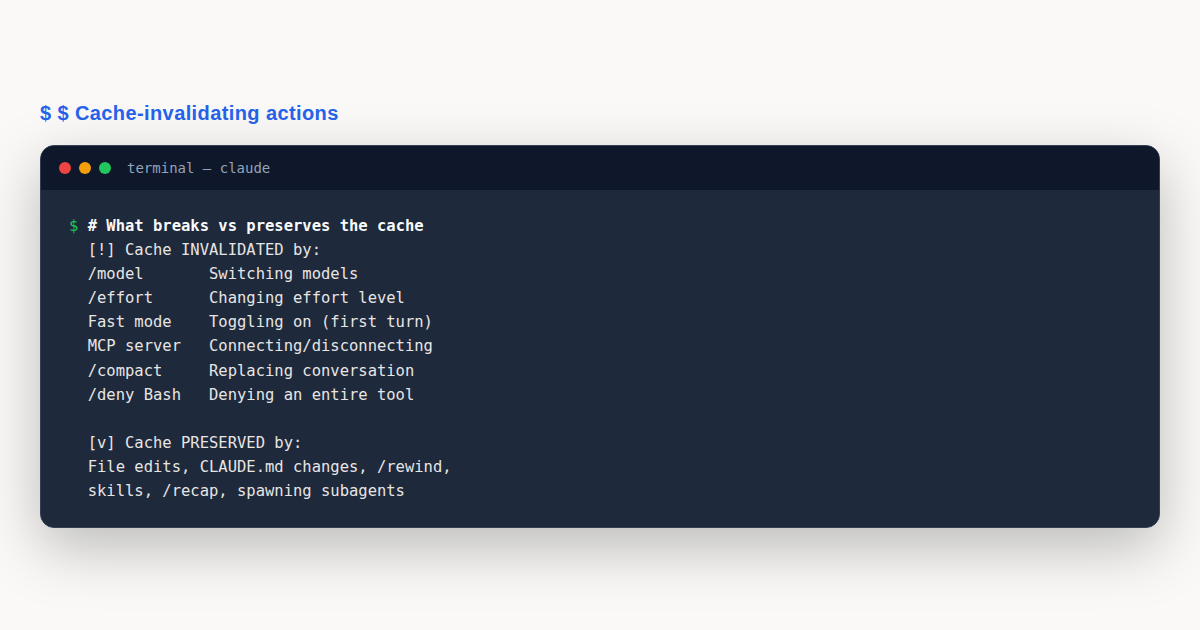
These are the eight actions that force the API to recompute your prefix from scratch. Each one changes something in the cache key, breaking the exact prefix match. Understanding all eight is the core of effective prompt caching.
1. Switching Models
Running /model switches you to a different model, and each model maintains its own separate cache. The next request after a switch reads your entire history from scratch with no cache hits. This includes switching between Opus plan mode and Sonnet execution when the opusplan setting is active, since that is still a model switch under the hood.
Automatic model fallback on Fable 5 also counts as a model switch. If Fable 5 falls back to a different model due to availability, the cache is invalidated. You cannot control automatic fallback, but you can be aware that it may happen and plan your most cache sensitive work for when model availability is stable.
2. Changing Effort Level
The cache is keyed by effort level combined with model. Running /effort to change from medium to high, or high to low, invalidates the cache just as thoroughly as switching models. Claude Code shows a confirmation dialog before applying the change, which gives you a moment to reconsider whether the effort change is worth the cache reset.
If you find yourself changing effort frequently, consider whether you are picking the right default at session start. Prompt caching works best when effort is chosen once and held steady. Use higher effort for complex reasoning tasks and lower effort for routine edits, but pick one per session block.
3. Turning On Fast Mode
Fast mode adds a request header that becomes part of the cache key. The first request after enabling fast mode has no cache hits, and uncached tokens are billed at fast mode rates. After the first turn, the header persists across subsequent turns, so toggling fast mode off and back on within the same session keeps the cache intact as of Claude Code v2.1.86 and later.
Note that enabling fast mode from a non Opus model also switches the model to Opus, which triggers the model switch invalidation described above. If you want fast mode without a model switch, start on Opus first, then enable fast mode. Cache management is all about minimizing disruptive changes.
4. Connecting or Disconnecting an MCP Server
MCP server tool definitions live in the system prompt layer. Connecting or disconnecting a server changes those definitions, which changes the prefix. There is an important exception: the advisor tool does not invalidate the cache when connected or disconnected.
Whether connecting a server invalidates the cache depends on tool search behavior. Deferred tools, which are the default on supported models, do not cause invalidation because they are not loaded into the prefix. Tools that are loaded into the prefix, which happens when tool search is unavailable or disabled, on Haiku models, on Google Cloud, on custom gateways, or when a server has alwaysLoad enabled, do invalidate the cache.
5. Enabling or Disabling a Plugin
Plugins can include skills, commands, agents, hooks, and MCP servers. Skills, commands, agents, and hooks never invalidate the cache because they are appended after the conversation rather than inserted into the prefix. Changes to these apply on /reload-plugins or in a new session.
The exception is a plugin that includes MCP servers. Such plugins follow the MCP server rules described above. If the plugin’s MCP server tools are loaded into the prefix, enabling or disabling the plugin invalidates the cache. Check what a plugin contains before toggling it if cache preservation matters.
6. Denying an Entire Tool
Denying a tool with a bare name like Bash or WebFetch removes that tool from context. Built in tools live in the system prompt layer, so removing them changes the prefix and invalidates the cache. This applies to bare tool names, Bash(*) style denies, and tool name globs using *.
Scoped deny rules do not invalidate the cache. A rule like Bash(rm *) only restricts specific uses of a tool without changing the tool definitions in the prefix. The cache is preserved because the system prompt is unchanged. Only broad denies that remove a tool entirely from context force a recompute.
7. Compacting the Conversation
Running /compact replaces your conversation history with a summary. This invalidates the conversation layer because the old messages are gone and replaced by new summary text. The system prompt and project context layers are reused, and project context is reloaded fresh.
Interestingly, the summarization request itself reads the existing cache, so the compact operation is not as expensive as it might seem. The post compaction turn rebuilds a cache based on the shorter summary, which means subsequent turns are cheaper because the prefix is smaller. Compacting is a tradeoff: you pay for one cache reset but get a shorter, cheaper prefix going forward.
8. Upgrading Claude Code
A new version of Claude Code updates the system prompt and tool definitions, which rebuilds the cache from scratch. Auto update applies on the next launch of Claude Code, never mid session, so an upgrade will not disrupt a running session. If you want to control when upgrades happen, set DISABLE_AUTOUPDATER=1 in your environment.
When you do upgrade, expect the first session in the new version to have lower cache hit rates until the new system prompt is cached. This is normal and resolves after the first few turns. The cache always needs a few turns to warm up after any system prompt change.
Eight Actions That Preserve the Cache
These eight actions do not invalidate the cache. Some do not change the prefix at all, and others change things that are read only once and not reloaded. Knowing what is safe helps you work freely without constantly worrying about cache resets.
1. Editing Repository Files
File contents enter the context only when Claude Code reads them. Editing a file on disk does not retroactively change the conversation history where the file was previously read. If you read a file, then edit it externally, then ask Claude about it, Claude will read the new version on the next read, but the old read in the conversation stays as it was.
This means you can freely edit files in your editor while Claude Code is running. The cache is unaffected. It only cares about what is in the conversation, not what is on disk. This is one of the most convenient properties of prompt caching for real world workflows.
2. Editing CLAUDE.md Mid Session
Your CLAUDE.md is read once at session start. Editing it during a session does not invalidate the cache, but it also does not apply the changes. The updated CLAUDE.md loads on the next /clear, /compact, or session restart. If you need CLAUDE.md changes to take effect immediately, you must accept the cache reset that comes with compacting.
This is a common source of confusion. Developers edit CLAUDE.md, expect Claude to immediately follow the new instructions, and are surprised when nothing changes. The cache keeps the old instructions alive until the next context reload. Plan your CLAUDE.md edits for the start of a session or accept the compact cost.
3. Changing Output Style
Output style is part of the system prompt, which is read once at session start. Changing the output style mid session does not invalidate the cache, but the change does not take effect until the next session or context reload. Like CLAUDE.md edits, output style changes are deferred.
If you need a different output style, start a new session with that style configured. The cache will build a fresh prefix around the new style. Trying to change style mid session is futile even though it does not break the cache.
4. Changing Permission Mode
Switching permission modes does not change the system prompt, so it does not invalidate the cache. You can move between default, accept all, and plan modes freely without worrying about cache resets. The exception is plan mode when opusplan is active, because plan mode with opusplan switches the model, which is a separate invalidating action.
For most developers, permission mode changes are safe. Just be aware of the opusplan interaction. If you rely on the cache and use opusplan, treat plan mode toggling the same way you treat model switching: do it at natural break points, not mid task.
5. Invoking Skills and Commands
Skills and commands inject content as user messages at the point of invocation. They are appended to the conversation, not inserted into the system prompt. This means invoking a skill or running a command does not invalidate the cache. The injected content simply extends the conversation prefix that subsequent turns build upon.
This is great news for power users who rely on custom skills and commands. You can invoke them freely throughout a session. The cache continues to serve all prior turns from cache, and only the newly injected content is uncached.
6. Running /recap
The /recap command generates a summary of the conversation for display purposes. This summary is appended as command output, not used to replace the conversation. The cache is untouched because nothing in the prefix changes. You get a recap without paying any cache reset cost.
Use /recap freely when you need to remind yourself what happened earlier in a long session. It is strictly additive and cache safe. The cache does not penalize you for reviewing your own conversation.
7. Rewinding the Conversation
Running /rewind truncates the conversation to an earlier turn. The remaining history after a rewind still matches the cache prefix up to that point. This means rewinding preserves the cache for the remaining turns. You do not pay a full recompute when you rewind.
This makes /rewind a cache friendly way to backtrack. If you went down a wrong path, rewinding to the fork point and trying again is cheaper than compacting or starting over. The cache covers the retained prefix, so you only pay for new tokens added after the rewind point.
8. Spawning a Subagent
When you spawn a subagent, the subagent builds its own cache based on its own system prompt and tools. The parent’s cache is completely unaffected. A forked subagent inherits the parent’s prefix, so its first request reads the parent’s cache, but subsequent requests build the subagent’s own cache.
Subagents have a 5 minute TTL even on subscription plans that otherwise get 1 hour. This means subagent caches expire faster, so long running subagents may see more cache misses than the parent session. Use subagents for bounded tasks that complete within a few minutes to get the most from the cache in subagent contexts.
Quick Reference: Invalidating vs Preserving Actions
Prompt caching comes down to knowing which actions break the prefix and which do not. The table below summarizes all sixteen actions covered above. Use it as a quick lookup when you are about to do something mid session and want to know whether it will cost you a cache reset.
| Invalidates the Cache | Preserves the Cache |
|---|---|
Switching models (/model) |
Editing repository files on disk |
Changing effort level (/effort) |
Editing CLAUDE.md (deferred until reload) |
| Turning on fast mode | Changing output style (deferred until reload) |
| Connecting or disconnecting MCP servers | Changing permission mode (except opusplan) |
| Enabling or disabling plugins with MCP servers | Invoking skills and commands |
| Denying an entire tool (bare name) | Running /recap |
Compacting (/compact) |
Rewinding (/rewind) |
| Upgrading Claude Code | Spawning a subagent |
The pattern is clear. Actions that change the system prompt or replace the conversation invalidate the cache. Actions that only add to the conversation or change things outside the prefix leave the cache intact. Prompt caching is fundamentally about prefix stability, and this table captures the entire picture in one glance.
Notice that some preserving actions, like editing CLAUDE.md or changing output style, do not apply their changes until the next context reload. They preserve the cache but also defer their effect. This is a tradeoff built into the design: the system prioritizes cache stability over immediate application of settings changes. Prompt caching would be far less effective if every settings change forced a recompute.
When you are unsure whether an action will invalidate the cache, ask yourself one question: does this change the content of the system prompt or replace existing conversation turns? If the answer is yes, expect a cache reset. If the answer is no, the cache is safe. Prompt caching rewards this kind of structural thinking about your session.
A useful mental model is to treat your session as a growing document. Anything that rewrites earlier pages of the document invalidates the cache. Anything that only appends new pages at the end, or changes nothing in the document at all, keeps the cache alive. The sixteen actions above map cleanly onto this model once you internalize which layer each one touches.
Cache Lifetime and TTL
Cached content does not live forever. There are two TTL options: 5 minutes and 1 hour. Each cache hit resets the timer, so an active session with frequent turns can keep a cache alive well beyond the base TTL. The key is maintaining a steady cadence of requests.
Your default TTL depends on your auth method. The table below summarizes the defaults and how to override them.
| Auth Method | Default TTL | Override |
|---|---|---|
| Claude subscription | 1 hour (auto, included in plan) | Drops to 5 min if on usage credits |
| API key | 5 minutes | ENABLE_PROMPT_CACHING_1H=1 for 1 hour |
| Amazon Bedrock | 5 minutes | ENABLE_PROMPT_CACHING_1H=1 for 1 hour |
| Google Cloud Agent Platform | 5 minutes | ENABLE_PROMPT_CACHING_1H=1 for 1 hour |
| Microsoft Foundry | 5 minutes | ENABLE_PROMPT_CACHING_1H=1 for 1 hour |
| Any method | Force 5 min | FORCE_PROMPT_CACHING_5M=1 |
If you are on an API key and working on tasks where you sometimes pause for more than 5 minutes to read documentation or think through a design, enabling the 1 hour TTL can significantly improve your cache hit rate. Set the environment variable before launching Claude Code:
export ENABLE_PROMPT_CACHING_1H=1
claude
Conversely, if you want to force 5 minute TTL for testing or debugging purposes, use FORCE_PROMPT_CACHING_5M=1. This overrides any 1 hour setting and ensures caches expire quickly, which can help reproduce cache miss scenarios.
Cache Scope: Machines and Directories
The cache is effectively scoped to one machine plus one directory. The system prompt embeds several environment specific details: your working directory, platform, shell, OS version, and auto memory paths. Two sessions running in different directories have different prefixes and do not share cache.
Two sessions running in the same directory on the same machine have matching prefixes and can share cache. This means parallel sessions in the same repo benefit from each other’s cache. If you often run multiple Claude Code sessions in the same project, caching gives you a bonus efficiency boost.
Sessions on different machines never share cache, even in the same directory, because platform and OS version are part of the cache key. If you switch between a laptop and a desktop for the same project, each machine builds its own cache independently. This is rarely a problem but worth knowing if you are trying to explain why a fresh machine feels more expensive on the first session.
Checking Cache Performance
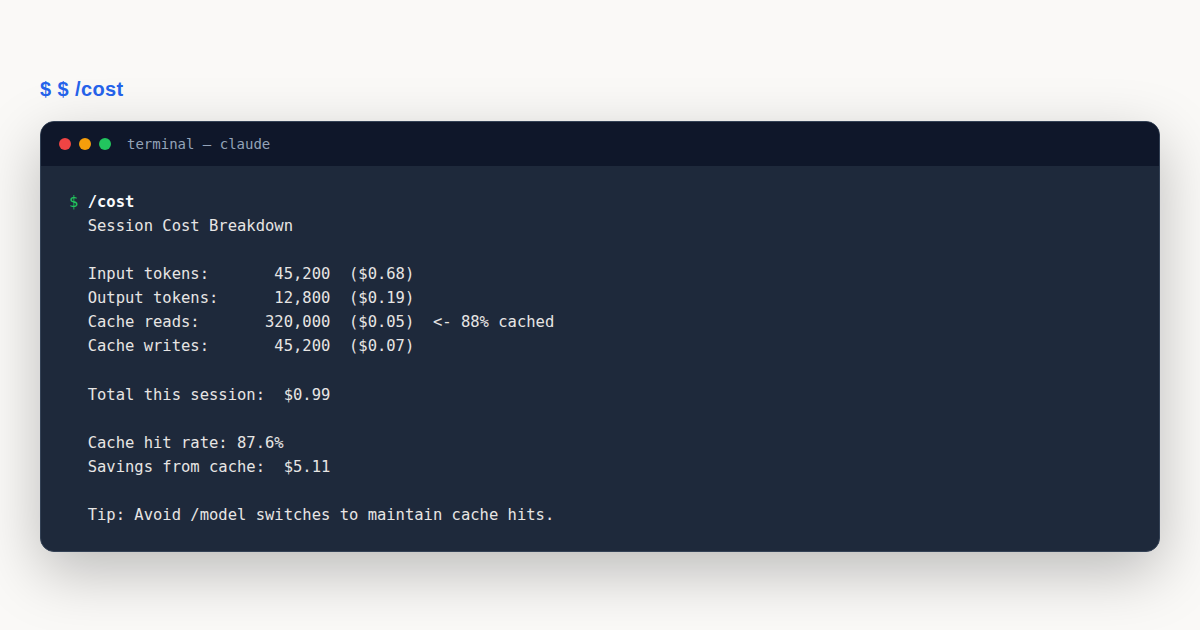
Every API response includes two token count fields that tell you exactly how prompt caching is performing. These are the most important numbers for understanding your cost, and they appear in the /cost output.
cache_creation_input_tokens
This field reports how many tokens were written to the cache on the current turn. These tokens are billed at the cache write rate, which is slightly higher than the standard input rate. Cache creation happens when new tokens enter the prefix that were not cached before, such as a new turn’s content or content after a cache invalidation.
cache_read_input_tokens
This field reports how many tokens were served from the cache. These tokens are billed at roughly ten percent of the standard input rate. A high read to creation ratio means caching is working well. A low ratio means you are paying to reprocess content that should have been cached.
Run /cost periodically during long sessions to check your ratio. A healthy session shows cache reads that are many times larger than cache creations. If you see cache creation spikes, look back at what you did in the preceding turns. You will usually find one of the eight invalidating actions.
# Check cost and cache performance mid-session
/cost
The output shows a breakdown of input, output, cache read, and cache creation tokens with their respective costs. If cache read tokens dominate, the cache is doing its job. If cache creation tokens are high on multiple consecutive turns, something is repeatedly invalidating your cache.
Subagents and the Cache
Subagents interact with prompt caching in a specific way. When you spawn a subagent, it starts its own conversation with its own system prompt and tools. This means the subagent builds its own cache from scratch. The parent session’s cache is not affected by subagent activity.
A forked subagent inherits the parent’s prefix, so the subagent’s first request reads the parent’s cache. But subsequent requests in the subagent build the subagent’s own cache, which has a 5 minute TTL even on subscription plans that normally get 1 hour. This shorter TTL means long running subagents may experience more cache misses.
The practical takeaway is to keep subagent tasks bounded. If a subagent task takes more than a few minutes, the subagent’s cache may expire between turns. For longer tasks, consider whether the work can be broken into smaller pieces or done in the parent session where the longer TTL applies.
When to Disable Prompt Caching
Prompt caching can be disabled for debugging purposes. This is rarely necessary in normal use, but it can help isolate whether unexpected behavior is caused by stale cached content or by something else entirely. Disabling it means every request is processed from scratch at full input rate.
Several environment variables control disabling, each targeting a specific model tier:
# Disable for all models
export DISABLE_PROMPT_CACHING=1

# Disable for specific model tiers
export DISABLE_PROMPT_CACHING_HAIKU=1
export DISABLE_PROMPT_CACHING_SONNET=1
export DISABLE_PROMPT_CACHING_OPUS=1
export DISABLE_PROMPT_CACHING_FABLE=1
Use these only for debugging. In normal operation, caching should always be enabled. Disabling it can increase your costs by ten times or more on long sessions. Once you have finished debugging, unset the variable and restart Claude Code to restore normal caching behavior.
See the official prompt caching documentation on code.claude.com for the complete technical reference, including up to date details on TTL behavior and model specific caveats.
Prompt Caching: Common Mistakes to Avoid
The cache fails silently. There is no error message when you invalidate the cache. You just pay more. These four mistakes account for the vast majority of wasted cache.
- Switching models mid session. Each switch forces a full recompute of your entire history at full input rate. Fix: pick your model at session start and stick with it. If you need a different model, finish your current unit of work first and open a new session.
- Compacting unnecessarily. Compacting replaces your conversation with a summary, invalidating the conversation layer. Fix: only compact when your context is genuinely too large or at natural break points. Do not compact reflexively just because the context window feels long.
- Toggling effort level frequently. Effort changes invalidate the cache just like model switches. Fix: choose your effort level at the top of the session. If a specific task needs different effort, consider whether it deserves its own session rather than disrupting the current one.
- Connecting MCP servers mid task. Servers with tools loaded into the prefix invalidate the system prompt layer. Fix: connect MCP servers at session start before you begin working. If you need a new server mid task, accept the cache reset or start a fresh session.
Prompt Caching: Best Practices
- Pick your model and effort level at session start. Do not change them mid task. The cache rewards consistency above all else.
- Connect all MCP servers and configure plugins before your first turn. Adding tools to the prefix later invalidates the system prompt layer.
- Run
/costperiodically. A high read to creation ratio means the cache is working. Spikes in creation signal an invalidation. - Enable the 1 hour TTL on API key auth if you take thinking breaks. Set
ENABLE_PROMPT_CACHING_1H=1before launching Claude Code. - Keep subagent tasks bounded to a few minutes. Subagent caches use a 5 minute TTL even on subscription plans, so long tasks lose cache hits.
Prompt Caching: Frequently Asked Questions
Does prompt caching work with all Claude models?
Yes. It works across Haiku, Sonnet, Opus, and Fable. Each model has its own separate cache, so switching models invalidates the cache. Pick one model per session for best results.
How much does prompt caching save?
Cached tokens are billed at roughly ten percent of the standard input rate. On long sessions with stable prefixes, this can reduce input costs by up to ninety percent compared to processing every turn from scratch.
What is the difference between cache creation and cache read tokens?
cache_creation_input_tokens are tokens written to the cache this turn, billed at the write rate. cache_read_input_tokens are tokens served from cache, billed at roughly ten percent of the standard input rate.
Does editing files on disk invalidate the cache?
No. File contents enter context only when Claude Code reads them. Editing files externally does not change the conversation history. The cache only cares about what is in the conversation, not what is on disk.
Should I disable the cache for debugging?
Only when isolating whether stale cached content causes unexpected behavior. Use DISABLE_PROMPT_CACHING=1 temporarily. In normal use, always keep it enabled. Disabling it can increase costs tenfold on long sessions.
Prompt caching is the most impactful cost lever in Claude Code. It works by matching the exact prefix of each request against recently processed content, serving matched tokens at roughly ten percent of the standard rate. The eight invalidating actions, from model switches to MCP server changes, force full recomputes. The eight preserving actions, from file edits to subagent spawns, leave the cache intact. Pick your model and effort once, configure tools at session start, check your /cost ratio regularly, and let prompt caching do the rest.