Agentic AI flips the usual chatbot script: instead of a model that only answers questions, you give it a job, a set of tools, and the judgment to decide when to use them. In this AWS agentic AI foundations lab you’ll build that pattern end to end with Amazon Bedrock Agents: a travel-booking assistant that can check flight availability and book a flight by calling a Lambda function you write yourself.
There’s no real airline API behind it; the mocked responses exist purely so you can see, step by step, how an agent’s reasoning loop actually talks to your code.
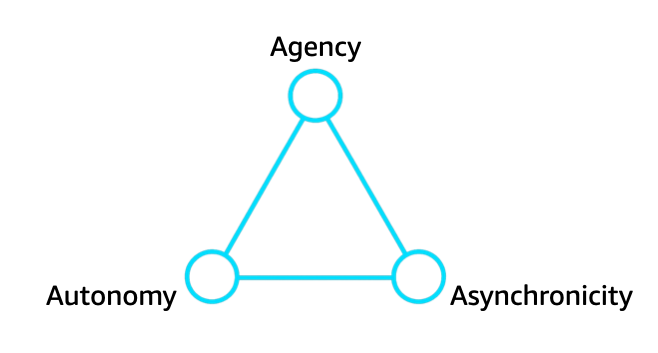
What You’ll Build: An Agentic AI Travel Assistant
By the end of this AWS agentic AI foundations lab you’ll have a working agentic AI system: an Amazon Bedrock Agent named travel-booking-assistant, backed by a Claude model with strong tool-use behavior. It’s paired with one Lambda function implementing two mocked actions, checkFlightAvailability and bookFlight, wired together by an action group.
You’ll test the agentic AI flow with a multi-turn conversation using invoke_agent: the user asks about a flight, the agent checks availability, then in the same session says “book it,” and the agent confirms.
This is a foundations lab for agentic AI on Bedrock. The Lambda returns hardcoded mock data instead of calling a real airline API, GDS, or payment processor. The goal is to internalize the architecture: agent, instruction, action group, schema, Lambda contract, and the invoke loop.
Once this skeleton works, swapping the mock logic for a real API call is a small step; getting the agentic AI wiring right the first time is the part that trips most people up.
Before you start, make sure you have:
- An AWS account with permissions to create IAM roles, Lambda functions, and Bedrock agents (
AmazonBedrockFullAccess,AWSLambda_FullAccess,IAMFullAccess, or narrower equivalents). - Python 3.11+ with
boto3installed (pip install boto3). We’ll drive every step via the SDK rather than the console. - The AWS CLI configured with credentials for your target account and region (
aws configure). - Model access enabled for a Claude model in the Bedrock console for your chosen region (Bedrock → Model access). This is the most common cause of a first invocation failing with an access-denied error.
Step 1: Enable Model Access and Choose a Region
Open the Bedrock console, switch to your target region (we’ll use us-east-1; check current Bedrock Agents availability before committing to another), and request access to an Anthropic Claude model under Model access. Claude 3.5 Haiku is fast and inexpensive for this lab. Access is usually granted within minutes, but do this first: create_agent will succeed without it, while every actual invocation will fail with a confusing access-denied error.
Confirm your identity and default region from the CLI before moving on:
aws sts get-caller-identity
aws configure get region
Step 2: Create the IAM Roles
An agent and a Lambda function each need their own execution role. The agent’s execution role is what Bedrock assumes to invoke the foundation model and, during orchestration, the action group’s Lambda. The Lambda’s execution role is what the function itself assumes at runtime. For our mocked handler, just CloudWatch Logs access.
Create the agent’s role first, with a trust policy that lets bedrock.amazonaws.com assume it and a permissions policy allowing model invocation:
import boto3
import json

iam = boto3.client("iam")
account_id = boto3.client("sts").get_caller_identity()["Account"]
region = boto3.session.Session().region_name or "us-east-1"

agent_trust_policy = {
    "Version": "2012-10-17",
    "Statement": [{
        "Effect": "Allow",
        "Principal": {"Service": "bedrock.amazonaws.com"},
        "Action": "sts:AssumeRole",
        "Condition": {
            "StringEquals": {"aws:SourceAccount": account_id},
            "ArnLike": {"aws:SourceArn": f"arn:aws:bedrock:{region}:{account_id}:agent/*"}
        }
    }]
}

agent_role = iam.create_role(
    RoleName="AmazonBedrockExecutionRoleForAgents_travelbot",
    AssumeRolePolicyDocument=json.dumps(agent_trust_policy),
    Description="Execution role for the travel-booking-assistant Bedrock Agent",
)
agent_role_arn = agent_role["Role"]["Arn"]

model_invoke_policy = {
    "Version": "2012-10-17",
    "Statement": [{
        "Effect": "Allow",
        "Action": ["bedrock:InvokeModel", "bedrock:InvokeModelWithResponseStream"],
        "Resource": f"arn:aws:bedrock:{region}::foundation-model/*"
    }]
}

iam.put_role_policy(
    RoleName="AmazonBedrockExecutionRoleForAgents_travelbot",
    PolicyName="InvokeFoundationModel",
    PolicyDocument=json.dumps(model_invoke_policy),
)
print("Agent role ARN:", agent_role_arn)
The aws:SourceAccount and aws:SourceArn condition keys follow the security best practice in the AWS agent-permissions documentation, protecting against a “confused deputy” where another account’s Bedrock resource could otherwise assume a role that trusts the bare service principal.
Now create a minimal Lambda execution role. It only needs CloudWatch Logs permissions, since our function doesn’t touch any other AWS resource:
lambda_trust_policy = {
    "Version": "2012-10-17",
    "Statement": [{
        "Effect": "Allow",
        "Principal": {"Service": "lambda.amazonaws.com"},
        "Action": "sts:AssumeRole"
    }]
}

lambda_role = iam.create_role(
    RoleName="travelbot-lambda-execution-role",
    AssumeRolePolicyDocument=json.dumps(lambda_trust_policy),
)
lambda_role_arn = lambda_role["Role"]["Arn"]

iam.attach_role_policy(
    RoleName="travelbot-lambda-execution-role",
    PolicyArn="arn:aws:iam::aws:policy/service-role/AWSLambdaBasicExecutionRole",
)
print("Lambda role ARN:", lambda_role_arn)
IAM role propagation is eventually consistent. After creating a role, wait 10-15 seconds before using it elsewhere, or you’ll occasionally hit an “assume role” failure that has nothing to do with your policy JSON being wrong.
Step 3: Write the Lambda Function
Getting the Lambda contract exactly right matters. Bedrock invokes it with a specific event shape and expects a specific response shape back; get either wrong and the trace shows a Lambda failure instead of a clean answer. Per AWS’s guide to configuring Lambda functions for action groups, an OpenAPI-schema action group sends this event shape:
{
  "messageVersion": "1.0",
  "agent": {"name": "string", "id": "string", "alias": "string", "version": "string"},
  "inputText": "string",
  "sessionId": "string",
  "actionGroup": "string",
  "apiPath": "string",
  "httpMethod": "string",
  "parameters": [{"name": "string", "type": "string", "value": "string"}],
  "requestBody": {
    "content": {
      "application/json": {
        "properties": [{"name": "string", "type": "string", "value": "string"}]
      }
    }
  },
  "sessionAttributes": {},
  "promptSessionAttributes": {}
}
Your handler cares about apiPath (which endpoint the agent called), httpMethod, and either parameters (GET-style) or requestBody.content (POST-style). The response must mirror this shape, with a JSON-encoded string in responseBody:
{
  "messageVersion": "1.0",
  "response": {
    "actionGroup": "string",
    "apiPath": "string",
    "httpMethod": "string",
    "httpStatusCode": 200,
    "responseBody": {
      "application/json": {"body": "JSON-formatted string"}
    }
  }
}
Here’s the Lambda function for the lab. It routes on apiPath, pulls parameters from either source, and returns mocked-but-plausible data:
import json
import random
import uuid


def _get_param(event, name, default=None):
    """Look for a named value first in the flat parameters list
    (used for GET-style query params), then in the JSON request body
    (used for POST-style operations)."""
    for p in event.get("parameters", []):
        if p.get("name") == name:
            return p.get("value")
    body_props = (
        event.get("requestBody", {})
        .get("content", {})
        .get("application/json", {})
        .get("properties", [])
    )
    for p in body_props:
        if p.get("name") == name:
            return p.get("value")
    return default


def _respond(event, status_code, payload):
    return {
        "messageVersion": "1.0",
        "response": {
            "actionGroup": event["actionGroup"],
            "apiPath": event["apiPath"],
            "httpMethod": event["httpMethod"],
            "httpStatusCode": status_code,
            "responseBody": {
                "application/json": {"body": json.dumps(payload)}
            },
        },
    }


def check_flight_availability(event):
    origin = _get_param(event, "origin", "UNKNOWN")
    destination = _get_param(event, "destination", "UNKNOWN")
    date = _get_param(event, "date", "UNKNOWN")

    # Mocked logic only: a real implementation would call a GDS or
    # airline inventory API here instead of random.choice().
    available = random.choice([True, True, False])
    flights = []
    if available:
        flights = [
            {
                "flightNumber": f"IQ{random.randint(100, 999)}",
                "origin": origin,
                "destination": destination,
                "date": date,
                "departTime": "08:15",
                "arriveTime": "11:40",
                "price": round(random.uniform(120, 480), 2),
                "seatsLeft": random.randint(1, 9),
            }
        ]

    return _respond(event, 200, {
        "available": available,
        "origin": origin,
        "destination": destination,
        "date": date,
        "flights": flights,
    })


def book_flight(event):
    flight_number = _get_param(event, "flightNumber", "UNKNOWN")
    passenger_name = _get_param(event, "passengerName", "Guest")

    confirmation_code = uuid.uuid4().hex[:8].upper()

    return _respond(event, 200, {
        "status": "CONFIRMED",
        "flightNumber": flight_number,
        "passengerName": passenger_name,
        "confirmationCode": confirmation_code,
    })


def lambda_handler(event, context):
    api_path = event.get("apiPath", "")

    if api_path == "/check-availability":
        return check_flight_availability(event)
    if api_path == "/book-flight":
        return book_flight(event)

    return _respond(event, 400, {"error": f"Unrecognized apiPath: {api_path}"})
Two details matter here. First, responseBody’s body field must be a JSON string, hence json.dumps(payload), not the raw dict. Second, an action group can host up to 11 operations but only one Lambda function, so routing on apiPath inside a single handler is the expected pattern, not a workaround.
Step 4: Package and Deploy the Lambda, Then Grant Bedrock Permission to Invoke It
Zip the function and create it with boto3:
mkdir -p build && cp lambda_function.py build/
cd build && zip ../travelbot_lambda.zip lambda_function.py && cd ..
import time
lambda_client = boto3.client("lambda")
with open("travelbot_lambda.zip", "rb") as f:
zip_bytes = f.read()
# Give IAM a moment to propagate before Lambda tries to assume the role.
time.sleep(10)
create_fn_response = lambda_client.create_function(
FunctionName="travelbot-action-group-fn",
Runtime="python3.12",
Role=lambda_role_arn,
Handler="lambda_function.lambda_handler",
Code={"ZipFile": zip_bytes},
Timeout=15,
Description="Mocked flight availability + booking actions for the travel-booking-assistant Bedrock Agent",
)
lambda_function_arn = create_fn_response["FunctionArn"]
print("Lambda ARN:", lambda_function_arn)Your Lambda won’t accept invocations from Bedrock until you attach a resource-based policy allowing the bedrock.amazonaws.com principal to call it, separate from the execution role, which governs what the function can do once running. Skipping this is the single most common reason an otherwise correctly configured agent fails with an “access denied” error when calling its action group. We’ll grant broadly first, then tighten once the agent ID exists:
lambda_client.add_permission(
    FunctionName="travelbot-action-group-fn",
    StatementId="AllowBedrockAgentInvoke",
    Action="lambda:InvokeFunction",
    Principal="bedrock.amazonaws.com",
    SourceAccount=account_id,
)
To lock this down to one agent (recommended once you have its ID), remove this permission and re-add it with SourceArn=f"arn:aws:bedrock:{region}:{account_id}:agent/AGENT_ID" included alongside SourceAccount.
Step 5: Create the Agentic AI Bedrock Agent
Now create the agent. The instruction field is effectively its system prompt: what its job is, what tone to take, and when it must call a tool versus just answer. Vague instructions produce an agent that over-calls the action group for things it could answer directly, or refuses to call it when it should:
bedrock_agent = boto3.client("bedrock-agent")

instruction = (
    "You are a travel-booking assistant for an airline. Your job is to help "
    "customers check flight availability and book flights. Always use the "
    "check-availability action before telling a customer whether a flight "
    "exists — never guess or make up flight details yourself. Once a "
    "customer confirms they want to book a specific flight, use the "
    "book-flight action to complete the booking and give them the "
    "confirmation code. Be concise and friendly, and never invent prices, "
    "flight numbers, or confirmation codes on your own — those only come "
    "from your actions."
)

create_agent_response = bedrock_agent.create_agent(
    agentName="travel-booking-assistant",
    foundationModel="anthropic.claude-3-5-haiku-20241022-v1:0",
    agentResourceRoleArn=agent_role_arn,
    instruction=instruction,
    description="Lab agent: mocked flight availability + booking via a Lambda action group.",
    idleSessionTTLInSeconds=1800,
)
agent_id = create_agent_response["agent"]["agentId"]
print("Agent ID:", agent_id)
Check the current model ID for your chosen Claude model in the Bedrock console’s catalog, since version suffixes change over time. Right after this call the agent is NOT_PREPARED. It has no action group yet and needs to be prepared, which we do in Step 7.
Step 6: Define the OpenAPI Schema for the Action Group
An action group needs an API schema (or a simpler “function details” definition. We use the OpenAPI approach here since it maps to a real REST API). The schema is what the model reads to decide which operation to call and what parameters to collect. Vague descriptions produce confusing follow-up questions or missing fields:
api_schema = {
    "openapi": "3.0.0",
    "info": {
        "title": "Travel Booking Actions",
        "version": "1.0.0",
        "description": "Mocked actions for checking flight availability and booking flights.",
    },
    "paths": {
        "/check-availability": {
            "get": {
                "summary": "Check whether a flight exists for a given route and date",
                "operationId": "checkFlightAvailability",
                "parameters": [
                    {
                        "name": "origin",
                        "in": "query",
                        "description": "Three-letter IATA origin airport code, e.g. JFK",
                        "required": True,
                        "schema": {"type": "string"},
                    },
                    {
                        "name": "destination",
                        "in": "query",
                        "description": "Three-letter IATA destination airport code, e.g. LAX",
                        "required": True,
                        "schema": {"type": "string"},
                    },
                    {
                        "name": "date",
                        "in": "query",
                        "description": "Travel date in YYYY-MM-DD format",
                        "required": True,
                        "schema": {"type": "string"},
                    },
                ],
                "responses": {
                    "200": {
                        "description": "Availability result",
                        "content": {
                            "application/json": {
                                "schema": {"type": "object"}
                            }
                        },
                    }
                },
            }
        },
        "/book-flight": {
            "post": {
                "summary": "Book a specific flight for a named passenger",
                "operationId": "bookFlight",
                "requestBody": {
                    "required": True,
                    "content": {
                        "application/json": {
                            "schema": {
                                "type": "object",
                                "properties": {
                                    "flightNumber": {
                                        "type": "string",
                                        "description": "The flight number returned by checkFlightAvailability",
                                    },
                                    "passengerName": {
                                        "type": "string",
                                        "description": "Full name of the passenger to book",
                                    },
                                },
                                "required": ["flightNumber", "passengerName"],
                            }
                        }
                    },
                },
                "responses": {
                    "200": {
                        "description": "Booking confirmation",
                        "content": {
                            "application/json": {
                                "schema": {"type": "object"}
                            }
                        },
                    }
                },
            }
        },
    },
}
Save this as a Python dict as shown, or as a standalone JSON file. Either works, since create_agent_action_group accepts the schema payload as a string.
Step 7: Create the Action Group and Prepare the Agent
With the schema and Lambda ARN ready, wire them together into an action group on the DRAFT version of the agent:
import json

action_group_response = bedrock_agent.create_agent_action_group(
    actionGroupName="FlightBookingActions",
    description="Check flight availability and book flights (mocked).",
    agentId=agent_id,
    agentVersion="DRAFT",
    actionGroupExecutor={"lambda": lambda_function_arn},
    apiSchema={"payload": json.dumps(api_schema)},
    actionGroupState="ENABLED",
)
print("Action group created:", action_group_response["agentActionGroup"]["actionGroupId"])
The DRAFT version doesn’t auto-pick-up changes. Every time you add or modify an action group, knowledge base, or instruction, call prepare_agent to rebuild it into invocable form. Forgetting this is the second most common “why isn’t my change showing up” problem in this lab, right behind the Lambda resource policy:
bedrock_agent.prepare_agent(agentId=agent_id)

# prepare_agent is asynchronous — poll until the agent leaves PREPARING.
import time
while True:
    status = bedrock_agent.get_agent(agentId=agent_id)["agent"]["agentStatus"]
    print("Agent status:", status)
    if status == "PREPARED":
        break
    if status == "FAILED":
        raise RuntimeError("Agent preparation failed — check the console for details.")
    time.sleep(5)
Now that you have a concrete agent ID, go back and tighten the Lambda’s resource policy from Step 4 to scope SourceArn to this specific agent.
Step 8: Create an Alias and Test in the Console (Optional but Recommended)
Before scripting the full conversation, try the Bedrock console’s test chat against DRAFT. It renders the orchestration trace visually, far easier to read than raw JSON. For programmatic use, create an alias, since invoke_agent should target an alias rather than the mutable DRAFT version:
alias_response = bedrock_agent.create_agent_alias(
    agentAliasName="prod",
    agentId=agent_id,
    description="Stable alias for the travel-booking-assistant lab agent.",
)
agent_alias_id = alias_response["agentAlias"]["agentAliasId"]
print("Agent alias ID:", agent_alias_id)
Aliases take a moment to become invocable, since each one points at a new agent version Bedrock builds behind the scenes from your current DRAFT. A “ResourceNotReady”-style error right after creation just means wait a few seconds and retry.
Step 9: Invoke the Agent: A Multi-Turn Conversation
The payoff. The bedrock-agent-runtime client’s invoke_agent call sends one user turn at a time; reusing the same sessionId across calls lets Bedrock retain context. The response comes back as an event stream. Iterate over response["completion"] and concatenate the decoded bytes from each chunk event to get the full text reply:
import uuid

bedrock_agent_runtime = boto3.client("bedrock-agent-runtime")
session_id = str(uuid.uuid4())


def ask(prompt):
    response = bedrock_agent_runtime.invoke_agent(
        agentId=agent_id,
        agentAliasId=agent_alias_id,
        sessionId=session_id,
        inputText=prompt,
        enableTrace=True,
    )
    completion = ""
    for event in response.get("completion"):
        if "chunk" in event:
            completion += event["chunk"]["bytes"].decode()
        if "trace" in event:
            # Useful for debugging: shows which action the agent decided
            # to call and what parameters it extracted from the prompt.
            trace = event["trace"]["trace"]
            for key, value in trace.items():
                print(f"[trace:{key}]", value)
    return completion


turn_1 = ask("Is there a flight from JFK to LAX on 2026-08-14?")
print("Agent:", turn_1)

turn_2 = ask("Great, please book that flight for John Smith.")
print("Agent:", turn_2)
Watch the trace on the first turn: an orchestrationTrace entry shows the model calling /check-availability with origin=JFK, destination=LAX, date=2026-08-14, followed by your Lambda’s mocked response and the model’s natural-language summary. The second turn shows the multi-turn behavior. Because session_id is reused, the agent remembers the first exchange and calls /book-flight with the flight number it just learned and the passenger name from this turn.
If a call returns a generic answer instead of a real tool invocation, open the trace to check whether the model actually chose the action group, a more explicit test prompt (or refined parameter descriptions) usually resolves it faster than assuming the plumbing is broken.
Common Agentic AI Mistakes
The single most common failure in this lab is forgetting the Lambda resource-based policy that allows bedrock.amazonaws.com to invoke your function. This is separate from the Lambda’s own execution role. The resource policy controls who is allowed to call the function at all, not what it can do once running. Without it, every action group invocation fails with an access-denied error deep in the orchestration trace, even when your IAM roles otherwise look correct.
A close second is forgetting to call prepare_agent after any change to the agent’s instruction, action groups, or knowledge bases. The DRAFT version is a mutable working copy. Editing it updates the configuration, but the agent doesn’t rebuild its invocable form until you explicitly prepare it. A stale prepared version keeps behaving exactly as before, with no error to tip you off.
Third, malformed or overly ambiguous OpenAPI schemas cause subtler failures than an outright rejection. A schema missing parameter descriptions often still validates, but at invocation time the agentic AI model may extract the wrong parameters or hallucinate a value instead of asking. Detailed description fields are effectively part of the prompt, not optional polish.
Fourth, model access not enabled in your working region is an easy trap because the failure doesn’t show up until the very last step. create_agent happily accepts a foundationModel identifier for a model your account doesn’t yet have access to in that region. The error only surfaces when the agent actually tries to invoke it during orchestration, often after you’ve already built out the action group and Lambda.
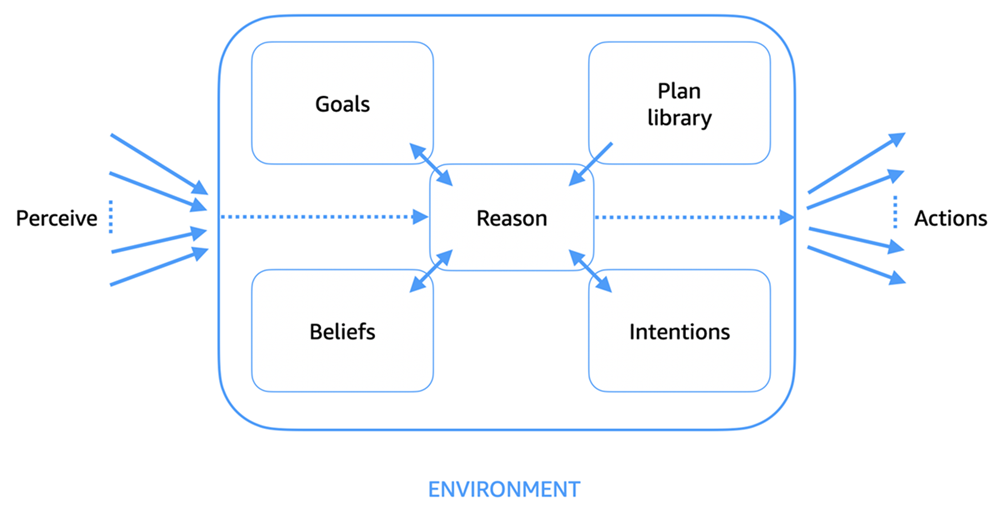
Going Further with Agentic AI in Production
Once the lab skeleton works reliably, the natural next step toward a production-ready agentic AI system is hardening the Lambda function itself. Right now our handler assumes every field it needs will be present and well-formed. A production version should validate that origin, destination, and date actually look like an IATA code and an ISO date.
It should also return a structured error in the same responseBody shape (with a non-200 httpStatusCode) rather than raising an unhandled exception, which Lambda turns into a generic invocation error the agent can’t gracefully explain.
Guardrails are the next layer worth adding once the core loop is solid. Amazon Bedrock Guardrails let you attach content and topic filters to an agentic AI system so it declines to discuss things outside its intended scope. For a travel-booking assistant, that means blocking unrelated topics, preventing the model from ever inventing prices or confirmation codes on its own, and filtering abusive input before it reaches the model.
Guardrails attach to an agent as a configuration reference rather than requiring you to rewrite any action group logic.
Cost is worth thinking about early rather than after a surprising bill. Every agentic AI invocation involves several foundation model calls as it reasons about which action to take, calls it, interprets the result, and composes a final answer. A “check availability then book” conversation like this one can easily involve three or four model invocations under the hood even though it looks like two user turns.
A fast, cheap model like Claude 3.5 Haiku keeps token costs reasonable at this scale; matching model choice to the actual complexity of the task is one of the highest-leverage cost decisions you’ll make when running agentic AI at scale.
Finally, agent alias versioning is what separates a lab from a deployable agentic AI system. Rather than repeatedly updating a single alias to point at whatever the DRAFT currently looks like, a more disciplined pattern creates a new immutable agent version and moves a stable alias forward only after you’ve validated the new version in a staging alias.
This gives you a rollback path: if a change misbehaves in production, you can repoint the production alias back to the previous known-good agent version without reconstructing anything.
Frequently Asked Questions
Do I need a real airline API to complete this lab?
No. The point of this foundations lab is learning the agentic AI architecture: the agent, its instruction, the action group, the OpenAPI schema, and the Lambda invocation contract, without the added complexity of a real third-party integration. The Lambda function returns mocked, randomly-generated data.
Once you’re comfortable with the wiring, swapping the mock logic in check_flight_availability and book_flight for real API calls is a comparatively small change that doesn’t touch the agent, the schema, or the invocation code.
Why does my agent say it can’t help, or answer without calling the action group at all?
This almost always traces back to either the instruction text or the OpenAPI schema’s parameter descriptions being too vague for the model to confidently decide an action group call is warranted. Try phrasing the instruction more directively about when the model must use an action rather than answering from its own knowledge, and check the orchestration trace (enableTrace=True) to see whether the model even considered calling the action group before answering.
How do I debug a failed action group invocation?
Start with enableTrace=True on your invoke_agent call and print every trace event. This shows the exact parameters the agentic AI model extracted and decided to send, which is often where the real problem lives rather than in the Lambda code itself.
If the trace shows the agent attempting the call but it never reaches your function, check CloudWatch Logs for the Lambda directly (or the absence of any invocation record, which usually points to a missing resource-based policy) before assuming the bug is in your Python code.
Can one Lambda function serve more than one action group, or does each action group need its own function?
A single Lambda function can be reused across multiple action groups and even multiple agents, as long as your handler correctly distinguishes between them using the actionGroup field in the input event alongside apiPath.
Conversely, one action group can define up to 11 different API operations but is limited to exactly one Lambda function to handle all of them, which is why our handler routes on apiPath internally rather than needing a separate function per operation.
Is the DRAFT version of an agent usable in production?
Technically you can test against DRAFT directly, but it’s not the recommended pattern for anything beyond development and testing, because DRAFT is mutable. Any teammate (or your own next edit) can change its behavior without warning.
Production traffic should always go through a named alias pointing at a specific, immutable agent version, which is exactly the pattern the create_agent_alias step in this lab sets up, and which gives you a stable rollback point if a future change misbehaves.
This AWS agentic AI foundations lab underpins everything else in the agentic AI series: once you can wire an agent, an action group, and a Lambda function together confidently, layering in guardrails, additional action groups, or a multi-agent architecture is mostly an extension of the same pattern. Keep this working travel-booking assistant around as a reference implementation the next time you build an agentic AI system of your own.