


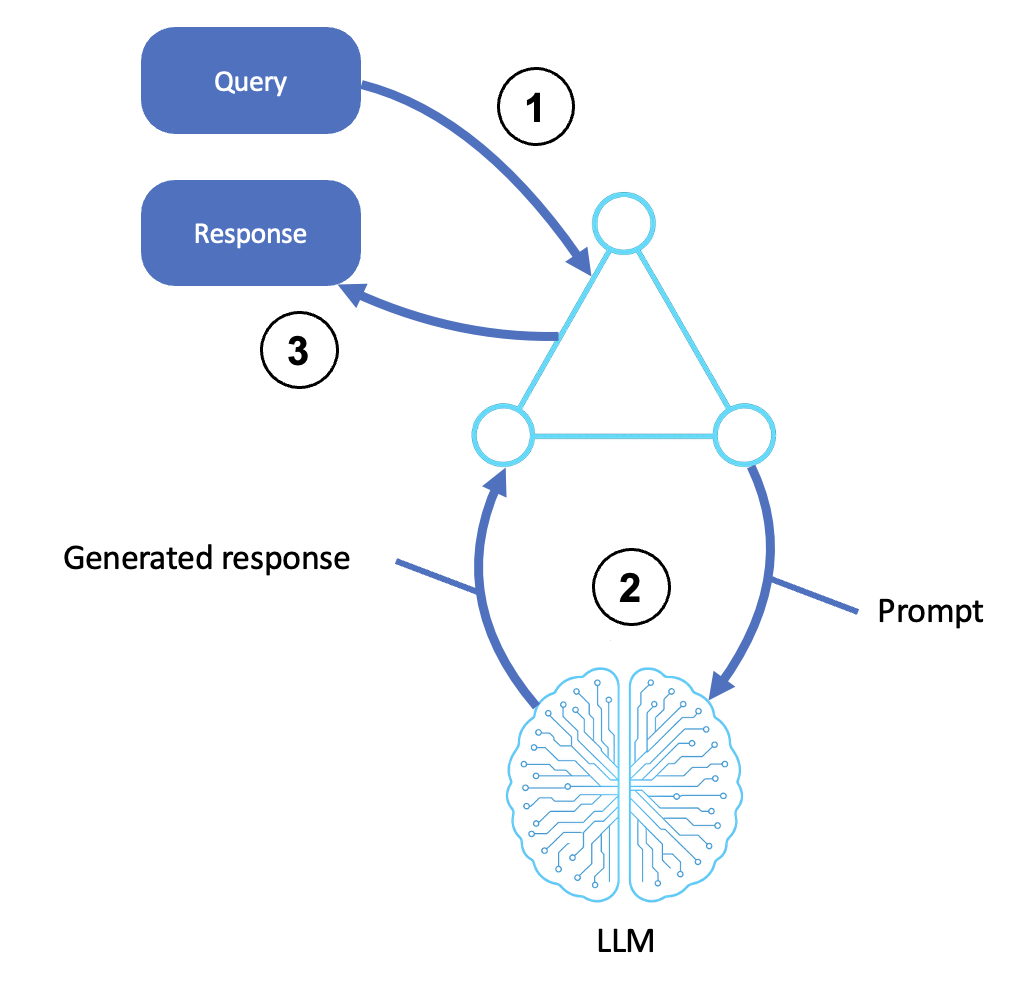
Most “AI agent” demos stop at a single prompt-and-response call, but real agentic AI patterns are built from loops: a model reasons, picks a tool, observes the result, and reasons again until it has an answer worth trusting. In this lab you’ll build two of these foundational patterns from scratch on AWS.
The first is a ReAct-style reasoning loop for a customer-support agent; the second is a retrieval-augmented agent backed by an Amazon Bedrock Knowledge Base — so you understand exactly what’s happening under the hood before you ever click “Create Agent” in a console.

What You’ll Build: Two Agentic AI Patterns
By the end of this lab you will have two working Python programs, each implementing one of the two agentic AI patterns covered here. The first is a plain ReAct (Reasoning + Acting) loop that drives a Bedrock foundation model through explicit Thought → Action → Observation cycles to resolve a customer-support question by calling a mocked lookup_order_status tool.
The second extends that loop with a retrieval tool backed by an Amazon Bedrock Knowledge Base, answering open-ended questions from a product FAQ using retrieve_and_generate. Together the two programs cover the agentic AI patterns most production agents on AWS are assembled from: controlled tool-use reasoning, and retrieval-augmented generation.
Before you start, make sure you have the following in place:
- An AWS account with permission to use Amazon Bedrock, Amazon S3, and (for Part B) either Amazon OpenSearch Serverless or Amazon Aurora PostgreSQL as a vector store.
- Model access granted in the Bedrock console for an Anthropic Claude model (e.g. Claude 3.5 Sonnet or newer) and the Amazon Titan Embeddings model, in a supported region such as
us-east-1orus-west-2. - Python 3.10+ with
boto3installed (pip install boto3), and credentials configured via the AWS CLI (aws configure) or an IAM role if you’re running this from Cloud9, CloudShell, or an EC2 instance. - An S3 bucket to hold a sample product FAQ document (a plain-text or PDF file works fine — a handful of Q&A pairs about shipping, returns, and warranty is enough for this lab).
- Roughly 45–60 minutes and a willingness to read model output carefully — most of the “bugs” in agent code are really just prompt or parsing mismatches.
None of the infrastructure here is exotic, and that’s deliberate. Agentic AI patterns are often presented as needing a specialized framework or a managed platform, but the two patterns in this lab only need a model you can invoke over an API and, for Part B, a place to store vectors.
If you’ve already run a basic Bedrock “hello world” Converse call, the only new infrastructure this lab introduces is the Knowledge Base’s vector store and data source — a one-time setup you’ll reuse across future labs built on these same agentic AI patterns.
This lab intentionally avoids the Bedrock Agents console feature for Part A. Amazon Bedrock Agents provide their own multi-step orchestration with a visible reasoning trace (pre-processing, orchestration, and post-processing steps, each carrying a Rationale object), but that orchestration is a proprietary internal process, not a documented “ReAct” implementation you can inspect token-by-token.
To actually understand the ReAct pattern, you need to build the Thought/Action/Observation loop yourself with a plain model-invocation API — which is exactly what Part A does. Part B then shows how to plug a Knowledge Base into that same hand-rolled loop.
Part A — A Hand-Rolled ReAct Loop for Customer Support
Step 1: Understand what ReAct actually is. ReAct is one of the foundational agentic AI patterns — a prompting pattern (from the 2022 paper “ReAct: Synergizing Reasoning and Acting in Language Models”), not a specific AWS API.
You instruct the model, via its system/user prompt, to produce structured text in the shape Thought: ..., Action: tool_name[args], and after you supply an Observation: ..., the model continues reasoning until it emits a Final Answer: ....
Nothing about this requires Bedrock Agents — any model reachable through the Bedrock Converse or InvokeModel API can play this role, because the pattern lives entirely in your prompt template and your parsing code, not in a special “ReAct mode” flag.
Step 2: Define the mocked tool. For this lab, “look up order status” is a plain Python function backed by a fake in-memory dictionary — no real order system required, since the goal is to see the loop mechanics clearly.
def lookup_order_status(order_id: str) -> str:
    """Mocked tool: looks up an order's shipping status."""
    fake_orders = {
        "A100": "Shipped on 2026-06-25, arriving 2026-07-02 via UPS.",
        "A101": "Processing — has not shipped yet.",
        "A102": "Delivered on 2026-06-20.",
    }
    return fake_orders.get(order_id, f"No order found with ID {order_id}.")
Step 3: Write the ReAct system prompt. The prompt must teach the model the exact output grammar you intend to parse. Being explicit and giving one worked example (few-shot) dramatically reduces parsing failures later.
REACT_SYSTEM_PROMPT = """You are a customer-support agent. Answer the user's question by
reasoning step by step and using tools when needed. You have exactly one tool available:

lookup_order_status(order_id: str) -> str
    Returns the current shipping status for a given order ID.

Follow this exact format for every turn, and stop after producing one Action or one Final Answer:

Thought:
Action: lookup_order_status[]

...or, once you have enough information...

Thought:
Final Answer:

Never invent an Observation yourself — wait for it to be provided to you. Example:

Thought: The customer wants to know about order A100. I should look it up.
Action: lookup_order_status[A100]
"""
Step 4: Call the model with the Bedrock Converse API. The Converse API is the recommended cross-model entry point in Bedrock (it normalizes message formatting across Anthropic, Amazon, Meta, and other providers), so we use it here instead of the older model-specific InvokeModel request bodies.
import boto3

bedrock_runtime = boto3.client("bedrock-runtime", region_name="us-east-1")
MODEL_ID = "anthropic.claude-3-5-sonnet-20241022-v2:0"

def call_model(messages):
    response = bedrock_runtime.converse(
        modelId=MODEL_ID,
        system=[{"text": REACT_SYSTEM_PROMPT}],
        messages=messages,
        inferenceConfig={"maxTokens": 512, "temperature": 0.0, "stopSequences": ["Observation:"]},
    )
    return response["output"]["message"]["content"][0]["text"]
Notice the stopSequences parameter: we stop the model as soon as it tries to write its own “Observation:” line, because the observation must come from our tool call, not the model’s imagination. This prevents one of the most common ReAct bugs — a model that hallucinates an observation and short-circuits the loop with a wrong final answer.
Step 5: Parse the Action line. Keep the parser tolerant of minor formatting drift (extra whitespace, different casing) but strict enough to fail loudly rather than silently when the model deviates from the grammar.
import re

ACTION_RE = re.compile(r"Action:s*lookup_order_status[([^]]+)]", re.IGNORECASE)
FINAL_RE = re.compile(r"Final Answer:s*(.+)", re.IGNORECASE | re.DOTALL)

def parse_step(model_text: str):
    final_match = FINAL_RE.search(model_text)
    if final_match:
        return {"type": "final", "answer": final_match.group(1).strip()}

    action_match = ACTION_RE.search(model_text)
    if action_match:
        return {"type": "action", "tool": "lookup_order_status", "arg": action_match.group(1).strip()}

    # Neither pattern matched — this is a parsing failure, not a silent guess.
    return {"type": "unparseable", "raw": model_text}
Step 6: Assemble the loop, with a hard iteration cap. Every ReAct loop needs a maximum iteration count, because a model can get stuck re-issuing the same action if the observation doesn’t resolve its confusion.
MAX_ITERATIONS = 6

def run_react_loop(user_question: str):
    messages = [{"role": "user", "content": [{"text": user_question}]}]

    for step in range(1, MAX_ITERATIONS + 1):
        model_text = call_model(messages)
        parsed = parse_step(model_text)

        if parsed["type"] == "final":
            return parsed["answer"]

        if parsed["type"] == "unparseable":
            raise RuntimeError(f"Could not parse model output on step {step}:n{model_text}")

        # Execute the mocked tool and feed the observation back in.
        observation = lookup_order_status(parsed["arg"])
        messages.append({"role": "assistant", "content": [{"text": model_text}]})
        messages.append({"role": "user", "content": [{"text": f"Observation: {observation}"}]})

    raise RuntimeError(f"Exceeded {MAX_ITERATIONS} iterations without a Final Answer.")

if __name__ == "__main__":
    answer = run_react_loop("Hi, can you tell me the status of order A100?")
    print("Agent answer:", answer)
Run this and you should see the model produce a Thought/Action pair, your code intercept it, call the mocked tool, feed the observation back as a new turn, and then produce a second Thought followed by a Final Answer quoting the shipping status.
That two-turn exchange — model reasons, code acts, model reasons again — is the entire ReAct pattern; everything in production agent frameworks (LangChain agents, Bedrock Agents’ own orchestration, Strands Agents) is essentially this loop with more tools and more polished parsing around the same core mechanic.
For the official reference on the Converse API’s request and response shape used above, see the Amazon Bedrock Converse API documentation.
Part B — Extending the Agent with a Bedrock Knowledge Base
Step 7: Create the Knowledge Base’s storage backend first. Before you can create a Bedrock Knowledge Base, you need a vector store already provisioned — Bedrock does not create one implicitly.
For this lab, Amazon OpenSearch Serverless is the simplest managed option: create a serverless collection of type VECTORSEARCH, then create a vector index inside it with a vector field sized to match your embedding model’s output dimension — 1024 for Amazon Titan Text Embeddings V2 at its default dimensionality. Aurora PostgreSQL with the pgvector extension is a valid alternative if you already operate a relational database.
Step 8: Upload the FAQ document to S3. Bedrock Knowledge Bases ingest from a data source — most commonly an S3 bucket/prefix. Upload a short product FAQ (plain text or PDF works) so the ingestion job has something to chunk and embed.
aws s3 mb s3://my-iqraa-lab-faq-bucket --region us-east-1
aws s3 cp product-faq.txt s3://my-iqraa-lab-faq-bucket/faq/product-faq.txt
Step 9: Create the Knowledge Base and its data source. You can do this through the console (Bedrock → Knowledge Bases → Create), via CloudFormation with the AWS::Bedrock::KnowledgeBase and AWS::Bedrock::DataSource resource types, or with the bedrock-agent boto3 client.
Whichever route you use, the important shape is: a knowledgeBaseConfiguration of type VECTOR naming your embedding model’s ARN, and a storageConfiguration of type OPENSEARCH_SERVERLESS (or RDS for Aurora) pointing at the collection and vector index from Step 7, plus field-mapping names for the vector, text, and metadata fields. A minimal CloudFormation sketch:
Resources:
  FaqKnowledgeBase:
    Type: AWS::Bedrock::KnowledgeBase
    Properties:
      Name: product-faq-kb
      RoleArn: arn:aws:iam::123456789012:role/bedrock-kb-role
      KnowledgeBaseConfiguration:
        Type: VECTOR
        VectorKnowledgeBaseConfiguration:
          EmbeddingModelArn: arn:aws:bedrock:us-east-1::foundation-model/amazon.titan-embed-text-v2:0
      StorageConfiguration:
        Type: OPENSEARCH_SERVERLESS
        OpensearchServerlessConfiguration:
          CollectionArn: arn:aws:aoss:us-east-1:123456789012:collection/abcdefghij1234567890
          VectorIndexName: faq-index
          FieldMapping:
            VectorField: faq-vector
            TextField: AMAZON_BEDROCK_TEXT_CHUNK
            MetadataField: AMAZON_BEDROCK_METADATA

  FaqDataSource:
    Type: AWS::Bedrock::DataSource
    Properties:
      KnowledgeBaseId: !Ref FaqKnowledgeBase
      Name: product-faq-s3-source
      DataSourceConfiguration:
        Type: S3
        S3Configuration:
          BucketArn: arn:aws:s3:::my-iqraa-lab-faq-bucket
          InclusionPrefixes: ["faq/"]
Step 10: Sync (ingest) the data source before querying it. Creating the data source does not automatically ingest the document — you must explicitly start an ingestion job, and it must finish before your retrieval calls will find anything.
import boto3

bedrock_agent = boto3.client("bedrock-agent", region_name="us-east-1")

start = bedrock_agent.start_ingestion_job(
    knowledgeBaseId="ABCD1234EF",
    dataSourceId="XYZ9876AB",
)
job_id = start["ingestionJob"]["ingestionJobId"]

# Poll until the job leaves IN_PROGRESS/STARTING
import time
while True:
    status = bedrock_agent.get_ingestion_job(
        knowledgeBaseId="ABCD1234EF",
        dataSourceId="XYZ9876AB",
        ingestionJobId=job_id,
    )["ingestionJob"]["status"]
    if status in ("COMPLETE", "FAILED"):
        print("Ingestion finished with status:", status)
        break
    time.sleep(5)
Step 11: Query the Knowledge Base with retrieve_and_generate. This call, on the bedrock-agent-runtime client, both retrieves relevant chunks from the vector store and asks a foundation model to synthesize an answer citing those chunks — in one round trip.
bedrock_agent_runtime = boto3.client("bedrock-agent-runtime", region_name="us-east-1")

def ask_faq(question: str, knowledge_base_id: str, model_arn: str):
    response = bedrock_agent_runtime.retrieve_and_generate(
        input={"text": question},
        retrieveAndGenerateConfiguration={
            "type": "KNOWLEDGE_BASE",
            "knowledgeBaseConfiguration": {
                "knowledgeBaseId": knowledge_base_id,
                "modelArn": model_arn,
            },
        },
    )
    answer = response["output"]["text"]
    citations = response.get("citations", [])
    return answer, citations

answer, citations = ask_faq(
    "What's your return policy for opened items?",
    knowledge_base_id="ABCD1234EF",
    model_arn="arn:aws:bedrock:us-east-1::foundation-model/anthropic.claude-3-5-sonnet-20241022-v2:0",
)
print(answer)
Step 12: Or use retrieve plus your own generation step, if you want full control over the prompt used to synthesize the answer. The retrieve call takes a retrievalQuery.text and returns raw retrieval results you then feed into a normal Converse call yourself.
def retrieve_chunks(question: str, knowledge_base_id: str, top_k: int = 4):
    response = bedrock_agent_runtime.retrieve(
        knowledgeBaseId=knowledge_base_id,
        retrievalQuery={"text": question},
        retrievalConfiguration={
            "vectorSearchConfiguration": {"numberOfResults": top_k}
        },
    )
    return [r["content"]["text"] for r in response["retrievalResults"]]

def answer_with_manual_generation(question: str, knowledge_base_id: str):
    chunks = retrieve_chunks(question, knowledge_base_id)
    context = "nn".join(chunks)
    prompt = f"Answer the question using only the context below.nnContext:n{context}nnQuestion: {question}"
    response = bedrock_runtime.converse(
        modelId=MODEL_ID,
        messages=[{"role": "user", "content": [{"text": prompt}]}],
        inferenceConfig={"maxTokens": 400, "temperature": 0.0},
    )
    return response["output"]["message"]["content"][0]["text"]
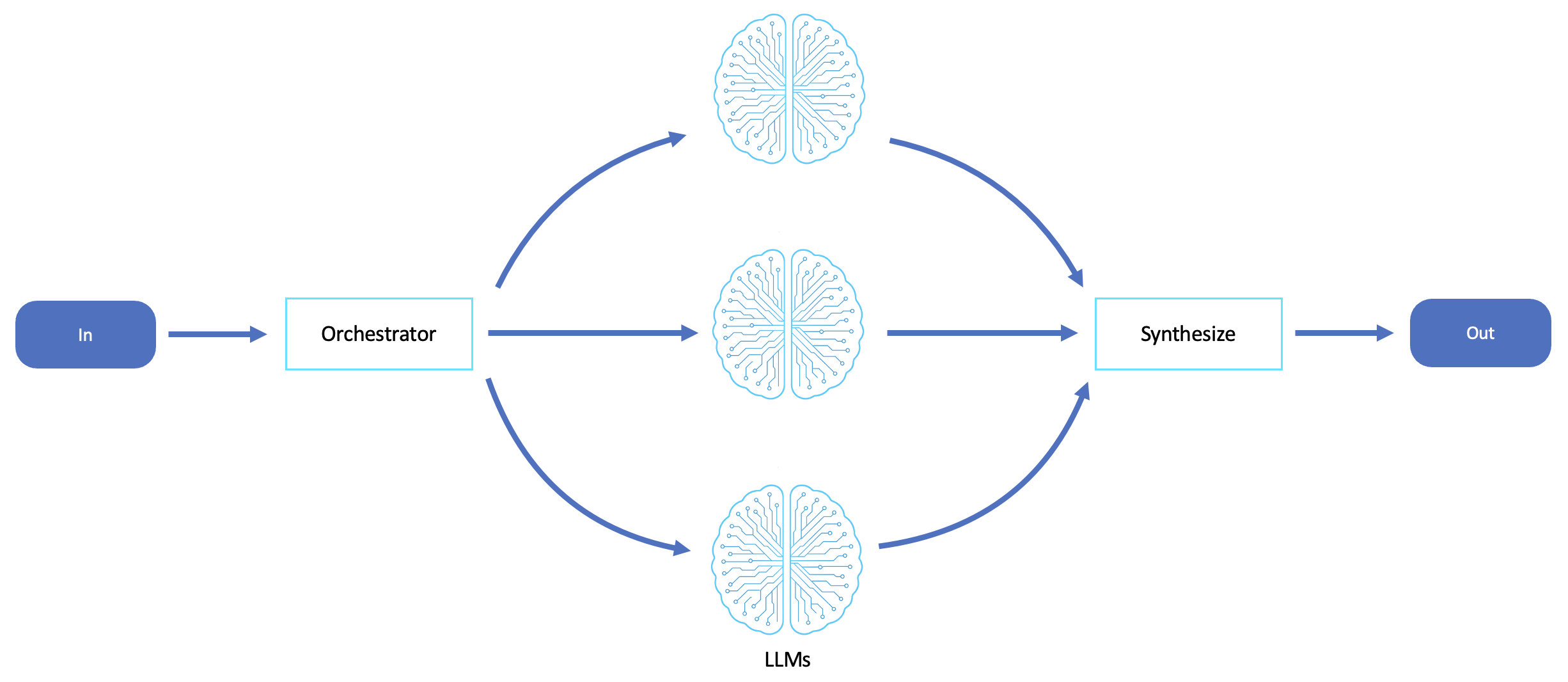
Step 13: Wire the retrieval tool into your ReAct loop. This is where the two agentic AI patterns merge: add a second tool definition — search_faq(question) -> str — to the system prompt from Part A, and extend your action parser to recognize Action: search_faq[...] alongside lookup_order_status[...].
MULTI_TOOL_SYSTEM_PROMPT = """You are a customer-support agent with two tools:

lookup_order_status(order_id: str) -> str
    Returns the current shipping status for a given order ID.

search_faq(question: str) -> str
    Searches the product FAQ knowledge base and returns a grounded answer.

Follow this exact format, one Action or Final Answer per turn:

Thought:
Action: lookup_order_status[]
   -- or --
Action: search_faq[]
   -- or, once you have enough information --
Final Answer:
"""

TOOLS = {
    "lookup_order_status": lambda arg: lookup_order_status(arg),
    "search_faq": lambda arg: ask_faq(arg, knowledge_base_id="ABCD1234EF",
                                       model_arn="arn:aws:bedrock:us-east-1::foundation-model/anthropic.claude-3-5-sonnet-20241022-v2:0")[0],
}

MULTI_ACTION_RE = re.compile(r"Action:s*(lookup_order_status|search_faq)[([^]]+)]", re.IGNORECASE)

def parse_multi_tool_step(model_text: str):
    final_match = FINAL_RE.search(model_text)
    if final_match:
        return {"type": "final", "answer": final_match.group(1).strip()}
    action_match = MULTI_ACTION_RE.search(model_text)
    if action_match:
        return {"type": "action", "tool": action_match.group(1), "arg": action_match.group(2).strip()}
    return {"type": "unparseable", "raw": model_text}
With this in place the loop body from Step 6 barely changes — instead of always calling lookup_order_status, you look the chosen tool name up in the TOOLS dictionary and call whichever function the model selected. Adding a third tool later is a matter of one more dictionary entry and one more line in the system prompt, not rewriting the loop.
Common Mistakes with Agentic AI Patterns
These four mistakes account for most of the broken agentic AI patterns we see reported from readers working through this lab.
1. No maximum iteration guard on the ReAct loop. If you skip the MAX_ITERATIONS cap in Step 6, a model that gets stuck re-issuing the same malformed action will loop indefinitely, burning tokens with no forward progress. Always cap iterations and raise a clear error, or return a graceful fallback, when the cap is hit.
2. Querying the Knowledge Base before ingestion has finished. Creating a data source does not populate the vector store — you must call start_ingestion_job and wait for status COMPLETE (Step 10). Skipping this reliably returns an empty result set, which is easy to misdiagnose as “the embedding model is wrong” when it’s simply not synced yet.
3. Embedding model / vector dimension mismatch. Your OpenSearch Serverless (or Aurora pgvector) index’s vector field must be created with the exact dimensionality your chosen embedding model produces — 1024 for Titan Text Embeddings V2 at default settings, different for other models. Provisioning the index before deciding on the embedding model reliably causes ingestion failures or silently degraded retrieval quality.
4. Conflating “the agent retrieved something” with “the agent answered correctly.” A retrieval-augmented agent can retrieve a topically relevant but factually insufficient chunk and still generate a fluent, confident-sounding wrong answer. The citations from retrieve_and_generate, and grounding checks from Guardrails discussed in Going Further, are what give you an automated signal that distinguishes a correctly grounded answer from a plausible-sounding one built on the wrong paragraph.

Going Further with Agentic AI Patterns
Once both agentic AI patterns work independently, the natural next step is production hardening. Three extensions are worth prioritizing.
First, add citation and source tracking: retrieve_and_generate‘s response includes a citations array mapping spans of the generated answer back to the retrieved chunks that justified them. Surfacing these to users, or logging them for audit, turns “the agent said X” into “the agent said X, and here’s the FAQ paragraph it came from” — which matters for customer-support use cases where trust and traceability are a product requirement.
Second, apply Amazon Bedrock Guardrails to both agentic AI patterns’ model calls — the ReAct loop and the retrieval-augmented generation call — so guardrails can block topics, filter PII, and enforce grounding checks that flag when a generated answer isn’t supported by the retrieved content.
Third, think about cost early: each ReAct iteration is a full model invocation, and each retrieve_and_generate call bundles a retrieval pass with a generation pass, so an agent that loops five or six times per question can cost meaningfully more per conversation than a single-shot prompt.
Track token usage per iteration (the usage field on the Converse response) and set a budget-aware fallback — for example, forcing a “Final Answer” after three iterations even without a hard error.
A further, more architectural extension is to treat the Knowledge Base retrieval function as just one more tool available to the ReAct loop, alongside lookup_order_status and any other backend integration you add later.
Framed this way, the “retrieval-augmented agent” from Part B isn’t a separate system from the “reasoning agent” in Part A — it’s the same control loop with a richer tool belt, which is the direction production frameworks like Strands Agents or LangGraph push these agentic AI patterns toward once you outgrow a single mocked tool.
It’s also worth comparing your hand-rolled loop against a managed framework rather than assuming one is strictly better. AWS’s Strands Agents SDK gives you a model-driven agent loop with built-in tool-calling conventions and observability hooks, so you don’t maintain your own regex-based parser — but it means trusting the framework’s internal prompt templates.
LangGraph takes a more explicit graph-based approach, modeling the loop as nodes and edges with conditional routing, which can make complex multi-tool agents easier to reason about visually but adds its own dependency to learn.
Teams maintaining a single well-understood agent with two or three tools, as in this lab, often get more long-term value from the transparency of a hand-rolled loop; teams building a broad platform of many agents tend to benefit from a framework’s shared conventions across their agentic AI patterns.
Finally, consider how you’d move this lab’s mocked tool toward a real integration without changing the agent’s reasoning shape at all. Swapping lookup_order_status‘s fake dictionary for a call to a real orders API or a DynamoDB table requires no change to the ReAct loop itself — only to the tool function’s body.
That property, tools being swappable without touching the reasoning loop, is what makes these agentic AI patterns scale from a lab exercise to a production customer-support agent.
Agentic AI Patterns: Frequently Asked Questions
Do I need Amazon Bedrock Agents (the console feature) to build a ReAct agent?
No. Bedrock Agents is a managed orchestration layer with its own internal reasoning process (visible via its trace and Rationale objects), but it is a different, proprietary mechanism from the ReAct-based agentic AI patterns you build by hand with the Converse API in this lab. You can build a fully functional ReAct loop against any Bedrock foundation model without touching the Agents feature.
What’s the difference between retrieve and retrieve_and_generate?
retrieve returns raw ranked chunks and leaves generation entirely up to you — useful when you want to merge retrieved context with your own ReAct loop, one of the two agentic AI patterns in this lab. retrieve_and_generate does both steps in one call, which is faster to wire up but gives you less control over the final generation prompt.
Why did my Knowledge Base return zero results even though ingestion said “COMPLETE”?
Most commonly this is either a vector-dimension mismatch between your embedding model and your vector index, an IAM/data-access-policy gap preventing the service role from reading the index, or a query that’s semantically distant from anything in your source document.
Is this lab’s mocked lookup_order_status tool realistic for production?
Structurally, yes — a production version would call a real order-management API or database instead of an in-memory dictionary, but the loop mechanics don’t change. The lab intentionally mocks the tool so you can focus entirely on the agentic AI patterns’ reasoning-loop mechanics without needing real backend infrastructure.
What happens if the model calls a tool that doesn’t exist or isn’t in the system prompt?
Your parser should treat any unrecognized action name as a parsing failure rather than guessing at intent. Fail loudly, log the raw model output, and treat repeated unrecognized-tool errors as a signal that your system prompt’s tool list needs to be clearer.
This lab walked through both foundational agentic AI patterns end to end: a hand-rolled ReAct loop that gives a Bedrock model a mocked order-lookup tool, and a retrieval-augmented extension that grounds the same agent in a real Knowledge Base.
With these agentic AI patterns built from first principles rather than a managed console feature, you now have the mental model to debug, extend, and combine them confidently as your own agents take on more tools and more responsibility.