


In this hands-on lab you’ll build a working healthcare RAG pipeline end to end: uploading synthetic clinical documents to Amazon S3, generating embeddings with Amazon Bedrock, indexing vectors in Amazon OpenSearch Serverless, and answering clinician questions with cited sources. Every document used here is fictional, de-identified test data — no real PHI is involved anywhere in this exercise.

What You’ll Build: A Healthcare RAG Pipeline
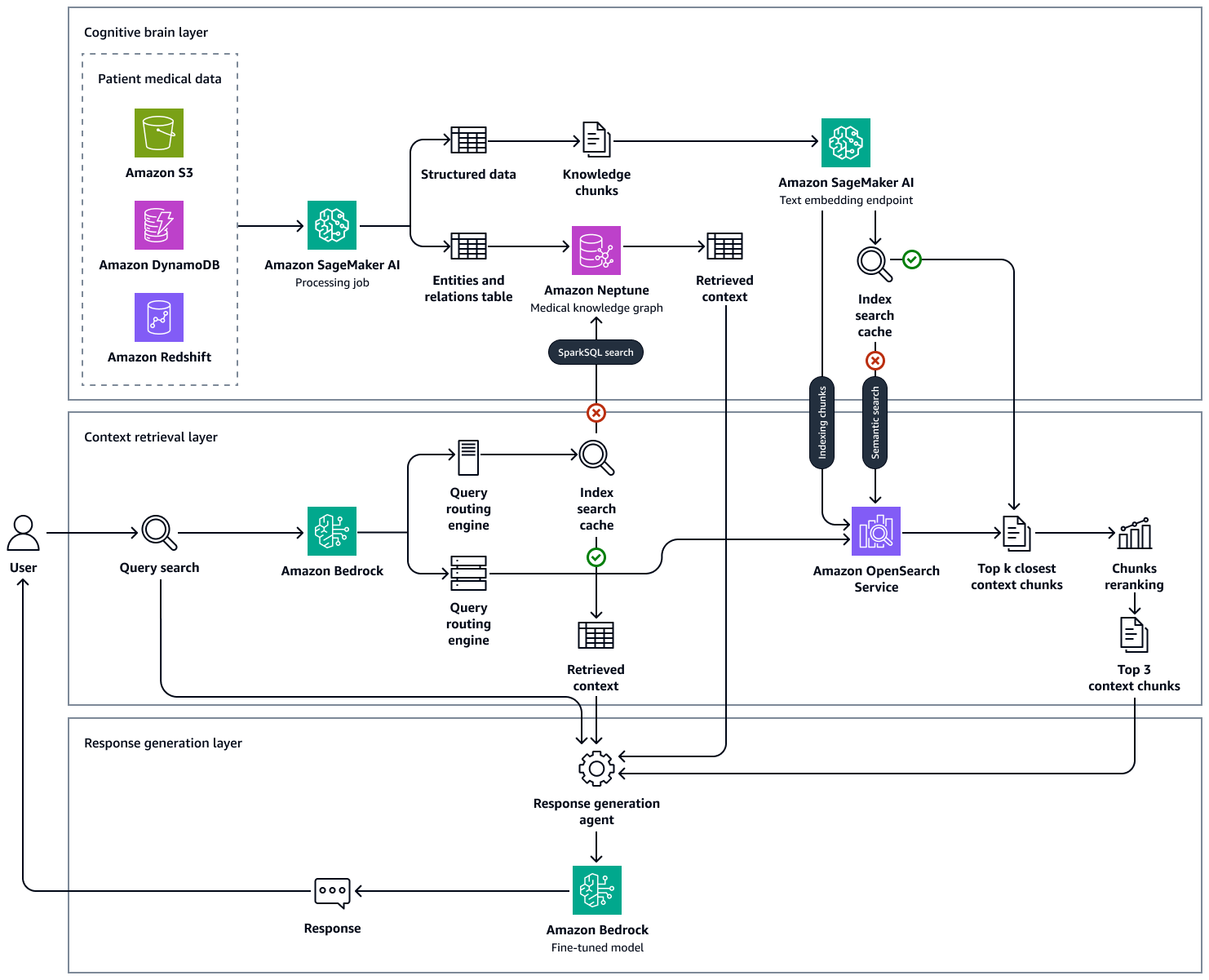
By the end of this lab you’ll have a small but complete healthcare RAG system: a Python pipeline that ingests synthetic clinical-guideline and patient-FAQ documents, chunks and embeds them with Amazon Bedrock Titan Embeddings, indexes the vectors in an Amazon OpenSearch Serverless collection, and retrieves the most relevant chunks to ground answers from a Bedrock foundation model — complete with source citations.
This healthcare RAG lab intentionally sticks to AWS services that are HIPAA-eligible. Per AWS’s current HIPAA Eligible Services Reference, Amazon S3, Amazon Bedrock, Amazon OpenSearch Service (including OpenSearch Serverless), and Amazon RDS all qualify — though every document here is synthetic, so no BAA is required to complete the exercise as written.
Prerequisites: an AWS account with Bedrock model access enabled for a Titan Embeddings model and a text-generation model (e.g. Claude on Bedrock), Python 3.10+, the boto3 and opensearch-py packages, and an AWS CLI profile scoped to S3, Bedrock Runtime, and OpenSearch Serverless. Familiarity with the parent tutorial’s RAG concepts (chunking, embeddings, retrieval) is assumed.
The data flow is linear: synthetic documents land in an encrypted S3 bucket, a script chunks them and calls Bedrock Titan Embeddings to turn each chunk into a vector, and those vectors are indexed into OpenSearch Serverless. At query time the same embedding model turns a clinician’s question into a vector that OpenSearch matches against the index.
The top hits get stitched into a prompt, and a Bedrock generation model answers using only that context while citing its sources. Every step of this healthcare RAG pipeline is a short-lived script or managed service, so the whole lab runs from a laptop with nothing more than the AWS CLI and a Python virtual environment.
Step 0 — Set Up an IAM Role Scoped to This Lab
Before touching S3, Bedrock, or OpenSearch, create a dedicated IAM role or user for this lab rather than reusing broad administrator credentials. Least-privilege access is one of the “secure access controls” AWS calls out in its HIPAA guidance for generative-AI workloads — a good habit to build even on synthetic data.
aws iam create-policy \
  --policy-name HealthcareRagLabPolicy \
  --policy-document '{
    "Version": "2012-10-17",
    "Statement": [
      {
        "Effect": "Allow",
        "Action": ["s3:PutObject", "s3:GetObject", "s3:ListBucket"],
        "Resource": [
          "arn:aws:s3:::healthcare-rag-lab-demo-*",
          "arn:aws:s3:::healthcare-rag-lab-demo-*/*"
        ]
      },
      {
        "Effect": "Allow",
        "Action": ["bedrock:InvokeModel"],
        "Resource": "*"
      },
      {
        "Effect": "Allow",
        "Action": ["aoss:APIAccessAll"],
        "Resource": "*"
      }
    ]
  }'

aws iam create-role \
  --role-name HealthcareRagLabRole \
  --assume-role-policy-document file://trust-policy.json

aws iam attach-role-policy \
  --role-name HealthcareRagLabRole \
  --policy-arn arn:aws:iam::YOUR_ACCOUNT_ID:policy/HealthcareRagLabPolicy
Scoping the S3 actions to a specific bucket prefix, rather than granting s3:* on all buckets, means a bug in your lab script can’t touch unrelated data in your account. Apply the same discipline to Bedrock and OpenSearch Serverless — grant only the actions you actually need, and revisit the policy before pointing this pipeline at a real workload.
Step 1 — Create an Encrypted S3 Bucket for Synthetic Clinical Documents
Even though our documents are synthetic, treat the bucket as if it held real ePHI — that’s the habit worth building before a healthcare RAG pipeline ever touches production. HIPAA-eligible use of S3 requires server-side encryption at rest and TLS in transit, plus tightened public-access controls, so we enforce all three from the first command.
aws s3api create-bucket \
  --bucket healthcare-rag-lab-demo-$(date +%s) \
  --region us-east-1

aws s3api put-bucket-encryption \
  --bucket healthcare-rag-lab-demo-123456 \
  --server-side-encryption-configuration '{
    "Rules": [{
      "ApplyServerSideEncryptionByDefault": {
        "SSEAlgorithm": "aws:kms"
      },
      "BucketKeyEnabled": true
    }]
  }'

aws s3api put-public-access-block \
  --bucket healthcare-rag-lab-demo-123456 \
  --public-access-block-configuration \
  BlockPublicAcls=true,IgnorePublicAcls=true,BlockPublicPolicy=true,RestrictPublicBuckets=true
A customer-managed KMS key (rather than default AES256) gives you an audit trail of every decrypt call via CloudTrail and lets you revoke key access independently of bucket policy — a control auditors look for when reviewing HIPAA-eligible S3 usage. Blocking public access at the bucket level is a second, independent guardrail against misconfigured object ACLs.
Generating the Synthetic Documents
We fabricate two document types — short “clinical guideline” snippets and “patient FAQ” entries — both entirely invented, with no real institution names or patient identifiers. Save this as generate_docs.py.
import json, os

# All content below is 100% synthetic / fabricated for lab purposes only.
# It is NOT sourced from any real clinical guideline, institution, or patient.
SYNTHETIC_DOCS = [
    {
        "doc_id": "GUIDE-001",
        "title": "Synthetic Guideline: Adult Fasting Glucose Screening Cadence",
        "text": (
            "For this training scenario, asymptomatic adult patients in the "
            "fictional Riverbend Clinic network are screened for fasting "
            "glucose every three years starting at simulated age 35, or "
            "annually if the synthetic patient profile includes a fabricated "
            "BMI over 30. This is illustrative sample text only."
        ),
    },
    {
        "doc_id": "GUIDE-002",
        "title": "Synthetic Guideline: Post-Visit Follow-Up Window",
        "text": (
            "In this fictional care pathway, a follow-up call is scheduled "
            "within 5 simulated business days of any synthetic 'urgent-care' "
            "encounter tagged with a fabricated acuity score above 3. No "
            "real scheduling policy is represented here."
        ),
    },
    {
        "doc_id": "FAQ-101",
        "title": "Synthetic Patient FAQ: Refill Requests",
        "text": (
            "Sample FAQ answer: fictional patients using the demo portal "
            "can request a prescription refill through the synthetic "
            "'MyRiverbend' app; the simulated turnaround time modeled in "
            "this exercise is 48 hours."
        ),
    },
    {
        "doc_id": "FAQ-102",
        "title": "Synthetic Patient FAQ: Lab Result Availability",
        "text": (
            "Sample FAQ answer: in this fabricated scenario, routine lab "
            "results appear in the synthetic patient portal within 3 "
            "simulated business days; results flagged by the demo system "
            "as 'critical' trigger a fictional clinician phone call instead."
        ),
    },
]

os.makedirs("synthetic_docs", exist_ok=True)
for doc in SYNTHETIC_DOCS:
    path = f"synthetic_docs/{doc['doc_id']}.json"
    with open(path, "w") as f:
        json.dump(doc, f, indent=2)

print(f"Wrote {len(SYNTHETIC_DOCS)} synthetic documents to synthetic_docs/")
Run python generate_docs.py, then upload the folder with server-side encryption headers explicit on every object — belt-and-suspenders even though the bucket default already covers it.
aws s3 cp synthetic_docs/ s3://healthcare-rag-lab-demo-123456/synthetic_docs/ \
  --recursive \
  --sse aws:kms
Verifying the Upload and Access Controls
Confirm the objects landed encrypted and the bucket truly blocks public access — a quick sanity check that catches JSON policy typos before they cause confusing failures later.
aws s3api head-object \
  --bucket healthcare-rag-lab-demo-123456 \
  --key synthetic_docs/GUIDE-001.json \
  --query 'ServerSideEncryption'

aws s3api get-public-access-block \
  --bucket healthcare-rag-lab-demo-123456
The first command should return "aws:kms"; if it errors or returns nothing, re-run the put-bucket-encryption call from Step 1 before continuing. The second command should show all four public-access-block settings as true.
Step 2 — Chunk and Embed Documents with Bedrock Titan Embeddings
RAG retrieval quality depends heavily on chunk size: too large and irrelevant text dilutes the match, too small and you lose context the generation model needs. For these short synthetic documents we keep each document as a single chunk, but the code below supports real-world splitting via a simple word-count chunker so you can drop in longer documents later.
import boto3, json, glob

bedrock = boto3.client("bedrock-runtime", region_name="us-east-1")

def chunk_text(text, max_words=200):
    words = text.split()
    return [" ".join(words[i:i + max_words]) for i in range(0, len(words), max_words)]

def embed_text(text):
    body = json.dumps({"inputText": text})
    response = bedrock.invoke_model(
        modelId="amazon.titan-embed-text-v2:0",
        body=body,
        accept="application/json",
        contentType="application/json",
    )
    payload = json.loads(response["body"].read())
    return payload["embedding"]

records = []
for path in glob.glob("synthetic_docs/*.json"):
    with open(path) as f:
        doc = json.load(f)
    for i, chunk in enumerate(chunk_text(doc["text"])):
        vector = embed_text(chunk)
        records.append({
            "doc_id": doc["doc_id"],
            "chunk_id": f"{doc['doc_id']}-{i}",
            "title": doc["title"],
            "text": chunk,
            "embedding": vector,
        })

with open("embedded_chunks.json", "w") as f:
    json.dump(records, f)

print(f"Embedded {len(records)} chunks")
We call Bedrock’s invoke_model synchronously per chunk here for clarity. Titan Embeddings v2 returns a 1024-dimension vector by default; that dimension has to match whatever you configure the OpenSearch index with in the next step. Bedrock encrypts data in transit with TLS and does not persist your prompts or completions, per its security and compliance documentation — one reason it’s a reasonable choice for this stage of a healthcare RAG pipeline.
Step 3 — Create an OpenSearch Serverless Vector Collection for Healthcare RAG
We use Amazon OpenSearch Serverless rather than a self-managed cluster because it removes capacity planning for a lab this small, while remaining a HIPAA-eligible service. First create a vector-search collection and the required security/network policies through the CLI.
aws opensearchserverless create-security-policy \
  --name healthcare-rag-encryption \
  --type encryption \
  --policy '{"Rules":[{"ResourceType":"collection","Resource":["collection/healthcare-rag-lab"]}],"AWSOwnedKey":true}'

aws opensearchserverless create-security-policy \
  --name healthcare-rag-network \
  --type network \
  --policy '[{"Rules":[{"ResourceType":"collection","Resource":["collection/healthcare-rag-lab"]}],"AllowFromPublic":false,"SourceVPCEs":["vpce-EXAMPLE"]}]'

aws opensearchserverless create-collection \
  --name healthcare-rag-lab \
  --type VECTORSEARCH

aws opensearchserverless create-access-policy \
  --name healthcare-rag-access \
  --type data \
  --policy '[{
    "Rules": [
      {"ResourceType": "collection", "Resource": ["collection/healthcare-rag-lab"], "Permission": ["aoss:*"]},
      {"ResourceType": "index", "Resource": ["index/healthcare-rag-lab/*"], "Permission": ["aoss:*"]}
    ],
    "Principal": ["arn:aws:iam::YOUR_ACCOUNT_ID:role/HealthcareRagLabRole"]
  }]'
OpenSearch Serverless separates three concerns you configure independently: encryption policy, network policy, and data-access policy. Skipping the data-access policy is a common source of confusing “access denied” errors — the collection can be perfectly reachable over the network and still reject every request until a matching principal is granted explicit permission.
Notice the network policy disallows public access and instead routes through a VPC endpoint (vpce-EXAMPLE — replace with a real endpoint ID). Keeping the collection off the public internet is the kind of configuration AWS’s HIPAA guidance calls out as a customer responsibility under the shared-responsibility model — service eligibility doesn’t automatically make an insecurely-configured deployment compliant.
Once the collection is ACTIVE, create the vector index with a knn_vector mapping matching the 1024-dimension Titan embeddings from Step 2.
from opensearchpy import OpenSearch, RequestsHttpConnection, AWSV4SignerAuth
import boto3

region = "us-east-1"
service = "aoss"
credentials = boto3.Session().get_credentials()
auth = AWSV4SignerAuth(credentials, region, service)

client = OpenSearch(
    hosts=[{"host": "YOUR-COLLECTION-ENDPOINT.us-east-1.aoss.amazonaws.com", "port": 443}],
    http_auth=auth,
    use_ssl=True,
    verify_certs=True,
    connection_class=RequestsHttpConnection,
)

index_body = {
    "settings": {"index": {"knn": True}},
    "mappings": {
        "properties": {
            "embedding": {
                "type": "knn_vector",
                "dimension": 1024,
                "method": {"name": "hnsw", "engine": "nmslib", "space_type": "cosinesimil"},
            },
            "doc_id": {"type": "keyword"},
            "chunk_id": {"type": "keyword"},
            "title": {"type": "text"},
            "text": {"type": "text"},
        }
    },
}

client.indices.create(index="clinical-chunks", body=index_body)
print("Index created")
Step 4 — Load Embedded Chunks into the Vector Index
With the index mapping in place, bulk-load the embedded synthetic chunks produced in Step 2. We use the chunk ID as the document ID so re-running this script is idempotent — re-embedding the same synthetic corpus overwrites rather than duplicates entries.
import json

with open("embedded_chunks.json") as f:
    records = json.load(f)

for r in records:
    client.index(
        index="clinical-chunks",
        id=r["chunk_id"],
        body={
            "doc_id": r["doc_id"],
            "chunk_id": r["chunk_id"],
            "title": r["title"],
            "text": r["text"],
            "embedding": r["embedding"],
        },
    )

print(f"Indexed {len(records)} chunks into OpenSearch Serverless")
Step 5 — Retrieval: k-NN Search Against the Vector Index
Retrieval starts by embedding the incoming clinician question with the same Titan model used at ingestion time — mismatched embedding models produce vectors that aren’t comparable and will silently degrade retrieval quality. We then run an approximate k-NN query and pull back the top matching chunks.
def retrieve(question, k=3):
    query_vector = embed_text(question)
    body = {
        "size": k,
        "query": {"knn": {"embedding": {"vector": query_vector, "k": k}}},
    }
    response = client.search(index="clinical-chunks", body=body)
    hits = response["hits"]["hits"]
    return [
        {
            "doc_id": h["_source"]["doc_id"],
            "title": h["_source"]["title"],
            "text": h["_source"]["text"],
            "score": h["_score"],
        }
        for h in hits
    ]
We deliberately return doc_id alongside the retrieved text, not just the raw passage. The next step needs that identifier to force the generation model to cite its sources rather than paraphrasing without attribution — a requirement in almost any real clinical Q&A tool, synthetic or not.
Adding Metadata Filters to Retrieval
Real clinical corpora usually mix document types you don’t always want blended together — a “patient FAQ” answer and a “clinical guideline” excerpt can both mention glucose screening, but a clinician asking a policy question probably wants the guideline. OpenSearch lets you combine the k-NN vector query with a standard filter clause so you can narrow retrieval by metadata before ranking by similarity.
def retrieve_filtered(question, doc_type_prefix="GUIDE", k=3):
    query_vector = embed_text(question)
    body = {
        "size": k,
        "query": {
            "bool": {
                "must": [{"knn": {"embedding": {"vector": query_vector, "k": k}}}],
                "filter": [{"prefix": {"doc_id": doc_type_prefix}}],
            }
        },
    }
    response = client.search(index="clinical-chunks", body=body)
    return [h["_source"] for h in response["hits"]["hits"]]
Here we filter by a naming convention (GUIDE- vs. FAQ-), but a production index would typically store an explicit doc_type keyword field instead. The principle carries over regardless: combining semantic similarity with structured metadata filters produces sharper retrieval than similarity search alone.
Step 6 — Healthcare RAG Generation with Source Citations via Bedrock
The prompt template below explicitly instructs the model to answer only from the supplied context and to cite the doc_id of every source it draws on. This is the single most important prompt-engineering detail in a clinical RAG system: an ungrounded or uncited answer is far more dangerous in a healthcare context than in a general-purpose chatbot.
def build_prompt(question, retrieved_chunks):
    context_block = "\n\n".join(
        f"[{c['doc_id']}] {c['title']}\n{c['text']}" for c in retrieved_chunks
    )
    return f"""You are a clinical reference assistant working ONLY with the
synthetic sample documents provided below. Do not use any outside knowledge.
Answer the clinician's question using only this context. After your answer,
list the doc_id of every source you used in the format: Sources: [DOC_ID, ...].
If the context does not contain the answer, say so explicitly.

Context:
{context_block}

Question: {question}

Answer:"""

def generate_answer(question):
    chunks = retrieve(question)
    prompt = build_prompt(question, chunks)
    body = json.dumps({
        "anthropic_version": "bedrock-2023-05-31",
        "max_tokens": 400,
        "messages": [{"role": "user", "content": prompt}],
    })
    response = bedrock.invoke_model(
        modelId="anthropic.claude-3-haiku-20240307-v1:0",
        body=body,
        accept="application/json",
        contentType="application/json",
    )
    result = json.loads(response["body"].read())
    return result["content"][0]["text"], chunks
Using a smaller, faster model like Claude 3 Haiku on Bedrock keeps this demo cheap and responsive; swap the modelId for a larger Claude model if you need more nuanced synthesis across many retrieved chunks. The prompt structure — context first, explicit citation instruction, then question — keeps the model anchored to the retrieved passages instead of drifting into general medical knowledge it may have picked up during pretraining.
Step 7 — The Demo Q&A Loop
Finally, wire retrieval and generation into a small interactive loop that simulates a clinician typing questions and seeing cited answers back.
SAMPLE_QUESTIONS = [
    "How often should we screen asymptomatic adult patients for fasting glucose?",
    "What is the follow-up window after an urgent-care visit?",
    "How long does a prescription refill take through the patient portal?",
]

if __name__ == "__main__":
    for q in SAMPLE_QUESTIONS:
        answer, sources = generate_answer(q)
        print(f"\nQ: {q}")
        print(f"A: {answer}")
        print("Retrieved chunks:", [s["doc_id"] for s in sources])
Running this against our four synthetic documents produces answers like “Screening occurs every three years starting at simulated age 35… Sources: [GUIDE-001]” — grounded, cited, and traceable back to a specific synthetic document ID. A clinician (or an auditor) can click through from the citation to the exact source passage rather than trusting an opaque model output.
Step 8 — A Basic Retrieval Quality Check
Before trusting any RAG pipeline, run a small evaluation that checks whether retrieval actually surfaces the document you expect for a known question. This isn’t a substitute for a real evaluation harness, but it catches embedding or indexing mistakes early.
EVAL_CASES = [
    {"question": "How often should adults get fasting glucose screening?", "expected_doc_id": "GUIDE-001"},
    {"question": "How soon after urgent care is there a follow-up call?", "expected_doc_id": "GUIDE-002"},
    {"question": "How long does a prescription refill take?", "expected_doc_id": "FAQ-101"},
    {"question": "When do lab results show up in the portal?", "expected_doc_id": "FAQ-102"},
]

def run_eval():
    correct = 0
    for case in EVAL_CASES:
        results = retrieve(case["question"], k=1)
        top_doc_id = results[0]["doc_id"] if results else None
        passed = top_doc_id == case["expected_doc_id"]
        correct += passed
        print(f"{'PASS' if passed else 'FAIL'} — {case['question']!r} -> got {top_doc_id}, expected {case['expected_doc_id']}")
    print(f"\n{correct}/{len(EVAL_CASES)} retrieval checks passed")

if __name__ == "__main__":
    run_eval()
Four questions is obviously a tiny evaluation set, but the pattern scales: as you add real synthetic documents, add a matching question/expected-doc_id pair, and re-run this check any time you change the chunking strategy, embedding model version, or index mapping. A regression here is often the first visible sign that something upstream broke silently.
Step 9 — Cleaning Up Lab Resources
Because this is a synthetic exercise rather than a persistent healthcare RAG application, tear down the resources you created once you’re done so they don’t accrue idle cost. OpenSearch Serverless bills a small baseline even at rest.
aws opensearchserverless delete-collection --id YOUR_COLLECTION_ID

aws opensearchserverless delete-security-policy --name healthcare-rag-encryption --type encryption
aws opensearchserverless delete-security-policy --name healthcare-rag-network --type network
aws opensearchserverless delete-access-policy --name healthcare-rag-access --type data

aws s3 rm s3://healthcare-rag-lab-demo-123456/synthetic_docs/ --recursive
aws s3api delete-bucket --bucket healthcare-rag-lab-demo-123456

aws iam detach-role-policy --role-name HealthcareRagLabRole --policy-arn arn:aws:iam::YOUR_ACCOUNT_ID:policy/HealthcareRagLabPolicy
aws iam delete-role --role-name HealthcareRagLabRole
aws iam delete-policy --policy-arn arn:aws:iam::YOUR_ACCOUNT_ID:policy/HealthcareRagLabPolicy
Delete resources in dependency order: the OpenSearch collection and its policies first, then the S3 objects and bucket, then the IAM role and policy last. None of this data was ever real PHI, so there’s no additional data-disposal obligation — but practicing a clean teardown is a habit worth carrying into any future production build.
Common Mistakes
These pitfalls come up repeatedly when people build their first healthcare RAG pipeline, whether on synthetic or real data.
- Accidentally pasting in real PHI while testing. It’s tempting to grab a “realistic-looking” sample from a real EHR export to make the demo feel authentic — don’t. Only use fabricated, clearly-labeled synthetic text, exactly as this lab does, especially without a signed AWS BAA.
- Skipping encryption configuration because “it’s just a demo.” Habits carry over. Practicing with default, unencrypted buckets and public OpenSearch access teaches the wrong muscle memory for when the data becomes real.
- Mismatched embedding models between ingestion and query time. If you re-embed your corpus with a newer Titan model version but forget to re-embed the query with the same version, similarity scores become meaningless and retrieval quality silently collapses.
- Not forcing citations in the generation prompt. Without an explicit instruction to cite
doc_ids, generation models will happily blend retrieved context with pretrained knowledge, producing fluent but unverifiable answers — a serious liability in any clinical-adjacent tool.
None of these mistakes are exotic — they’re the same issues that show up in almost every first-time RAG build. In a clinical context the cost of getting them wrong is simply higher: an uncited answer to “how often should we screen this patient” is a genuine safety concern in a real workflow.
Going Further: Healthcare RAG Citation Verification and Audit Logging
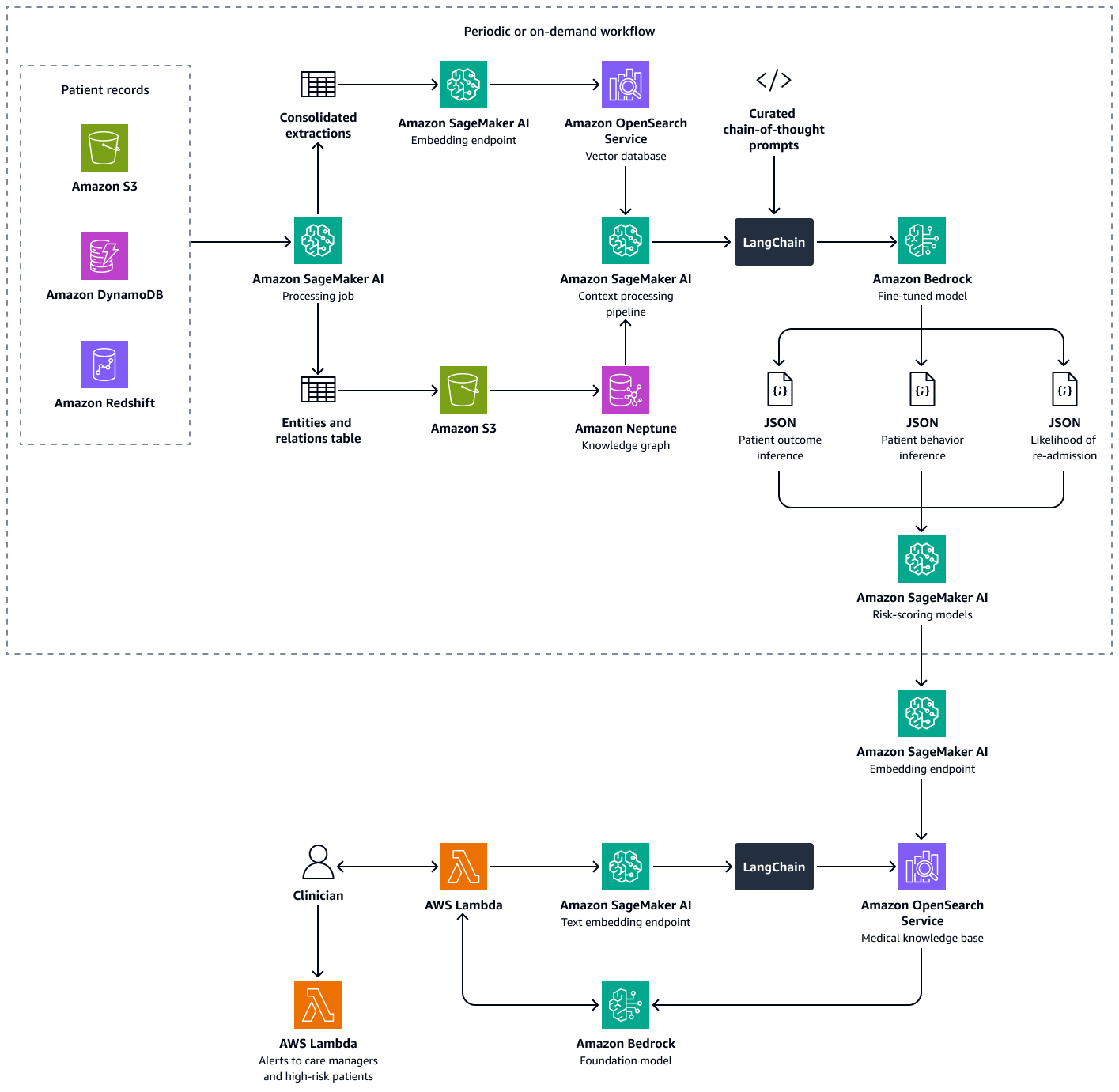
A production healthcare RAG pipeline should verify that a cited source really supports the generated claim, since models occasionally hallucinate plausible-looking citations. One lightweight approach: run a second, cheap Bedrock call that checks whether each cited chunk’s text entails the attributed sentence, flagging failures for human review.
def verify_citation(claim_sentence, cited_chunk_text):
    prompt = f"""Does the following SOURCE TEXT support this CLAIM? Answer only
"YES" or "NO".

SOURCE TEXT: {cited_chunk_text}

CLAIM: {claim_sentence}

Answer:"""
    body = json.dumps({
        "anthropic_version": "bedrock-2023-05-31",
        "max_tokens": 5,
        "messages": [{"role": "user", "content": prompt}],
    })
    response = bedrock.invoke_model(
        modelId="anthropic.claude-3-haiku-20240307-v1:0",
        body=body,
        accept="application/json",
        contentType="application/json",
    )
    result = json.loads(response["body"].read())
    return result["content"][0]["text"].strip().upper().startswith("YES")
Running a small, cheap model as a citation checker is far less expensive than the original generation call. In production you’d run this check on every generated answer before it reaches a clinician, routing any “NO” result to a human reviewer.
Equally important in a real healthcare deployment is comprehensive audit logging: every retrieval query, every set of returned chunks, and every generated answer should be written to an immutable log (CloudTrail data events plus a CloudWatch Logs stream) so any answer given to a clinician can be reconstructed and reviewed later.
import boto3, json, time, uuid

logs_client = boto3.client("logs", region_name="us-east-1")
LOG_GROUP = "/healthcare-rag-lab/qa-audit"
LOG_STREAM = "demo-stream"

def generate_answer_with_audit(question):
    request_id = str(uuid.uuid4())
    answer, sources = generate_answer(question)

    audit_record = {
        "request_id": request_id,
        "timestamp": time.time(),
        "question": question,
        "answer": answer,
        "cited_doc_ids": [s["doc_id"] for s in sources],
        "retrieval_scores": [s["score"] for s in sources],
    }

    logs_client.put_log_events(
        logGroupName=LOG_GROUP,
        logStreamName=LOG_STREAM,
        logEvents=[{
            "timestamp": int(time.time() * 1000),
            "message": json.dumps(audit_record),
        }],
    )
    return answer, sources, request_id
Logging the question, answer, cited doc IDs, and retrieval scores together lets a reviewer reconstruct why the model answered as it did. In production, also log the requesting clinician’s identity and enable CloudTrail data events on S3 and OpenSearch.
Cost is worth watching: Bedrock charges per token on both calls, and OpenSearch Serverless bills by OCUs, with a small minimum baseline. For a lab-sized corpus the cost is negligible, but set CloudWatch billing alarms before scaling this healthcare RAG deployment past a demo.
Frequently Asked Questions
Do I need an AWS BAA to complete this lab?
No. This lab only ever touches fabricated, synthetic documents with no real PHI, so no Business Associate Addendum is required to run it as written. You would need an executed AWS BAA, and would need to restrict yourself to HIPAA-eligible services within a HIPAA-designated account, only if you later pointed this same healthcare RAG pipeline at real patient data.
Which AWS services in this lab are actually HIPAA-eligible?
Per AWS’s current HIPAA Eligible Services Reference, Amazon S3, Amazon Bedrock, and Amazon OpenSearch Service (including OpenSearch Serverless) are all HIPAA-eligible, as is Amazon RDS. Eligibility means AWS has audited and documented controls appropriate for ePHI under a signed BAA — it does not by itself make any particular deployment compliant; you’re still responsible for configuration.
Can I reuse this pipeline with real patient data?
Only after executing an AWS BAA, designating the relevant AWS account as a HIPAA account via AWS Artifact, restricting your architecture to HIPAA-eligible services end to end, and implementing the encryption, network isolation, and access-control practices this healthcare RAG lab demonstrates plus additional hardening such as audit logging and citation verification.
Why does the prompt force the model to cite doc_id values?
Forcing explicit citations turns an opaque generated answer into a traceable one: a clinician or reviewer can follow the citation back to the exact synthetic source passage and confirm the answer is actually grounded in retrieved context rather than the model’s general pretrained knowledge, which matters enormously in any clinical-adjacent application.
How do I know if my retrieval is actually working well?
Start with the small evaluation set from Step 8: a handful of known question/expected-document pairs that you re-run any time you change chunking, embeddings, or indexing. As your synthetic corpus grows, expand that set and track pass rate over time — a drop after a change is usually the earliest visible signal that something in the healthcare RAG pipeline regressed.
The healthcare RAG pipeline you just built ties together encrypted S3 storage, Bedrock embeddings and generation, and OpenSearch Serverless vector search into a citation-grounded Q&A system — all built from HIPAA-eligible AWS services and verified against AWS’s current compliance documentation. Every document used here was synthetic, fabricated test data with no real PHI; taking this same healthcare RAG architecture to real patient data would require a signed AWS BAA plus the additional hardening described above.