


A single shared support agent sounds efficient — until Tenant A’s confidential ticket shows up in Tenant B’s chat history. This lab builds real multi-tenant isolation for a fictional SaaS helpdesk called HelpFlow, whose one Bedrock-backed agent serves hundreds of customer accounts from a shared DynamoDB table and S3 bucket.
You’ll scope every request with IAM session tags, enforce per-tenant guardrails through Amazon Bedrock, and prove this multi-tenant isolation holds with a negative-access test harness — not just a policy that looks right on paper.

What You’ll Build: Multi-Tenant Isolation for HelpFlow
By the end of this lab you will have a working multi-tenant access-control layer for HelpFlow’s support agent: a Lambda-fronted “session broker” that calls sts:AssumeRole with a tenant_id session tag, an IAM policy using aws:PrincipalTag and dynamodb:LeadingKeys to scope DynamoDB access, an S3 bucket policy scoped the same way, two Bedrock Guardrails (strict Free tier, looser Enterprise), and a Python test harness asserting tenant A’s credentials cannot read tenant B’s data.
Prerequisites: an AWS account with IAM role/policy permissions, an S3 bucket and DynamoDB table to experiment in, AWS CLI v2 and Python 3.11+ with boto3 installed, and Amazon Bedrock model access enabled in your region (Anthropic Claude models, requested once via the console). You do not need the parent tutorial to follow this lab, but it explains the broader multi-tenant architecture this lab implements piece by piece.
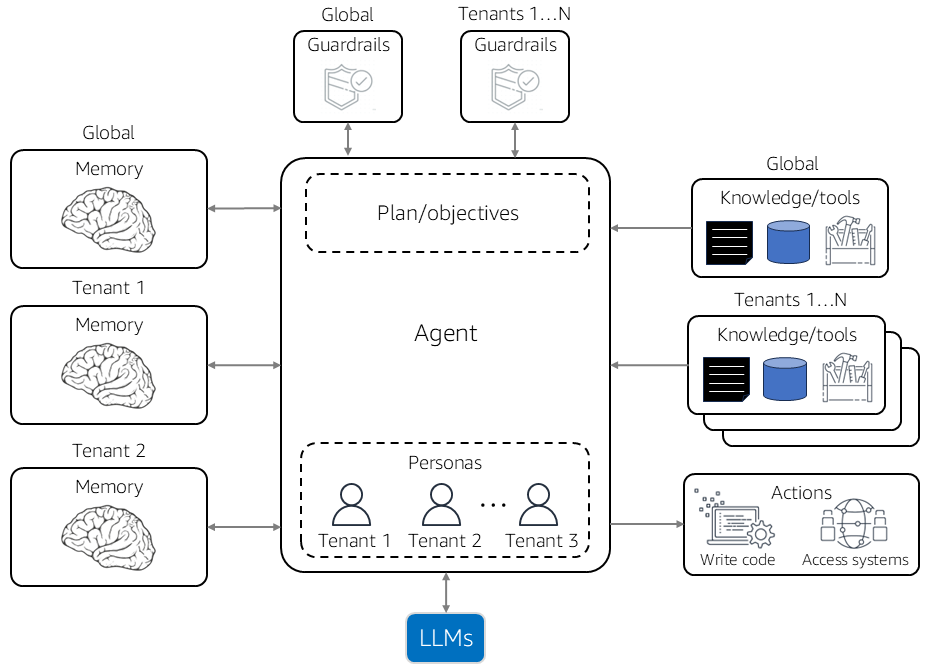
Take a moment before writing any code to sketch HelpFlow’s shape on paper, because the rest of the lab is really just implementing this sketch. One Lambda function (“the broker”) sits in front of every agent turn.
It never touches tenant data directly — its only job is to look at who is calling, verify their claimed tenant against a trusted identity source, and mint a short-lived, tagged credential scoped to exactly that tenant.
Every downstream client — the DynamoDB table client, the S3 client, the Bedrock Runtime client — is then built from that scoped credential, never from the broker’s own long-lived identity. This separation is what makes the isolation provable rather than merely intended: if the scoped credential itself cannot cross tenant boundaries, no bug in the agent’s business logic can either.
This lab does not cover multi-account isolation (a separate AWS account per tenant, for higher-assurance tenancy) or network-level isolation (VPC-per-tenant, PrivateLink) — those are valid, complementary strategies. It focuses on the identity- and policy-level pattern most SaaS teams reach for first, since it scales to thousands of tenants without a linear rise in infrastructure: one shared role, one shared table, one shared bucket, and conditions that do the separating.
Step-by-Step: Building Multi-Tenant Isolation for HelpFlow
HelpFlow’s architecture in this lab is intentionally simple so the isolation mechanics stay visible: one Lambda function receives a support request, assumes a scoped IAM role tagged with the caller’s tenant, reads/writes ticket data in one shared DynamoDB table (partition key tenant_id#ticket_id), pulls attachments from one shared S3 bucket, and invokes a Bedrock model behind a tier-specific guardrail.
Every step below narrows the blast radius of a single credential leak or coding mistake to exactly one tenant.
Step 1 — Design the tenant_id session tag
The whole scheme rests on one AWS STS fact: calling AssumeRole lets you attach session tags via the Tags parameter, which then become available in policy conditions as aws:PrincipalTag/<key> — but only if the assumed role’s trust policy grants the sts:TagSession permission-only action.
Miss that grant and AssumeRole fails outright for any tagged request rather than silently dropping the tags, a useful fail-safe to know while debugging a first attempt.
HelpFlow tags every assumed session with a single key, tenant_id, whose value is the tenant’s opaque UUID (never a human-readable name, since tag values land in CloudTrail and should not leak business identifiers). The trust policy on the shared agent role looks like this:
{
  "Version": "2012-10-17",
  "Statement": [
    {
      "Sid": "AllowSessionBrokerAssume",
      "Effect": "Allow",
      "Principal": { "AWS": "arn:aws:iam::111122223333:role/helpflow-session-broker-lambda" },
      "Action": ["sts:AssumeRole", "sts:TagSession"],
      "Condition": {
        "StringEquals": { "aws:RequestTag/tenant_id": "${aws:PrincipalTag/tenant_id}" },
        "ForAllValues:StringEquals": { "aws:TagKeys": ["tenant_id"] }
      }
    }
  ]
}
Two conditions matter here. ForAllValues:StringEquals on aws:TagKeys caps the request to exactly the tenant_id key, so the broker Lambda cannot smuggle in an extra tag some downstream policy might trust. The aws:RequestTag/tenant_id equals aws:PrincipalTag/tenant_id condition means the broker’s own identity must already carry a matching tag before it can stamp that value onto a new session.
In production, the broker’s principal tag is set once per invocation from a verified JWT claim, never from client input, and refreshed on every cold start rather than cached indefinitely.
Notice this trust policy grants both sts:AssumeRole and sts:TagSession in the same statement — deliberate, since sts:TagSession is a permission-only action that never appears as a directly callable API. You call AssumeRole as usual, and IAM separately checks whether the caller has been granted sts:TagSession before honoring the Tags parameter.
Teams sometimes assume this permission is implied by ordinary AssumeRole access, and are surprised the first time a tagged call fails while an untagged call to the same role succeeds.
Step 2 — Scope DynamoDB with a session-tag condition
HelpFlow stores tickets in one table, helpflow-tickets, partitioned by tenant_id as the leading (partition) key. The multi-tenant IAM policy attached to the assumed role uses the dynamodb:LeadingKeys condition key — documented by AWS specifically for this pattern — to compare the table’s partition key against the session’s principal tag at request time:
{
  "Version": "2012-10-17",
  "Statement": [
    {
      "Sid": "ScopedTicketAccess",
      "Effect": "Allow",
      "Action": ["dynamodb:GetItem", "dynamodb:PutItem", "dynamodb:Query", "dynamodb:UpdateItem"],
      "Resource": "arn:aws:dynamodb:us-east-1:111122223333:table/helpflow-tickets",
      "Condition": {
        "ForAllValues:StringEquals": {
          "dynamodb:LeadingKeys": ["${aws:PrincipalTag/tenant_id}"]
        }
      }
    }
  ]
}
Because the condition references aws:PrincipalTag/tenant_id rather than a hardcoded value, this single policy statement is reused unchanged for every tenant — you are not writing one IAM policy per customer. The DynamoDB request engine substitutes the session’s actual tag value before evaluating the condition, so a session tagged tenant_id=acme-corp can only touch items whose partition key starts with acme-corp — the core isolation mechanism everything else in this lab reinforces.
One subtlety worth internalizing: dynamodb:LeadingKeys constrains the partition key, not arbitrary attributes. If HelpFlow denormalizes tenant identity into a global secondary index queried across all tenants, that GSI query is not automatically covered — it needs its own scoping, either by requiring the GSI query to also filter on the partition key, or by denying that GSI to the tenant-scoped role and routing cross-tenant analytics through a separate, audited role.
Step 3 — Scope S3 attachments the same way
Ticket attachments live in s3://helpflow-attachments/tenants/<tenant_id>/, the same multi-tenant prefix pattern applied to storage. S3 doesn’t have a leading-key concept, but policy variables work the same way in the resource ARN itself:
{
  "Version": "2012-10-17",
  "Statement": [
    {
      "Sid": "ScopedAttachmentAccess",
      "Effect": "Allow",
      "Action": ["s3:GetObject", "s3:PutObject"],
      "Resource": "arn:aws:s3:::helpflow-attachments/tenants/${aws:PrincipalTag/tenant_id}/*"
    }
  ]
}
Because tenant_id is interpolated directly into the resource ARN, reading tenants/other-tenant/invoice.pdf with a session tagged for acme-corp evaluates against a Resource pattern that does not match at all — denied by the implicit deny, with no special-casing in application code.
It’s also worth denying s3:ListBucket at the bucket level, or scoping it with an s3:prefix condition, so a tenant’s session cannot enumerate the bucket and discover other tenant prefixes exist even if it can’t read their contents.
Step 4 — Assume the role with the tenant tag
The multi-tenant session broker (a small Lambda function invoked before every agent turn) performs the actual AssumeRole call. Here is the boto3 call, matching the parameter names in the current AWS STS reference (RoleArn, RoleSessionName, Tags, each tag a {'Key': ..., 'Value': ...} dict — AWS STS does not support multi-valued session tags, so keep this to one value per key):
import boto3

sts = boto3.client("sts")

def assume_tenant_scoped_role(tenant_id: str, session_name: str):
    resp = sts.assume_role(
        RoleArn="arn:aws:iam::111122223333:role/helpflow-agent-role",
        RoleSessionName=session_name,
        Tags=[{"Key": "tenant_id", "Value": tenant_id}],
        DurationSeconds=900,  # short-lived: one agent turn, not a whole session
    )
    creds = resp["Credentials"]
    return boto3.Session(
        aws_access_key_id=creds["AccessKeyId"],
        aws_secret_access_key=creds["SecretAccessKey"],
        aws_session_token=creds["SessionToken"],
    )

# Every downstream client is built from THIS session, never from the broker's own credentials
tenant_session = assume_tenant_scoped_role("acme-corp", "acme-corp-ticket-42")
ddb = tenant_session.resource("dynamodb").Table("helpflow-tickets")
s3  = tenant_session.client("s3")
Note the 900-second (15-minute) duration: a short-lived, single-turn credential limits how long a stolen token could be replayed if it ever leaked from a log or crashed process — worth keeping even though tag scoping already blocks cross-tenant reads.
Naming the session traceably, like <tenant_id>-ticket-<ticket_id>, also means every CloudTrail event carries a human-diagnosable identifier without cross-referencing the tag during an incident review.
Should the broker cache a tenant’s scoped credential across a conversation, or mint a fresh one per turn? HelpFlow mints fresh credentials per turn, trading extra STS call volume for a tighter exposure window — a compromised credential is only useful for one turn’s API calls, not an entire conversation.
Step 5 — Per-tier Bedrock Guardrails
HelpFlow sells two plans: Free (self-serve, higher abuse risk, must never leak PII) and Enterprise (vetted customers who need to discuss account numbers without over-blocking). Rather than one guardrail for everyone, HelpFlow provisions one per tier and looks up the right guardrail ID from the tenant’s tier at request time — never hardcoded.
Bedrock Guardrails are created with create_guardrail, which configures content filters, denied topics, word filters, and PII filters in one call. The Free-tier guardrail sets content filters to HIGH and enables PII masking; Enterprise is looser but still blocks a few denied topics:
import boto3

bedrock = boto3.client("bedrock")

free_tier_guardrail = bedrock.create_guardrail(
    name="helpflow-free-tier-guardrail",
    description="Strict guardrail for HelpFlow Free-tier tenants: aggressive PII masking, high content filtering.",
    topicPolicyConfig={
        "topicsConfig": [
            {
                "name": "CompetitorDiscussion",
                "definition": "Any discussion comparing HelpFlow to named competitor products.",
                "examples": ["How does HelpFlow compare to Zendesk?"],
                "type": "DENY",
            }
        ]
    },
    contentPolicyConfig={
        "filtersConfig": [
            {"type": "SEXUAL", "inputStrength": "HIGH", "outputStrength": "HIGH"},
            {"type": "VIOLENCE", "inputStrength": "HIGH", "outputStrength": "HIGH"},
            {"type": "HATE", "inputStrength": "HIGH", "outputStrength": "HIGH"},
            {"type": "PROMPT_ATTACK", "inputStrength": "HIGH", "outputStrength": "NONE"},
        ]
    },
    sensitiveInformationPolicyConfig={
        "piiEntitiesConfig": [
            {"type": "EMAIL", "action": "ANONYMIZE"},
            {"type": "PHONE", "action": "ANONYMIZE"},
            {"type": "CREDIT_DEBIT_CARD_NUMBER", "action": "BLOCK"},
        ]
    },
    blockedInputMessaging="I can't help with that request.",
    blockedOutputsMessaging="I can't share that information.",
)

enterprise_tier_guardrail = bedrock.create_guardrail(
    name="helpflow-enterprise-tier-guardrail",
    description="Looser content strength for vetted Enterprise tenants; PII still masked, account numbers allowed through internal-use topic exception.",
    contentPolicyConfig={
        "filtersConfig": [
            {"type": "SEXUAL", "inputStrength": "MEDIUM", "outputStrength": "MEDIUM"},
            {"type": "VIOLENCE", "inputStrength": "MEDIUM", "outputStrength": "MEDIUM"},
            {"type": "HATE", "inputStrength": "HIGH", "outputStrength": "HIGH"},
            {"type": "PROMPT_ATTACK", "inputStrength": "HIGH", "outputStrength": "NONE"},
        ]
    },
    sensitiveInformationPolicyConfig={
        "piiEntitiesConfig": [
            {"type": "EMAIL", "action": "ANONYMIZE"},
            {"type": "CREDIT_DEBIT_CARD_NUMBER", "action": "BLOCK"},
        ]
    },
    blockedInputMessaging="I can't help with that request.",
    blockedOutputsMessaging="I can't share that information.",
)

print(free_tier_guardrail["guardrailId"], free_tier_guardrail["version"])
print(enterprise_tier_guardrail["guardrailId"], enterprise_tier_guardrail["version"])
Both calls return a guardrailId and a version — call create_guardrail_version once you’re happy with a draft to get a stable, non-DRAFT version for production. Store both IDs (and per-tier version numbers) in a lookup table keyed by tier, not by tenant, so onboarding a Free-tier customer never touches Bedrock. Adding a third tier later just means one more guardrail and one more lookup row.
Read the four create_guardrail policy categories as a checklist, not a pick-one. Content filters (sexual, violence, hate, prompt-attack) catch harmful content by category and strength. Denied topics let you name business-specific things the model should never discuss regardless of strength dials — HelpFlow’s competitor-discussion topic is exactly this kind of business rule, not a safety concern.
Word filters catch specific profanity or competitor names as an exact-match backstop under the semantic denied-topics check. Sensitive-information filters matter most for a support agent — masking or blocking PII like emails, phone numbers, and card numbers before they reach a log or an unintended reader.
Step 6 — Look up and apply the right guardrail per tenant
The critical discipline: the guardrail is chosen dynamically from the tenant’s tier record, never hardcoded into the invoke call. A hardcoded ID is the single most common way this pattern breaks in real deployments — see Common Mistakes below.
GUARDRAILS_BY_TIER = {
    "free":       {"id": "abcd1234efgh", "version": "3"},
    "enterprise": {"id": "wxyz5678ijkl", "version": "2"},
}

def get_guardrail_for_tenant(tenant_id: str, tenant_tier_lookup) -> dict:
    tier = tenant_tier_lookup(tenant_id)  # e.g. a DynamoDB read against a tenants-config table
    guardrail = GUARDRAILS_BY_TIER.get(tier)
    if guardrail is None:
        raise ValueError(f"No guardrail configured for tier '{tier}' (tenant {tenant_id})")
    return guardrail

def invoke_agent_turn(tenant_session, tenant_id: str, user_message: str, tenant_tier_lookup):
    guardrail = get_guardrail_for_tenant(tenant_id, tenant_tier_lookup)
    bedrock_runtime = tenant_session.client("bedrock-runtime")
    response = bedrock_runtime.converse(
        modelId="anthropic.claude-3-5-sonnet-20241022-v2:0",
        messages=[{"role": "user", "content": [{"text": user_message}]}],
        guardrailConfig={
            "guardrailIdentifier": guardrail["id"],
            "guardrailVersion": guardrail["version"],
            "trace": "enabled",
        },
    )
    return response
Passing guardrailConfig on the Converse call means every input and response for this turn is screened by the guardrail matching the caller’s actual tier — read fresh on every turn, so a tier change takes effect on the next request with no redeploy. Setting trace: "enabled" gives a structured breakdown of exactly which policy blocked or passed, which the Step 7 test harness relies on.
To screen text without invoking a model at all — validating a raw user message, or checking a retrieved RAG document — Bedrock exposes a standalone ApplyGuardrail API, decoupled from model invocation. It takes the same guardrailIdentifier and guardrailVersion plus a source of INPUT or OUTPUT, and returns an assessment before any tokens are spent.
The IAM permission is narrower too: a role that only calls ApplyGuardrail needs just that action scoped to the guardrail’s ARN — no bedrock:InvokeModel needed, a meaningfully smaller footprint for content screening.
def prescreen_user_message(tenant_session, guardrail: dict, raw_text: str):
    bedrock_runtime = tenant_session.client("bedrock-runtime")
    result = bedrock_runtime.apply_guardrail(
        guardrailIdentifier=guardrail["id"],
        guardrailVersion=guardrail["version"],
        source="INPUT",
        content=[{"text": {"text": raw_text}}],
    )
    return result["action"] == "NONE"  # True means the message passed the guardrail
Step 7 — Prove isolation with a negative-access test harness
A policy that looks correct is not the same as a multi-tenant policy tested to fail closed. HelpFlow’s test harness deliberately tries to cross tenant boundaries and asserts every attempt is denied — not just that the happy path succeeds:
import boto3
from botocore.exceptions import ClientError

def assert_cross_tenant_denied(acme_session, other_tenant_id="globex-inc"):
    """Acme's session must NOT be able to read Globex's ticket rows or files."""
    ddb = acme_session.resource("dynamodb").Table("helpflow-tickets")
    s3  = acme_session.client("s3")

    # 1. DynamoDB: querying with the wrong partition key should return zero items,
    #    not raise — LeadingKeys condition scopes the *allowed* key space, so a
    #    mismatched query key is denied at the API level before any items are read.
    try:
        ddb.query(
            KeyConditionExpression=boto3.dynamodb.conditions.Key("tenant_id").eq(other_tenant_id)
        )
        raise AssertionError("Expected AccessDeniedException querying another tenant's partition")
    except ClientError as e:
        assert e.response["Error"]["Code"] == "AccessDeniedException", e.response["Error"]

    # 2. S3: reading another tenant's prefix must be denied, not just empty.
    try:
        s3.get_object(Bucket="helpflow-attachments", Key=f"tenants/{other_tenant_id}/invoice.pdf")
        raise AssertionError("Expected AccessDenied reading another tenant's S3 prefix")
    except ClientError as e:
        assert e.response["Error"]["Code"] == "AccessDenied", e.response["Error"]

    print("Cross-tenant access correctly denied for both DynamoDB and S3.")

def assert_guardrail_matches_tier(tenant_id, expected_tier, tenant_tier_lookup):
    """A Free-tier tenant's session must resolve to the Free-tier guardrail ID, never Enterprise's."""
    guardrail = get_guardrail_for_tenant(tenant_id, tenant_tier_lookup)
    expected_id = GUARDRAILS_BY_TIER[expected_tier]["id"]
    assert guardrail["id"] == expected_id, (
        f"Tenant {tenant_id} resolved to guardrail {guardrail['id']}, expected {expected_id}"
    )
    print(f"Tenant {tenant_id} correctly bound to the {expected_tier} guardrail.")
Run assert_cross_tenant_denied against every new tenant role, and again after any change to the shared policy — a single overly broad Resource: "*" added during a rushed feature can silently widen every tenant’s blast radius.
Wire this into CI against a disposable test account on every pull request touching the IAM policy or guardrail lookup table, and treat a passing negative test as a release gate: a green happy-path suite tells you the product works, only the negative-access suite tells you it’s isolated.
Extend this harness over time rather than treating the two assertions above as complete. Each new feature HelpFlow adds — bulk export, an admin dashboard — is a new place a scoping mistake can hide, and deserves its own negative-access test.
Step 8 — Verify the isolation from CloudTrail, not just from the test harness
The Step 7 assertions prove the policy behaves correctly from inside your own test code, but it’s worth confirming the same story from an independent source: CloudTrail. Every denied API call under a tenant-scoped session is recorded with full request context, including the session tags attached at AssumeRole time.
A CloudTrail Lake query for denied DynamoDB and S3 calls under helpflow-agent-role should show zero successful cross-tenant reads — and, in production, gives you an audit trail for a security reviewer or compliance team without explaining your test suite’s internals.
SELECT eventTime, eventName, errorCode, requestParameters, userIdentity.sessionContext.sessionIssuer.arn
FROM helpflow_cloudtrail_events
WHERE eventSource IN ('dynamodb.amazonaws.com', 's3.amazonaws.com')
  AND errorCode = 'AccessDenied'
  AND eventTime > now() - interval '1' hour
ORDER BY eventTime DESC
Treat this CloudTrail check as a second, independent verification layer rather than a duplicate of the Python harness — the harness proves the policy behaves correctly under conditions you control; the CloudTrail query proves the same thing is true for every real request the system has actually handled, including edge cases your test harness never anticipated.
Common Multi-Tenant Isolation Mistakes
Every mistake below traces back to one root cause: treating multi-tenant isolation as an afterthought instead of a first-class design constraint.
Multi-tenant isolation built on session tags and per-tier guardrails fails in quiet ways — the code runs fine in demos and only leaks in production under real tenant volume. Watch for these:
- Forgetting
sts:TagSessionon the trust policy. Without it, every taggedAssumeRolecall fails outright — a loud, fail-safe error, but one that blocks the whole session broker if deployed without testing the tagged path specifically before a release. - Hardcoding the guardrail ID instead of looking it up per tenant. This is the single most common regression: a developer wires in the Enterprise guardrail ID during testing (because it’s less restrictive and easier to work with) and ships it, so every Free-tier tenant is now running without the PII masking they were promised.
- Only testing the happy path. A policy that lets Tenant A read Tenant A’s own data proves nothing about isolation — the only test that matters is whether Tenant A’s session is denied when it tries to read Tenant B’s data. Build the negative test first, and treat it as the primary acceptance criterion for any change to the shared policy.
- Not accounting for guardrail latency in the agent’s turn budget. Passing
guardrailConfigon every Converse/InvokeModel call adds real evaluation time on top of model latency; under load, teams sometimes skip the guardrail call “just this once” for a fast path — do not build that exception in, since it is exactly the path an attacker or a buggy retry will hit.

Going Further: Automating Tenant Onboarding
For the authoritative reference on this topic, see AWS IAM session tags documentation.
The lab above provisions two guardrails by hand and assumes the multi-tenant IAM policies already exist. A production HelpFlow onboards new tenants continuously, so the natural next step is to move tenant-tier guardrail assignment — not guardrail creation — into infrastructure as code.
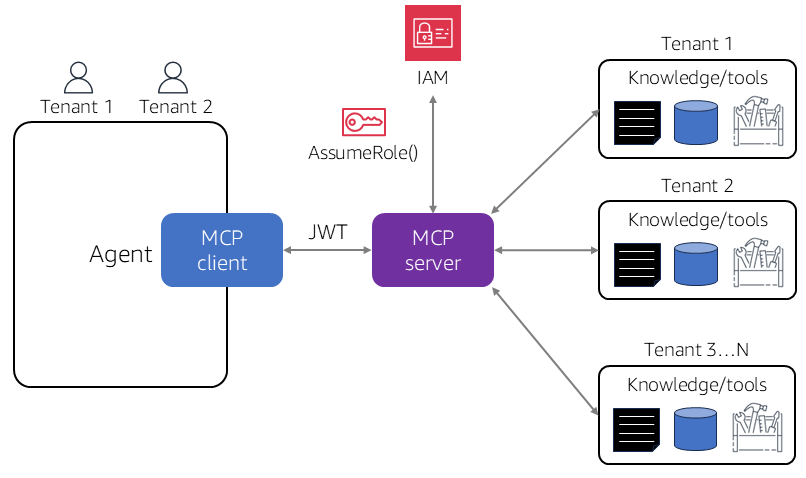
Because the design in Step 5 provisions guardrails per tier, not per tenant, onboarding a new customer never touches Bedrock at all: it only writes one row to the tenant-tier lookup table (tenant_id → tier), which the existing two guardrails already cover.
This is the real payoff of the per-tier design over a naive per-tenant-guardrail approach, which would require a Bedrock API call and a deployment for every new signup — a pattern that scales poorly the moment HelpFlow has more than a handful of enterprise customers, let alone thousands of self-serve Free-tier signups.
The second production hardening is CloudTrail-based alerting on cross-tenant access attempts. Every AccessDeniedException from Step 7 is also logged in CloudTrail, tagged with the session’s tenant_id. A CloudWatch metric filter on errorCode = "AccessDenied*" plus tenant_id distinguishes a legitimate bug from active probing — the latter deserves a page, the former a bug ticket.
Route both into an EventBridge rule so denial spikes surface within minutes, and keep a rolling baseline of the expected denial rate so a genuine spike stands out against normal noise.
Finally, weigh the cost of guardrail invocation at scale. Every screened call is billed per text unit on top of the model’s token cost — this matters more for a high-volume Free tier than a smaller Enterprise tier. Track guardrail cost per tier alongside token cost in your cost-attribution dashboard, using the same session tags visible in Cost and Usage Reports, so a tier’s guardrail bill never surprises you.
That same mechanism doubles as a usage-based billing input if HelpFlow ever passes Bedrock costs through to metered Enterprise customers — the tag that isolates a tenant’s data is, for free, also the tag that isolates their cost line.
Multi-Tenant Isolation: Frequently Asked Questions
These questions come up constantly when teams first design multi-tenant agent isolation for production.
Why use session tags instead of one IAM role per tenant?
One role per tenant works at small scale but becomes an operational burden past a few dozen tenants — every new signup needs a new role, new trust policy edits, and new deploys. A single multi-tenant role with session tags and tag-based conditions scales to any number of tenants without touching IAM after initial setup.
Can a tenant tamper with their own session tag to impersonate another tenant?
Not if the broker’s own trust policy conditions (Step 1) are correct: the broker can only stamp a tenant_id tag matching its own verified principal tag, which in turn was set from a signed identity claim, never from raw client input. The tenant never calls AssumeRole directly, and no code path in this design accepts a tenant-supplied tenant_id as authoritative.
What happens if the guardrail lookup table has no entry for a tenant’s tier?
In the reference implementation above, get_guardrail_for_tenant raises rather than falling back to no guardrail — a missing tier mapping should fail the request loudly, not silently skip content screening for that tenant’s turn.
Is ApplyGuardrail a replacement for passing guardrailConfig on InvokeModel/Converse?
No — they serve different points in the pipeline. Passing a guardrail identifier and version directly on a model invocation screens that specific call’s input and output together with the generation. ApplyGuardrail is a separate, model-independent API for screening arbitrary text — useful for checking a retrieved document or a raw user message before any model is invoked at all, and for third-party or self-hosted models that never touch Bedrock’s InvokeModel path.
Does adding a guardrail to every model call meaningfully slow down the agent?
It adds measurable latency — evaluation happens on both input and output — but for a support agent, correctness and safety outweigh a few hundred milliseconds. If latency becomes a real problem, trim guardrail scope before removing coverage altogether.
Multi-tenant isolation for an agentic SaaS product does not require a fleet of per-customer IAM roles — it requires one well-scoped session-tagged role, condition keys comparing the tag against the resource, and per-tier Bedrock Guardrails looked up dynamically rather than hardcoded.
This lab walked through designing the tenant_id session tag, scoping DynamoDB and S3 with tag-based conditions, provisioning per-tier guardrails, and — most importantly — proving the isolation holds with a negative-access test harness rather than trusting the policy on sight.