


A vector database stores embeddings and runs fast similarity searches that make Retrieval Augmented Generation work. Without one, a language model answers from stale training data alone. Pick the right store on AWS and your RAG pipeline returns grounded answers in milliseconds; pick wrong and you fight latency, cost, and relevance problems for the life of the product.

Vector Database: What You’ll Learn
A vector database holds the embeddings that let a language model retrieve exactly the right passages for any query. The choice of store shapes retrieval latency, cost at scale, and operational overhead — there is no single best option, only the best fit for your workload and stack. The AWS Prescriptive Guidance on choosing a vector database for RAG use cases is the source for the comparison framework below.
This tutorial walks through the full landscape of vector database options on AWS, the tradeoffs each engine makes, and a decision framework you can apply to your own workload before you write a line of infrastructure code. By the end you should be able to name the engine that fits a given retrieval workload and explain why, in one sentence, to a teammate who has never heard the phrase “approximate nearest neighbor.”
- What makes a store a vector database versus a database with a vector feature bolted on.
- How embeddings and ANN search combine to power retrieval in a RAG pipeline.
- The tradeoffs among OpenSearch, pgvector, MemoryDB, DocumentDB, Neptune Analytics, S3 Vectors, Bedrock Knowledge Bases, and Kendra.
- A worked migration from pgvector to OpenSearch Serverless, including the metrics that should trigger the move.
- The mistakes that quietly degrade retrieval quality, and the practices that keep a vector database healthy as it scales.
What Is a Vector Database?
A vector database finds items most similar to a query, where similarity is measured in high-dimensional space. Traditional databases match exact values — a keyword, an ID. A vector store matches meaning.
It holds embeddings — arrays of hundreds or thousands of floats capturing semantic content — and runs approximate nearest neighbor (ANN) algorithms to return the closest matches in milliseconds. Embeddings come from models like Amazon Titan, Cohere Embed, or OpenAI’s text-embedding models; similar content lands close together in vector space even with no shared words.
Three capabilities distinguish a production store: indexed search (HNSW or IVF algorithms scaling to billions of vectors), hybrid query (vector similarity combined with metadata filters or full-text ranking), and managed durability (replication, backups, scaling). The similarity function varies — cosine for text, dot-product for normalized embeddings, Euclidean for image and audio. HNSW is the default ANN algorithm on most AWS engines because it recall-optimizes at low latency.
Indexing algorithms trade recall for speed and memory. HNSW (Hierarchical Navigable Small World) builds a multi-layer graph where each vector links to its approximate neighbors; a search descends the layers, narrowing candidates until it reaches the ground floor.
Two parameters dominate HNSW’s behavior: m, the number of neighbor links per node (a higher value improves recall at the cost of memory and build time), and ef_construction, which controls how thoroughly the graph is built during indexing. A separate query-time parameter, ef_search, then trades recall against latency on every single query without requiring a rebuild — it is usually the first knob worth tuning once a vector database is in production.
IVF (Inverted File Index) instead partitions the vector space into clusters and searches only the clusters nearest the query — cheaper to build than HNSW, but it needs a training pass over representative data before ingestion begins, and it typically recalls slightly worse at the same latency budget. Both algorithms ship as configuration choices on OpenSearch and pgvector, so switching between them rarely means switching engines.
At large scale, raw float32 vectors become expensive to store and search. Quantization compresses each vector — scalar quantization rounds each dimension to a smaller numeric type, and product quantization splits a vector into subspaces and stores a compact code per subspace — trading a small amount of recall for a meaningful reduction in memory footprint.
Most managed AWS vector engines expose quantization as a configuration option rather than something you implement by hand, but understanding that it exists explains why two stores holding the same corpus, at the same vector count, can still differ in cost by several times. A team evaluating a vendor quote for a vector database should always ask which quantization setting produced the number.
How Vectors Power RAG Retrieval
In RAG, the vector store is the retrieval engine. The pipeline has two phases: ingestion builds the index, and runtime queries it.

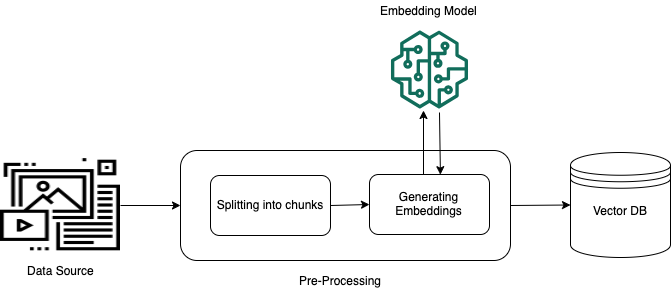
During ingestion, source documents are chunked, embedded, and indexed alongside their text and metadata. Chunking matters: semantic chunking respecting sentence boundaries yields vectors the store matches far more precisely than fixed-size chunks.

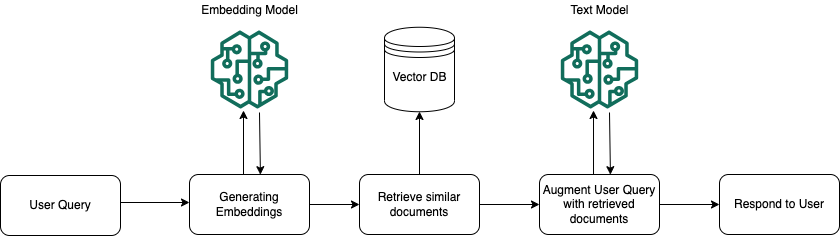
At runtime, the user’s question is embedded with the same model, the store runs a similarity search, and the closest passages are inserted into the prompt. A mature pipeline often adds reranking — the store returns top-50 candidates, a cross-encoder reranks them, and the best 5 reach the model.
The AWS Vector Database Landscape
AWS delivers vector capabilities across eight managed services in three tiers: purpose-built search (OpenSearch, Kendra), databases extended with vectors (RDS/pgvector, DocumentDB, MemoryDB, Neptune Analytics), and managed RAG and storage (Bedrock Knowledge Bases, S3 Vectors). Cost structures vary widely — S3 Vectors can cut storage costs by up to 90 percent versus specialized stores; the wrong tier can inflate a monthly bill tenfold.
Amazon OpenSearch Service for RAG
Amazon OpenSearch Service is the most widely deployed vector database for RAG on AWS. It supports both kNN vector search and BM25 full-text ranking in the same query — critical because pure semantic search sometimes misses exact terms (product codes, error strings, names).
It supports HNSW, IVF, and IVF-ADC and handles sharding, replication, and recovery automatically. OpenSearch Serverless removes instance management and is the default backing store when Bedrock Knowledge Bases quick-creates a vector index. Key tuning: ef_search (recall vs latency), ef_construction (build quality), shard count, and replicas.
RDS for PostgreSQL with pgvector
The pgvector extension turns Amazon RDS for PostgreSQL into a vector database with a single SQL command. For teams already running RDS, this is the simplest path: keep your database and add a vector column. Queries combine vector similarity with SQL filters, joins, and aggregations in one statement.
pgvector supports exact and approximate (HNSW, IVFFlat) search; for corpora up to a few million vectors it delivers millisecond retrieval, and it runs on Aurora PostgreSQL Serverless v2. At hundreds of millions of vectors, purpose-built engines like OpenSearch pull ahead.
MemoryDB, DocumentDB, Neptune Analytics, and S3 Vectors
Four more options, each tuned to a different extreme:
Amazon MemoryDB is a Redis-compatible, in-memory store delivering microsecond read latency — for real-time retrieval (conversational agents, recommendations, fraud detection). It is the most expensive option per gigabyte stored.
Amazon DocumentDB (MongoDB-compatible) added vector search for workloads where source data is naturally JSON — catalog items, content records, semi-structured logs. Store the document and embedding in the same record and query both together.
Amazon Neptune Analytics combines graph traversal with vector search for relationship-rich retrieval problems — it powers GraphRAG via Bedrock Knowledge Bases. Priced in Neptune Capacity Units (128-NCU minimum), it fits graph-heavy workloads, not simple text RAG.
Amazon S3 Vectors stores vector indexes directly in S3 with object-storage pricing plus per-request fees — up to 90 percent savings versus specialized stores with sub-second queries. Ideal for large cold corpora queried occasionally.
Amazon Bedrock Knowledge Bases: The Managed Path
Bedrock Knowledge Bases is the zero-infrastructure path: point it at an S3 data source, pick an embedding model, choose a vector store, and it handles chunking, embedding, indexing, syncing, and retrieval. It supports OpenSearch Serverless, Aurora PostgreSQL, Neptune Analytics, Pinecone, and S3 Vectors, and adds query rewriting, reranking, and session memory.
All engines integrate with KMS and IAM. Store an access-control list as metadata on every vector and filter at query time, so the engine never returns a passage the user is not entitled to see.
Amazon Kendra is a higher-level intelligent search service with ML-ranked results and native connectors (SharePoint, Confluence, Salesforce, web, databases). For enterprise knowledge where the corpus lives across many systems, Kendra handles ingestion and relevance without you building a vector database. Priced per query, it fits occasional internal search better than high-volume application retrieval.
How to Choose: A Decision Framework
Three questions drive the choice: What is your retrieval workload (latency, volume, corpus size)? What is your existing stack (PostgreSQL, OpenSearch, S3-heavy)? How much operational overhead can your team absorb?
| If your use case is… | Choose… | Why |
|---|---|---|
| Fully managed RAG, no ops | Bedrock Knowledge Bases | End-to-end pipeline, zero infra |
| Hybrid keyword + semantic search | OpenSearch Service | Supports both kNN and BM25 |
| Existing PostgreSQL workloads | RDS + pgvector | SQL interface, familiar ops |
| Sub-millisecond latency | MemoryDB | In-memory, microsecond reads |
| Relationship-rich knowledge graphs | Neptune Analytics | Graph traversal + vector search |
| Large cold corpora, cost-first | Amazon S3 Vectors | Object-storage pricing |
| Enterprise document search | Amazon Kendra | ML-ranked, connectors built-in |
Choices are not mutually exclusive — many production systems use Bedrock Knowledge Bases as orchestrator backed by OpenSearch Serverless. Cost should be modeled, not assumed: the Prescriptive Guidance cost comparison shows S3 Vectors can run a tenth the price of a managed cluster, while MemoryDB runs several times the price of OpenSearch. Model steady-state and peak separately.
A useful heuristic: let infrastructure make the first choice, then let growth force the next. Start on pgvector; add OpenSearch when scale demands it; lift ingestion into Bedrock when operations become a burden.
Vector Database in Practice: A Worked Example
Consider a legal-tech startup building RAG over 500,000 contracts. Requirements: sub-100-millisecond retrieval, exact clause citations, predictable cost. The team already uses PostgreSQL.
They start with pgvector on Aurora PostgreSQL Serverless v2. At 500,000 vectors, HNSW retrieval takes 15 ms, and SQL lets them join retrieved clauses against a permissions table. As query volume grows and hybrid search becomes the common shape, they migrate the retrieval layer to OpenSearch Serverless backed by Bedrock Knowledge Bases for ingestion, keeping Aurora for transactional data.
Setting up pgvector is one SQL command against an existing PostgreSQL database:
CREATE EXTENSION IF NOT EXISTS vector;

CREATE TABLE contract_chunks (
    id BIGSERIAL PRIMARY KEY,
    contract_id BIGINT NOT NULL,
    chunk_text TEXT NOT NULL,
    embedding VECTOR(1536),
    metadata JSONB
);

CREATE INDEX ON contract_chunks
    USING hnsw (embedding vector_cosine_ops)
    WITH (m = 16, ef_construction = 64);
The VECTOR(1536) column matches the output dimensionality of the embedding model in use; changing embedding models later means adding a new column and re-embedding, not just re-indexing. The vector_cosine_ops operator class tells the HNSW index which distance function to optimize for — cosine similarity is the right default for most text embeddings, since it compares direction and ignores magnitude.
import boto3, json

# Query the vector store via Bedrock Knowledge Bases
bedrock = boto3.client("bedrock-agent-runtime")

response = bedrock.retrieve(
    knowledgeBaseId="KB_ID",
    retrievalQuery={"text": "What is the termination clause for early exit?"},
    retrievalConfiguration={
        "vectorSearchConfiguration": {"numberOfResults": 5}
    },
)

# Each result carries the retrieved chunk, its source, and a score
for result in response["retrievalResults"]:
    snippet = result["content"]["text"]
    source = result.get("location", {}).get("s3Location", {}).get("uri")
    score = result.get("score", 0)
    print(f"[{score:.2f}] {source}\n{snippet[:200]}\n")
The example shows the key principle: start with the store that matches your current scale and skills, and migrate when measurements tell you to.
The migration itself does not happen overnight. A safe pattern is dual-write: new contracts are embedded and written to both pgvector and the new OpenSearch Serverless collection while the application keeps reading from pgvector.
Once the OpenSearch index has been backfilled from historical data and its recall on the evaluation set matches or beats pgvector’s, read traffic shifts over gradually — a small percentage first, then all of it — with the pgvector path kept warm as a rollback option for a few weeks. Only after that warm period ends does the team decommission the old index and reclaim the Aurora storage it used.
Access control stays close to the data throughout — row-level security in PostgreSQL, ACLs as metadata filters on OpenSearch queries.
Monitoring drives that evolution. Instrument four signals from day one: p95/p99 retrieval latency, recall against a labeled evaluation set, ingestion lag, and per-query cost from CloudWatch. The labeled set (a few hundred representative questions with their correct citations) is the real asset; re-run it after every chunking, embedding, or index change so regressions surface immediately.
Capacity planning follows the same measure-first discipline. At 500,000 vectors and 1536 dimensions, the raw embedding data is a few gigabytes — trivial for Aurora to hold alongside the transactional schema.
At tens of millions of vectors the calculus changes: the HNSW graph itself consumes memory proportional to m, and an under-provisioned instance starts swapping the index to disk, which turns millisecond retrieval into multi-second retrieval with no warning beyond a latency graph that quietly climbs.
Track index size alongside instance memory from the first day of production traffic, not after the first slow-query alert, since by then the fix requires an emergency resize instead of a planned one. Building that habit early is cheap; retrofitting it onto a vector database already serving production traffic means adding monitoring during an incident instead of before one.
Vector Database: Common Mistakes to Avoid
- Choosing the store before defining the workload — define latency, volume, and corpus size first; a million-vector corpus often runs fine on pgvector at a tenth the cost of OpenSearch. Teams that reach for OpenSearch by default because it is the “obvious” AWS vector database often discover the operational overhead outweighs the marginal recall gain.
- Ignoring chunking strategy — the store is only as good as the chunks it indexes. Tune chunk size before blaming the engine. An oversized chunk buries the relevant sentence in noise; an undersized chunk loses the surrounding context the model needs to answer correctly.
- Skipping hybrid search when exact terms matter — pure vector retrieval misses product codes, error strings, named entities. If your users search for SKUs, ticket numbers, or exact clause references, a keyword layer next to the vector database is not optional.
- Storing vectors with no metadata filtering — retrieving 500 passages and filtering in application code is slow and expensive. Push tenant IDs, dates, and access-control lists into the index itself so the engine narrows the search before it ranks results, not after.
- Forgetting to re-embed when you switch models — embeddings from different models are not comparable; switching requires re-indexing. A partially re-embedded index silently returns worse results because old and new vectors sit in the same space with no shared geometry.
- Over-provisioning a managed cluster — use serverless or auto-scaling; a store sized for peak that runs at 5 percent utilization most of the day is waste. Right-size against p95 traffic, not a worst-case guess.
- Measuring latency but not recall — a fast store missing 30 percent of relevant passages produces worse answers than a slower one. Recall is invisible in a latency dashboard; it only shows up when you run a labeled evaluation set.
- Treating the vector database as a black box — every engine exposes tuning knobs (
ef_search, shard count, replica count); leaving them at defaults for a workload far from the median case leaves latency and recall on the table. - Skipping a rollback plan during migration — moving from pgvector to OpenSearch, or between embedding models, without a dual-write or dual-read period turns a bad index into a production incident with no fast way back.
Vector Database: Best Practices
- Start with Bedrock Knowledge Bases if you have no dedicated platform engineer — it removes the chunking, embedding, and index-management burden entirely, at the cost of some tuning flexibility.
- Use the same embedding model for ingestion and queries — mixing models, even different versions of the same model family, silently breaks similarity comparisons.
- Build metadata into every vector — source URI, title, chunk offset, access-control list — so retrieval can filter and cite without a second round trip to another database.
- Measure recall alongside latency — a 2 ms store missing passages is worse than a 20 ms store that recalls everything; keep a labeled evaluation set and re-run it after every index change.
- Enable ANN indexes (HNSW) once the corpus exceeds 100,000 vectors — below that, exact search is often fast enough and simpler to reason about.
- Tag every resource — cost attribution is easy to lose inside a shared RDS or OpenSearch cluster serving multiple applications.
- Re-evaluate at each order-of-magnitude growth — the vector database that was right at 100,000 vectors is not automatically right at 10 million.
- Keep access control at the data layer — enforce ACLs as metadata filters on every query rather than filtering results after retrieval.
- Version your embedding pipeline — record which model, chunking strategy, and preprocessing steps produced each vector so a bad answer can be traced back to its source.
- Automate index rebuilds — a scheduled job that re-embeds and re-indexes on a fixed cadence catches drift from source-document edits that a purely event-driven pipeline can miss.
Observability deserves the same rigor teams apply to application logs. Export per-query latency percentiles, index size, and cache hit rate to CloudWatch, and alert on leading indicators — index size approaching instance memory, or p99 latency drifting upward — rather than waiting for user complaints. A dashboard that shows only average latency hides the tail where most retrieval failures live.
Security follows the same principle as everywhere else in the AWS RAG stack: authenticate at the API boundary, encrypt with KMS at rest and in transit, and never rely on the vector database as the sole enforcement point for who can see what. Treat the access-control metadata on each vector as a second, defense-in-depth layer behind the identity check that already happened before the query reached the retrieval service.
Vector Database: Frequently Asked Questions
Do I need a dedicated vector database for RAG?
Not always. If you run PostgreSQL, pgvector gives you a capable store without a new service. If you want zero ops, Bedrock Knowledge Bases manages one for you. A dedicated engine like OpenSearch becomes worthwhile at large scale or for hybrid search that pgvector cannot match.
What is the cheapest vector store on AWS?
Amazon S3 Vectors is the lowest-cost option for large corpora — up to 90 percent savings versus specialized stores. For smaller workloads, pgvector on an RDS instance you already run can be effectively free.
Which option has the lowest latency?
Amazon MemoryDB delivers microsecond read latency by keeping the entire index in memory. It is the fastest vector database on AWS, though also the most expensive per gigabyte stored.
Can I use OpenSearch for both search and vectors?
Yes. OpenSearch supports kNN vector search and BM25 full-text ranking in the same query, making it the leading store for hybrid retrieval — which is why it is the most common backing store for RAG on AWS.
How does Bedrock Knowledge Bases relate to a vector database?
Bedrock Knowledge Bases is a managed RAG orchestrator that uses a vector store internally. You choose the underlying engine — OpenSearch Serverless, Aurora PostgreSQL, Neptune Analytics, S3 Vectors — and Bedrock handles chunking, embedding, indexing, and retrieval. The store still exists; Bedrock just operates it for you.
Vector Database: Key Takeaways
- A vector database stores embeddings and runs similarity search, converting semantic meaning into ranked retrieval.
- There is no single best store on AWS — each of the eight options fits a different workload.
- Match the engine to your existing infrastructure — pgvector for PostgreSQL, OpenSearch for hybrid search, Bedrock for zero ops, S3 Vectors for cost-efficient scale.
- Hybrid search matters — vector similarity plus keyword ranking catches exact terms pure semantic retrieval misses.
- Start simple and re-evaluate at scale — measure latency and recall, migrate only when data justifies it.
- Cost can vary by an order of magnitude — model the numbers before committing.
A vector database turns a language model from a generic oracle into a grounded assistant. On AWS you choose among OpenSearch for hybrid search, pgvector for SQL workloads, MemoryDB for sub-millisecond retrieval, S3 Vectors for cost-efficient scale, and Bedrock Knowledge Bases for fully managed RAG. Define your workload first, match the engine to your stack, measure recall alongside latency, and revisit the decision as you grow.
Continue Learning
- Lab: Setting Up pgvector and OpenSearch
- AWS RAG Writing Best Practices — how to craft prompts and responses that get the most from retrieved context
- AWS Healthcare RAG Solutions — domain-specific vector database patterns for regulated workloads
- AWS Serverless Agentic AI — deploying RAG-backed agents on Lambda and Bedrock without servers