CLAUDE.md is the markdown file that gives Claude Code persistent project memory across every session. Each conversation starts with a fresh context window, but this file carries your build commands, coding standards, and architecture decisions forward. You write it once, commit it to version control, and your whole team gets shared context that loads automatically at launch. This guide covers the full file hierarchy, loading mechanics, import chains, path-scoped rules, and the broader .claude directory structure.
CLAUDE.md: What You’ll Learn
The official memory documentation and directory guide provide the complete specification. Understanding how configuration files cascade together prevents conflicts between user preferences, team conventions, and managed enterprise policies across your development workflow.
This guide covers the full CLAUDE.md system, from the five-level file hierarchy to loading mechanics, import chains, and path-scoped rules. You will learn how to structure CLAUDE.md files so Claude Code always has the right context, and how the broader .claude directory extends memory with settings, skills, commands, and agents. By the end, you will know exactly where each instruction file lives, when it loads, and how to keep your hierarchy clean.
The CLAUDE.md File Hierarchy Explained
Five levels of CLAUDE.md exist, each with a different scope. They range from organization-wide policies down to personal project notes. Claude Code loads them all, concatenates the content, and treats the combined text as persistent context for every session. Understanding this hierarchy is the foundation for organizing instructions so the right guidance reaches Claude at the right time.
The broadest level is the managed policy CLAUDE.md. IT or DevOps teams place this file at a system-wide path. On macOS it lives at /Library/Application Support/ClaudeCode/CLAUDE.md. On Linux and WSL it sits at /etc/claude-code/CLAUDE.md. Windows users find it at C:Program FilesClaudeCodeCLAUDE.md. This file applies to every user on the machine and cannot be excluded by individual settings.
The next level is your user CLAUDE.md at ~/.claude/CLAUDE.md. This holds personal preferences that apply across all your projects. Think response style preferences, commit message format, or general coding conventions. It loads in every session regardless of which repository you are working in. Keep it short since it enters context alongside every project’s own CLAUDE.md.
Project-level instructions come next. A project CLAUDE.md lives at either ./CLAUDE.md or ./.claude/CLAUDE.md in your repository root. This is the file teams share through version control. It contains build commands, test instructions, architecture decisions, and project-specific conventions that anyone working on the codebase needs to know. Both locations work identically, so pick whichever keeps your project root cleaner.
The most specific level is CLAUDE.local.md at your project root. This file holds personal preferences specific to one project, like sandbox URLs or preferred test data. You add it to .gitignore so it never gets committed. Within each directory level, CLAUDE.local.md loads after CLAUDE.md, so your personal notes are the last thing Claude reads at that level.
Here is a summary table of every CLAUDE.md location, ordered from broadest scope to most specific:
Scope             | Location                        | Shared With
------------------+---------------------------------+------------------
Managed policy    | /etc/claude-code/CLAUDE.md      | All users on machine
User instructions | ~/.claude/CLAUDE.md             | Just you (all projects)
Project           | ./CLAUDE.md                     | Team via version control
Project (alt)     | ./.claude/CLAUDE.md             | Team via version control
Local             | ./CLAUDE.local.md               | Just you (one project)
How CLAUDE.md Files Load at Session Start
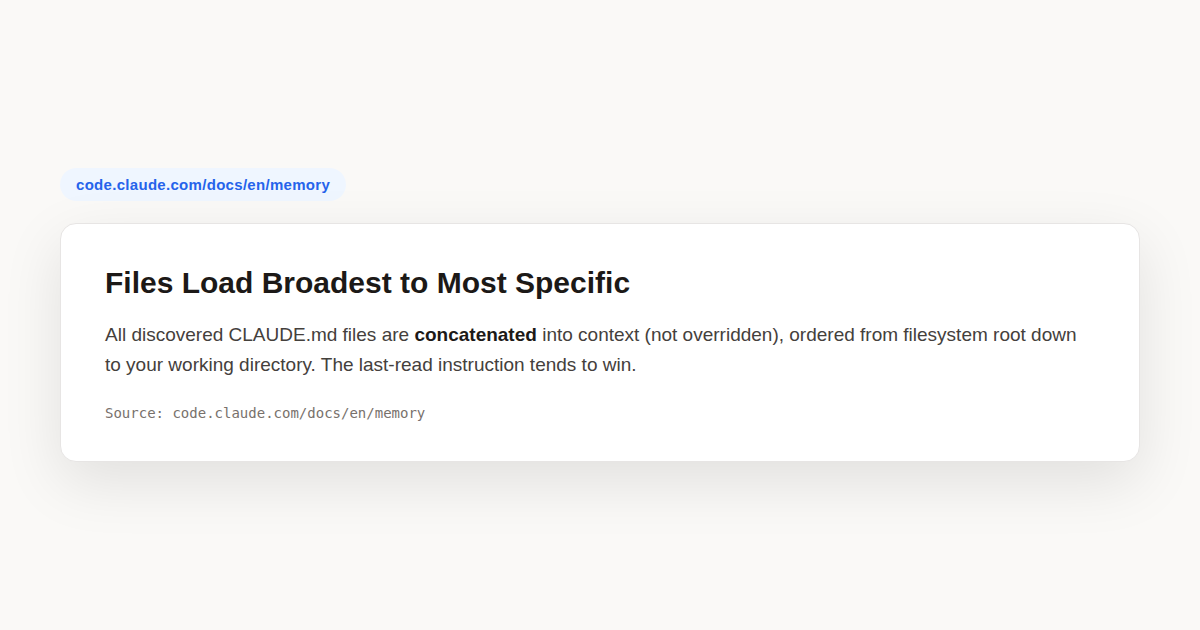
Claude Code walks up the directory tree from your current working directory, checking every directory along the way for CLAUDE.md and CLAUDE.local.md files. If you launch from foo/bar/, it loads foo/bar/CLAUDE.md, foo/CLAUDE.md, and any CLAUDE.local.md files alongside them. Every discovered file gets concatenated into context rather than overriding each other.
The order matters. Content loads from the filesystem root down to your working directory. For the foo/bar/ example, foo/CLAUDE.md appears in context before foo/bar/CLAUDE.md. Instructions closer to where you launched Claude are read last, giving them more prominence in the final context window. Within each directory, CLAUDE.local.md is appended after CLAUDE.md.
No file overrides another. Instead, all content is concatenated together. This means if a parent directory and a child directory both define a rule, Claude sees both instructions. When two CLAUDE.md files give conflicting guidance, Claude may pick one arbitrarily. Reviewing your hierarchy periodically and removing contradictions is one of the most effective ways to improve adherence.
Subdirectory files behave differently. CLAUDE.md files below your current working directory do not load at launch. They load on demand when Claude reads files in those subdirectories. This lazy loading keeps startup fast for large repositories with many nested instruction files scattered across team boundaries.
Block-level HTML comments in CLAUDE.md files get stripped before content reaches Claude’s context. Use <!-- maintainer notes --> to leave messages for human collaborators without spending tokens on them. Comments inside code blocks are preserved as-is. When you open a CLAUDE.md file directly with the Read tool, all comments remain visible to you and your team.
Writing Effective CLAUDE.md Instructions
CLAUDE.md files load into the context window at the start of every session, consuming tokens alongside your conversation. Because they are context rather than enforced configuration, how you write instructions directly affects how reliably Claude follows them. Specific, concise, well-structured instructions produce consistently better results than long, vague ones.
Target under 200 lines per CLAUDE.md file. Longer files still load in full, but they consume more context and reduce adherence. If your instructions are growing large, split them into path-scoped rules so content loads only when Claude works with matching files. You can also use imports for organization, though imported files still enter context at launch.
Structure matters. Use markdown headers and bullets to group related instructions. Claude scans structure the same way readers do. Organized sections with clear headings are easier to follow than dense paragraphs. A section titled “Build Commands” with a bullet list works better than burying the same information in a wall of text.
Write specific, verifiable instructions. The command “Use 2-space indentation” works better than “format code properly.” The instruction “Run npm test before committing” beats “test your changes.” A concrete rule like “API handlers live in src/api/handlers/” helps Claude navigate your codebase, while “keep files organized” leaves too much room for interpretation.
Consistency is critical. If two rules contradict each other, Claude may pick one arbitrarily. Review your CLAUDE.md files, nested CLAUDE.md files in subdirectories, and .claude/rules/ periodically to remove outdated or conflicting instructions. In monorepos, use claudeMdExcludes to skip CLAUDE.md files from other teams that are not relevant to your work.
Importing Files with @ Syntax
The @import system lets one CLAUDE.md pull in additional files. Write @path/to/file anywhere in your CLAUDE.md and Claude Code expands that reference at launch, loading the imported file’s content into context alongside the parent file. This is handy for pulling in READMEs, package manifests, or workflow docs.
Both relative and absolute paths work. Relative paths resolve from the file containing the import, not from your working directory. This means a CLAUDE.md at foo/CLAUDE.md that imports @docs/rules.md will look for foo/docs/rules.md, not a docs/ folder at your project root. Keep this resolution rule in mind when structuring imports.
Imports can chain recursively. A file you import can itself import other files, creating a tree of dependencies. The system caps this recursion at four hops to prevent infinite loops. This limit is deep enough for most organizational patterns while keeping load times predictable and the dependency graph traceable.
Import parsing skips markdown code spans and fenced code blocks. If you want to mention a path without importing it, wrap it in backticks. Writing `@README` keeps the text literal, while @README outside backticks triggers the actual import. This distinction lets you document import behavior in your CLAUDE.md without accidentally pulling files in.
A typical pattern is referencing the README for project overview and package.json for available npm scripts. Claude always knows the right commands without you re-explaining them each session:
See @README for project overview and @package.json
for available npm commands for this project.

# Additional Instructions
- git workflow @docs/git-instructions.md
For per-project personal preferences that should not be checked into version control, create a CLAUDE.local.md at the project root. It loads alongside CLAUDE.md and gets treated the same way. The first time Claude encounters external imports in a project, it shows an approval dialog listing the files. Decline and the imports stay disabled without the dialog reappearing.
If you work across multiple git worktrees of the same repository, a gitignored CLAUDE.local.md only exists in the worktree where you created it. To share personal instructions across worktrees, import a file from your home directory instead:
# Individual Preferences
- @~/.claude/my-project-instructions.md
AGENTS.md Compatibility
Claude Code reads CLAUDE.md, not AGENTS.md. If your repository already uses AGENTS.md for other coding agents, create a CLAUDE.md that imports it so both tools read the same instructions without duplicating content. You can also add Claude-specific instructions below the import:
@AGENTS.md

## Claude Code

Use plan mode for changes under `src/billing/`.
A symlink also works if you do not need to add Claude-specific content. Running ln -s AGENTS.md CLAUDE.md creates a direct alias. On Windows, creating a symlink requires Administrator privileges or Developer Mode, so use the @AGENTS.md import approach instead.
Running /init in a repo that already has an AGENTS.md reads it and incorporates the relevant parts into the generated CLAUDE.md. The init command also reads other tool configs like .cursorrules, .devin/rules/, and .windsurfrules. This means migrating from another AI coding tool to Claude Code preserves your existing instruction base.
Path-Scoped Rules in .claude/rules/
When a single CLAUDE.md grows past 200 lines, adherence drops and context bloats. The .claude/rules/ directory solves this by letting you split instructions into topic files. Each markdown file covers one subject with a descriptive filename like testing.md or api-design.md. All .md files are discovered recursively, so subdirectories work too.
Rules without path frontmatter load at session start with the same priority as .claude/CLAUDE.md. Rules with a paths field in their YAML frontmatter load conditionally. They only enter context when Claude reads a file matching the specified glob patterns. This means your API design rules do not clutter context when you are working on CSS files.
The frontmatter uses a paths key with a list of glob patterns. Here is a rule scoped to TypeScript API files:
---
paths:
  - "src/api/**/*.ts"
---

# API Development Rules

- All API endpoints must include input validation
- Use the standard error response format
- Include OpenAPI documentation comments
Glob patterns follow standard syntax. A pattern like **/*.ts matches every TypeScript file in any directory. The pattern src/**/* matches all files under the src/ directory. Brace expansion lets you target multiple extensions in one pattern. You can list multiple patterns and the rule triggers if any of them match.
---
paths:
  - "src/**/*.{ts,tsx}"
  - "lib/**/*.ts"
  - "tests/**/*.test.ts"
---
The .claude/rules/ directory supports symlinks. You can maintain a shared set of rules and link them into multiple projects. This is useful for organizations with consistent coding standards across repositories. Symlinks are resolved and loaded normally, and circular symlinks are detected and handled gracefully without crashing the session.
User-level rules in ~/.claude/rules/ apply to every project on your machine. They load before project rules, giving project rules higher priority when both exist. Use user-level rules for preferences that are not tied to a specific codebase, like your personal commit message format or general code style preferences that follow you everywhere.
Rules load into context every session or when matching files are opened. For task-specific instructions that do not need to be in context all the time, use skills instead. Skills only load when you invoke them or when Claude determines they are relevant to your prompt, which keeps the base context lean.
Auto Memory and MEMORY.md
Auto memory is the second half of Claude Code’s memory system. While CLAUDE.md files contain instructions you write, auto memory contains notes Claude writes itself. As you work, Claude saves build commands, debugging insights, architecture notes, and workflow patterns it discovers. You do not write these files manually.
Auto memory requires Claude Code v2.1.59 or later. It is on by default. You can toggle it through the /memory command or by setting autoMemoryEnabled in your project settings. To disable it via environment variable, set CLAUDE_CODE_DISABLE_AUTO_MEMORY to 1 before launching your session.
Each project gets its own memory directory at ~/.claude/projects/<project>/memory/. The project path is derived from the git repository, so all worktrees and subdirectories within the same repo share one auto memory directory. Outside a git repo, the project root is used instead. You can override the location with the autoMemoryDirectory setting.
The directory contains a MEMORY.md entrypoint and optional topic files:
~/.claude/projects/<project>/memory/
├── MEMORY.md          # Concise index, loaded into every session
├── debugging.md       # Detailed notes on debugging patterns
├── api-conventions.md # API design decisions
└── ...                # Any other topic files Claude creates
MEMORY.md acts as an index of the memory directory. The first 200 lines, or the first 25KB, whichever comes first, are loaded at the start of every conversation. Content beyond that threshold is not loaded at session start. Claude keeps MEMORY.md concise by moving detailed notes into separate topic files.
This limit applies only to MEMORY.md. CLAUDE.md files are loaded in full regardless of length, though shorter files produce better adherence. Topic files like debugging.md or patterns.md are not loaded at startup. Claude reads them on demand using its standard file tools when the information becomes relevant to the current task.
This two-tier system keeps context lean. MEMORY.md serves as a table of contents that is always present. Topic files hold the detail and load only when needed. Auto memory is machine-local. All files are plain markdown you can read, edit, or delete at any time through the /memory command.
Subagents can also maintain their own auto memory. A subagent with the memory: project frontmatter gets a dedicated memory directory at .claude/agent-memory/. This is distinct from your main session auto memory. Each subagent reads and writes its own MEMORY.md, keeping its learned patterns separate from your main context.
The .claude Directory Structure
The .claude/ directory is the central hub for project configuration. It sits at your project root and holds everything Claude Code reads that is specific to your repository. Most files here should be committed to version control so your team shares them. A few, like settings.local.json, are automatically gitignored.
The settings.json file holds permissions, hooks, and configuration. Unlike CLAUDE.md, which Claude reads as guidance, settings are enforced regardless of what Claude decides. You can allow specific bash commands without prompting, deny dangerous operations, or run scripts at lifecycle events through hooks. This is your hard enforcement layer.
{
  "permissions": {
    "allow": [
      "Bash(npm test *)",
      "Bash(npm run *)"
    ],
    "deny": [
      "Bash(rm -rf *)"
    ]
  },
  "hooks": {
    "PostToolUse": [{
      "matcher": "Edit|Write",
      "hooks": [{
        "type": "command",
        "command": "jq -r '.tool_input.file_path' | xargs npx prettier --write"
      }]
    }]
  }
}
The settings.local.json file holds personal overrides. Same schema as settings.json, but not committed. Array settings like permissions.allow combine across scopes, while scalar settings like model use the most specific value. Claude Code adds this file to your git ignore configuration automatically the first time it writes one.
The rules/ directory holds topic-scoped instruction files, covered in the previous section. The skills/ directory holds reusable prompts invoked by name. Each skill is a folder with a SKILL.md file plus supporting files. Skills can bundle reference docs, templates, or scripts alongside the prompt definition.
The commands/ directory holds single-file prompts. A file at commands/deploy.md creates a /deploy command. Skills and commands are now the same mechanism. For new workflows, use skills instead since they support bundled files and richer configuration through frontmatter fields.
The agents/ directory defines subagents. Each markdown file creates a subagent with its own system prompt, tool access, and optionally its own model. Subagents run in a fresh context window, keeping the main conversation clean. You can restrict tool access per agent with the tools: frontmatter field for safety.
---
name: code-reviewer
description: Reviews code for correctness, security, and maintainability
tools: Read, Grep, Glob
---

You are a senior code reviewer. Review for:

1. Correctness: logic errors, edge cases, null handling
2. Security: injection, auth bypass, data exposure
3. Maintainability: naming, complexity, duplication

Every finding must include a concrete fix.
The output-styles/ directory holds custom system prompt sections. Each markdown file defines a style that adjusts how Claude works. You can create teaching modes, review modes, or adapt Claude Code for uses beyond coding. Changes take effect on the next session since the system prompt is fixed at startup for caching.
The workflows/ directory holds dynamic workflow scripts. Each JavaScript file is a workflow that the runtime executes to spawn and coordinate many subagents. Workflows are written by Claude and saved here from the /workflows command rather than authored from scratch. A project workflow takes precedence over a personal one with the same name.
Key Commands for Managing CLAUDE.md
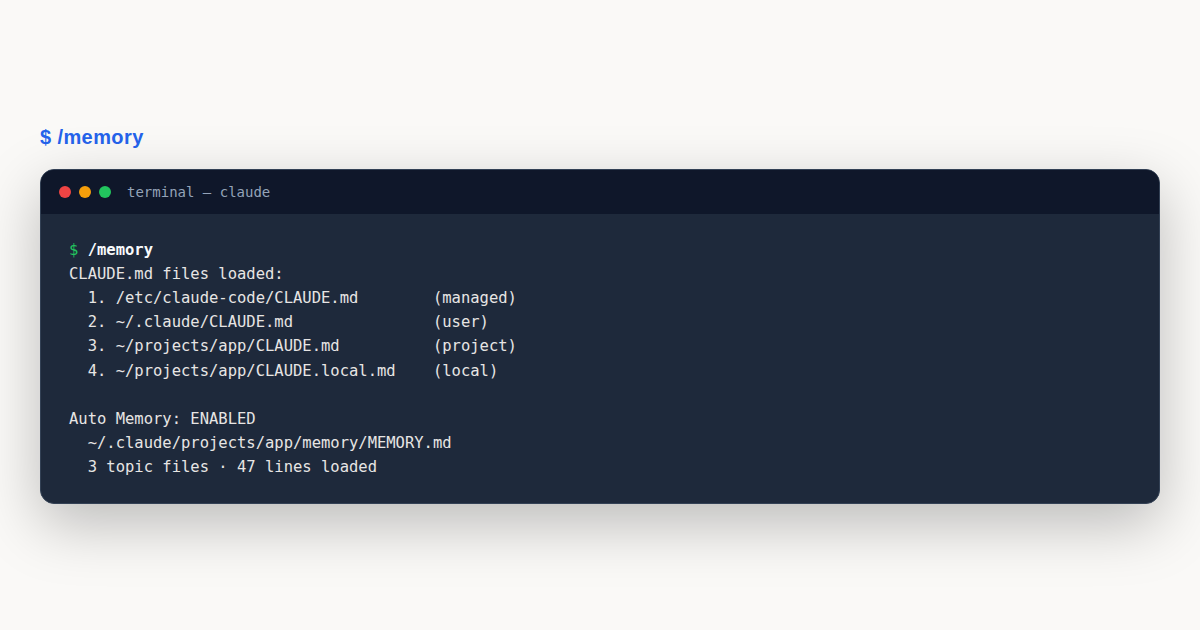
The /memory command is your primary window into the memory system. It lists all CLAUDE.md, CLAUDE.local.md, and rules files loaded in your current session. It lets you toggle auto memory on or off, and provides a link to open the auto memory folder. Select any file to open it in your editor for quick edits or review.
When you ask Claude to remember something, like “always use pnpm, not npm,” it saves to auto memory. To add instructions to CLAUDE.md instead, ask Claude directly, like “add this to CLAUDE.md,” or edit the file yourself via /memory. The distinction matters: auto memory is Claude’s notebook of learnings, while CLAUDE.md is your instruction set that shapes behavior.
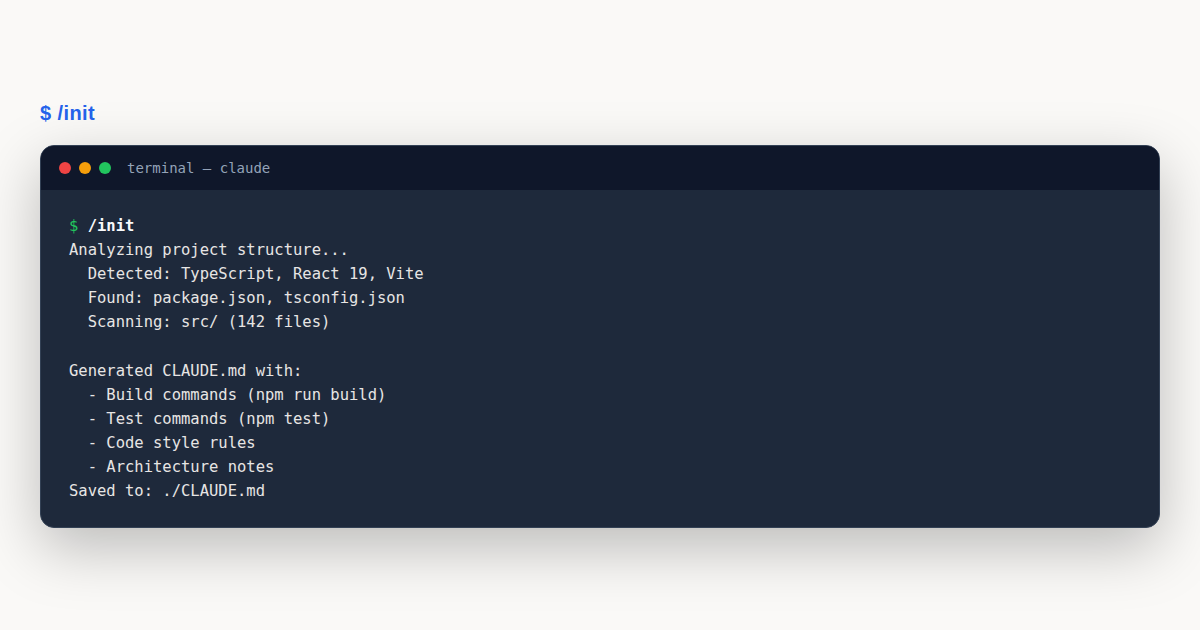
The /init command generates a starting CLAUDE.md automatically. Claude analyzes your codebase and creates a file with build commands, test instructions, and project conventions it discovers. If a CLAUDE.md already exists, /init suggests improvements rather than overwriting it. You refine from there with instructions Claude would not discover on its own.
Set the CLAUDE_CODE_NEW_INIT environment variable to 1 to enable an interactive multi-phase flow. The enhanced /init asks which artifacts to set up: CLAUDE.md files, skills, and hooks. It explores your codebase with a subagent, fills gaps through follow-up questions, and presents a reviewable proposal before writing any files to disk.
The --add-dir flag gives Claude access to additional directories outside your main working directory. By default, CLAUDE.md files from these directories are not loaded. To load them, set the CLAUDE_CODE_ADDITIONAL_DIRECTORIES_CLAUDE_MD environment variable:
CLAUDE_CODE_ADDITIONAL_DIRECTORIES_CLAUDE_MD=1 claude --add-dir ../shared-configThis loads CLAUDE.md, .claude/CLAUDE.md, .claude/rules/*.md, and CLAUDE.local.md from the additional directory. CLAUDE.local.md is skipped if you exclude local from your setting sources. This is useful when your project depends on a shared configuration repository with its own instruction set.
Managing CLAUDE.md in Monorepos
Large monorepos often contain CLAUDE.md files from multiple teams. When you launch Claude from deep within a monorepo, the directory walk picks up ancestor files that may not be relevant to your work. The claudeMdExcludes setting solves this by letting you skip specific files by path or glob pattern.
The setting accepts an array of glob patterns matched against absolute file paths. You can exclude a top-level CLAUDE.md from a different team, or skip an entire rules directory from a parent folder. Add the setting to .claude/settings.local.json so the exclusion stays local to your machine:
{
  "claudeMdExcludes": [
    "**/monorepo/CLAUDE.md",
    "/home/user/monorepo/other-team/.claude/rules/**"
  ]
}
Patterns merge across all settings layers: user, project, local, and managed policy. This means your team can commit shared exclusions to settings.json while individuals add personal ones to settings.local.json. Arrays combine, so every layer’s exclusions stack together.
Managed policy CLAUDE.md files cannot be excluded. This ensures organization-wide instructions always apply regardless of individual settings. If IT deploys a security or compliance policy at the managed level, no developer can opt out through configuration. This is the one level where exclusion is intentionally blocked.
Managed Settings and the claudeMd Key
Organizations can deploy a centrally managed CLAUDE.md that applies to all users on a machine. This file is distributed through MDM, Group Policy, Ansible, or similar configuration management tools. It loads before user and project CLAUDE.md files, giving it foundational priority in the context window.
The claudeMd key in managed settings lets you put CLAUDE.md content directly inside managed-settings.json instead of deploying a separate file. This is useful when your configuration management system prefers a single JSON payload over distributing markdown files. The scope is every session on the machine, in every repository.
{
  "claudeMd": "Always run `make lint` before committing.nNever push directly to main."
}
A managed CLAUDE.md and managed settings serve different purposes. Use settings for technical enforcement like blocking tools or enforcing sandbox isolation. Use a managed CLAUDE.md for behavioral guidance like code style standards and data handling reminders. Settings rules are enforced by the client. CLAUDE.md instructions shape behavior but are not a hard enforcement layer.
A Worked Example: Setting Up CLAUDE.md for a Real Project
Imagine you are setting up Claude Code for a TypeScript and React project. You start by running /init at your project root. Claude analyzes the codebase, finds your package.json, and generates a CLAUDE.md with the build command, test command, and the fact that you use React functional components exclusively.
The generated file is a solid starting point, but it needs refinement. You open it through /memory and add specifics Claude could not discover on its own. Your team uses named exports, never default exports. Tests live next to source files, following a foo.ts to foo.test.ts pattern. All API routes return a consistent shape with data and error fields. You keep the file under 200 lines.
Some instructions are too detailed for the main CLAUDE.md. You move API conventions into a path-scoped rule at .claude/rules/api-design.md with frontmatter scoping it to src/api/**/*.ts. Now those rules only load when Claude opens an API file. You create another rule, .claude/rules/testing.md, scoped to test files. Your main CLAUDE.md stays lean and focused on project-wide conventions.
For personal preferences, you add CLAUDE.local.md with your sandbox URL and preferred test database name. You add it to .gitignore so it never reaches the shared repository. When your teammate clones the repo, they get the shared CLAUDE.md and rules through version control, then create their own CLAUDE.local.md with their own sandbox configuration.
You also set up an import chain. Your CLAUDE.md references @README for the project overview and @package.json for the full list of npm scripts. This way, when new scripts get added to package.json, Claude always sees them without you needing to update CLAUDE.md manually. The import stays in sync with the source of truth.
As you work over several sessions, Claude writes auto memory. After you explain the build command twice, Claude saves it to MEMORY.md. After debugging an auth token rotation issue, Claude saves the pattern to a topic file called debugging.md. Next session, this context loads automatically. You verify everything is loaded correctly by running /memory and reviewing the file list.
Your teammate in a different part of the monorepo has a different setup. They use claudeMdExcludes in their settings.local.json to skip your team’s CLAUDE.md since it is not relevant to their work. Both of you get the managed policy CLAUDE.md from IT, since that cannot be excluded. The system scales from individual preferences up to organization-wide compliance without conflict.
CLAUDE.md: Common Mistakes to Avoid
Even experienced developers trip over the same issues with CLAUDE.md files. The flexibility of the hierarchy means there are many ways to get it wrong, from bloated files to conflicting instructions. Here are the most frequent mistakes and how to fix them.
- Writing a novel instead of instructions. CLAUDE.md is not documentation. It is a concise instruction set. If your file passes 200 lines, adherence drops. Move detailed procedures to skills or path-scoped rules. Keep CLAUDE.md to facts Claude needs in every single session.
- Conflicting instructions across files. If your user CLAUDE.md says one thing and your project CLAUDE.md says another, Claude picks arbitrarily. Audit your hierarchy through
/memory. Remove outdated instructions and keep guidance consistent across all levels of the tree. - Forgetting to gitignore CLAUDE.local.md. Personal preferences belong in CLAUDE.local.md, not in the committed CLAUDE.md. Forgetting to gitignore it means your sandbox URLs and personal shortcuts get pushed to the shared repository for the whole team to see.
- Expecting strict enforcement. CLAUDE.md is guidance, not a hard enforcement layer. Claude reads it and tries to follow it, but there is no guarantee of compliance. For behavior that must run at a specific point, write a hook. Hooks execute as shell commands at fixed lifecycle events regardless of Claude’s decisions.
CLAUDE.md: Best Practices
- Target under 200 lines per CLAUDE.md file. Longer files consume more context tokens and reduce how reliably Claude follows instructions. Split large files into path-scoped rules in
.claude/rules/so content loads only when Claude works with matching files. - Write specific, verifiable instructions. “Use 2-space indentation” beats “format code properly.” Concrete rules are easier for Claude to follow consistently and for you to audit during code review when something goes wrong.
- Use markdown structure with headers and bullets. Claude scans organized sections the same way human readers do. Group related instructions under clear headings so Claude can find and apply them without scanning through dense paragraphs of text.
- Run
/memoryregularly to verify which files are loaded. If a CLAUDE.md is not listed, Claude cannot see it. This command is your primary debugging tool when instructions are not being followed as expected during a session. - Review your hierarchy periodically for conflicts. Check managed, user, project, and local CLAUDE.md files for contradictory instructions. Remove anything outdated. In monorepos, use
claudeMdExcludesto filter out irrelevant files from other teams. - Use imports to keep content in sync. Reference
@package.jsonor@READMEso Claude always sees current scripts and documentation without you manually copying content into CLAUDE.md every time something changes in the project.
CLAUDE.md: Frequently Asked Questions
What is CLAUDE.md used for?
CLAUDE.md gives Claude Code persistent instructions for a project. You write build commands, coding standards, and architecture notes that load at the start of every session automatically.
Where should I put my CLAUDE.md file?
Put project instructions at ./CLAUDE.md or ./.claude/CLAUDE.md. Personal preferences go in ~/.claude/CLAUDE.md. Personal project notes go in CLAUDE.local.md, gitignored.
How does CLAUDE.md differ from auto memory?
You write CLAUDE.md files with explicit instructions. Claude writes auto memory files with learnings it discovers. Both load at session start, but MEMORY.md is capped at 200 lines or 25KB.
Can I import other files into CLAUDE.md?
Yes. Use @path/to/file syntax. Imports chain up to four hops deep. Code blocks are skipped during parsing, so wrap paths in backticks to keep them as literal text.
How do I exclude CLAUDE.md files in a monorepo?
Use the claudeMdExcludes setting with glob patterns matched against absolute paths. Add it to settings.local.json for personal exclusions. Managed policy files cannot be excluded.
CLAUDE.md is the backbone of Claude Code’s persistent memory system. Write concise instructions under 200 lines, organize detailed rules in .claude/rules/ with path scoping, and use /memory to verify what loads. The file hierarchy from managed policy down to CLAUDE.local.md gives every team and individual the right level of control, while auto memory and the .claude directory extend the system with learned patterns, enforced settings, and reusable skills.