30 sec5 min coredeep dive optional
AX is Google’s open-source orchestrator that runs agentic workloads the way Kubernetes runs containers: declare a Task in YAML, and the cluster sandboxes it, pre-wires its workspace, and lets you watch, shell into, suspend, and resume it at fleet scale.
- 13,230 stars and 667 forks since the repo went public in late March 2026, written in Go under Apache-2.0.
- Three YAML primitives: Task for isolated execution, Workspace for warm starts (repos, MCP servers, skills), Model for provider config with credentials from a Kubernetes secret.
- The CLI borrows kubectl’s grammar: apply, watch, ssh into the sandbox, suspend and resume with checkpointed state.
- Still v1alpha1: the README warns of major breaking changes, and it needs a Kubernetes cluster already running Agent Substrate.
AX is Google’s answer to a question most agent teams hit eventually: who runs the agents? It is an open-source declarative orchestration runtime where you describe agent workloads as YAML, and the cluster sandboxes them, wires up their workspaces, and gives you a brake pedal for the ones that start burning budget unsupervised. The repo went public in late March 2026 and sits at 13,230 stars today. If you already operate Kubernetes, the mental model transfers in about five minutes.
- 13,230 stars
- 667 forks
- Go
- Apache-2.0
Agents are a workload, not an app
The concepts guide opens with a line worth stealing: “An agent is not one process that runs to completion.” Give one a long enough lifetime and it will plan, hand work to others, retry what failed, and branch into parallel subproblems. No standard workload category fits that behavior. It is not a fire-and-forget service, and it is not a batch job either: it builds up state, demands hard isolation, talks to paid APIs, and will happily spend your money overnight with no supervisor in sight.
AX declines to model agency itself. Its one scheduling unit is designed to be spun up, fenced off, frozen, and discarded without ceremony, and nothing stops an agent from asking for a dozen more mid-problem. A task might carry the whole job on its own, or sit at the root of a tree the agent grows as it decomposes the work. Whatever shape that tree takes, each node is sandboxed, lifecycle-managed, and inspectable through the same commands, and that uniformity is exactly what you want once your agent count has a comma in it.
It is the same bet Kubernetes made on containers: the platform stays opinionated about scheduling, isolation, and lifecycle, and stays out of what actually runs inside the box. The difference is that the thing inside the box here can spend money, so the lifecycle verbs have to include a pause button.
What does the task lifecycle look like?
status.phase boils a task down to one word, something like Running, Suspended, or Failed, and the finer grain lives in conditions. Two of them do the real work: WorkspaceReady goes true once every workspace has finished provisioning and then stays true, and Ready combines that with the task actually executing, which makes it the signal to wait for. A suspend flips it to false and stamps the reason TaskSuspended; a resume flips it back. Deletion is synchronous where it counts: the sandbox goes away on Agent Substrate, the record is removed, and ax delete does not return until both are done. ax watch streams each of these transitions as it happens; ax describe is the pollable equivalent.
Three manifests: Task, Workspace, Model
Everything is a YAML resource under ax.io/v1alpha1. A Task is the atom: the image to run, the command to invoke, how much CPU and memory it may claim, any environment variables it needs, and pointers to the workspaces it wants mounted. A Model declares which provider the platform itself calls, with generation parameters and credentials read from a Kubernetes secret. Rotate a leaked key, pin a newer model, or retune the parameters and every task picks up the change from one place; AX itself is a consumer here too, reading Model resources when it provisions workspaces from goals. The README’s example model list shows a default pinned to Google’s gemini-3.8-flash, and nothing stops you declaring a fleet of providers side by side.
Workspace is the primitive that sells the repo. Getting an agent to a useful starting point means its data in place, the tools it may call, and its skills on disk, and left to themselves most teams rebuild that bootstrap for every agent. A Workspace declares the setup once; at task start the runner unpacks it into the sandbox so every agent begins warm. A binding can carry a goal, a plain-language instruction executed at first boot, such as ensuring the Go toolchain is built from source. Apply a manifest and the state reads back like any cluster object:
ax get tasks
# NAME      ATESPACE   PHASE     ACTOR     WORKER-IP    AGE
# task123   default    Running   task123   10.20.3.67   1m
What does a Workspace actually set up?
A workspace fills two surfaces: the filesystem and the tool shelf. On the filesystem side go Git checkouts, each in its own subdirectory under the workspace root, pinned to whatever revision you declared. On the tool side, MCP servers and registries get registered where the agent can reach them, and skill packs land at a path you specify instead of through some per-agent install ritual. Bind more than one workspace and each mounts separately, with the first acting as the working directory for the command. The goal field is the clever part: at first boot, a setup agent reads it and completes the environment, whether that means installing a toolchain or pulling dependencies, before the real command runs on a prepared stage.
The ops story: watch, ssh, suspend
The verbs are the ones your fingers already know from kubectl: ax apply, ax get, ax describe, ax watch, ax delete, plus a handful of agent-specific additions. Watch is the workhorse, streaming phase and condition transitions as they happen so automation can gate on Ready instead of scraping logs. Asking for a single task by name, ax get task task123, prints its full spec next to its live status as YAML, exactly the shape a CI script wants; ax describe covers the human-readable version. Under the hood the binary speaks gRPC to the control plane and tracks whichever Kubernetes context is active, so one install serves staging and prod.
Two verbs matter day to day. ax ssh drops you into the running sandbox to see what the agent is actually doing, provided the task sets debug: true; you get an interactive shell or a one-off command like ax ssh task123 -- python3 main.py. ax suspend checkpoints actor state and pauses the task; ax resume picks up exactly where it left off, working files included. For agents that idle between bursts, that is the difference between a paused workload and one quietly burning a budget at 2 a.m.
How does ax reach your cluster?
It follows whatever Kubernetes context is active, the convention kubectx made familiar, and when you hop between clusters it quietly stands up a tunnel to whichever control plane it needs, remembering them under ~/.ax/tunnels. Prefer not to switch contexts? --context=dev-cluster aims a single command elsewhere. Of the global flags, the ones worth memorizing: -a or --atespace scopes a command to an atespace, AX’s answer to a namespace, default unless told otherwise; -n or --namespace names where AX itself lives, ax-system normally; and --server overrides discovery with an explicit address, or reads one from $AX_SERVER.
Before you apply it
AX is early. The README warns of “major breaking changes prior to a stable release”, and the manifest API is still v1alpha1. It also assumes a Kubernetes cluster already running Agent Substrate, the sandbox layer it schedules tasks onto, plus its own Redis for the control plane. The published roadmap tracks four fronts, specification work, the actor architecture, environments for agents, and governance, so the direction is legible even while the surface churns. This is platform engineering, not an npm install.
The positioning matters more than the version number. AX does not compete with the SDKs that build an agent’s brain; it is the fleet layer underneath them, and Google is the first large vendor betting that agent infrastructure ends up looking like Kubernetes. If you run agent workloads on a cluster you control, follow this repo now, because the design vocabulary it is standardizing, warm workspaces, suspendable tasks, models as secrets, will show up everywhere. If you ship a single agent inside one app, check back at the first stable tag.
What does deploying the control plane involve?
You need a cluster that already runs Agent Substrate, plus Go, kubectl, the ko builder, and a registry the cluster can pull images from. Substrate installs into the ate-system namespace and serves its Control API on api.ate-system.svc.cluster.local:443; AX is hardwired to look there, so confirm it first with kubectl get svc api -n ate-system. From there, make deploy AX_IMAGE_REPO=<your-registry> brings up Redis, builds and pushes the control plane images with ko, and parks everything in ax-system. The bundled demo.sh plays the whole story: it submits a custom workspace, holds until it is ready, fires a few commands through ax ssh, and freezes the task with suspend.
Try it
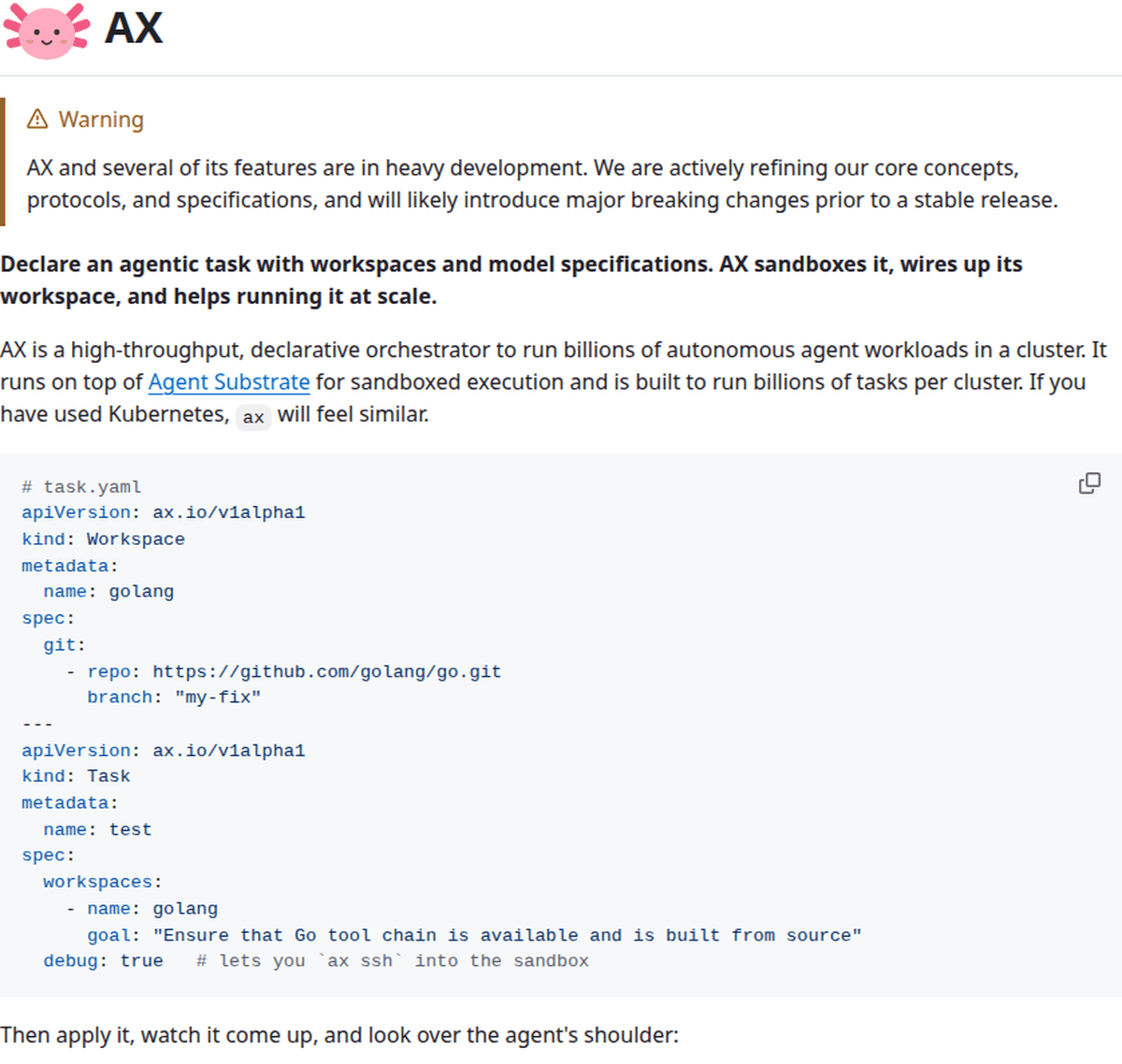
With Agent Substrate running, the CLI installs in one line; the binary lands in the Go bin directory, so put that on your PATH. From there the fastest tour is the repo’s examples/task.yaml, one file holding three documents: a debug-enabled Task, a Workspace that clones chalk from GitHub alongside MCP registries and a Node skills pack, and a Model pinning gemini-3.8-flash with its key in a Kubernetes secret. The README’s front-page snippet, the one in the screenshot above, shows the same shape with a Go toolchain goal instead. The companion site replays the flow end to end as an interactive terminal demo at agentexecutor.io:
go install github.com/google/ax/cmd/ax@latest
ax apply -f examples/task.yaml
ax watch task task123
The interesting bet in AX is not Google writing another agent framework; it is Google treating agent operations as a cluster-scheduling problem with a Kubernetes-shaped answer. The cut of the primitives feels right: warm workspaces, throwaway isolated tasks, suspendable state. The API will break before it stabilizes, so star the repo, read the concepts guide, and point production at it only after the first stable release.