30 sec6 min coredeep dive optional
Computer-use tools now cover five practical control surfaces for an agent: a $7 hardware rig, a classifier loop at $0.0002 a step, disposable VM desktops, open weights trained for screens, and terminal control with no screen at all.
- A $7 ESP32-S3 board drives a real iPhone, with AirPlay for sight and USB HID for input; the repo passed 2,600 stars within five days of landing.
- typesafe-computer-use swaps the frontier-model loop for a calibrated classifier: $0.0002 per step and roughly 1.5 seconds end to end on a Mac.
- Holo4’s open 27B model scores 61.7% on OSWorld 2.0; only the strongest closed models rank higher on long workflows.
- trycua’s Cua stack gives every agent a disposable macOS or Linux desktop, at nearly 29,900 stars the lane’s biggest project.
- Desktop Commander MCP hands ChatGPT or Claude your terminal and files directly, no screenshots involved.
Agents keep hitting the same wall: the app they need to drive has no API. The computer-use tools lane filled out fast this month, and you can now match the control surface to the job instead of forcing one approach onto every problem. Every number below comes from the projects’ own documentation and repositories, re-checked against live sources this week, not from our bench time.
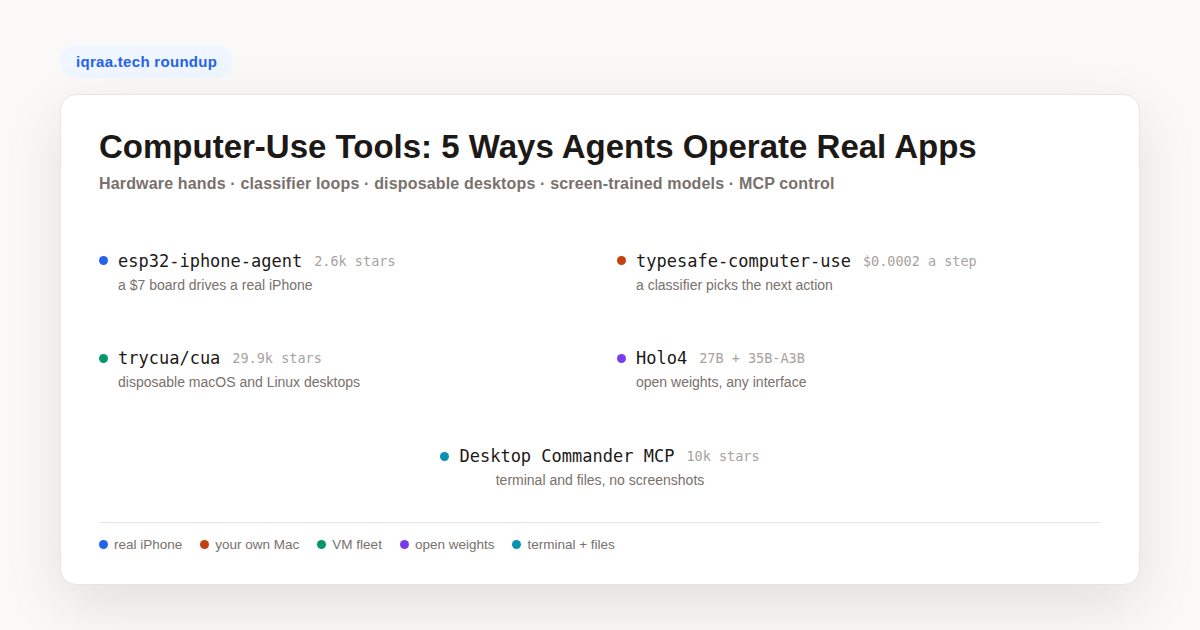
The five picks below are grouped by what actually touches the machine: a board pretending to be a mouse, a loop that classifies screenshots, a fleet of throwaway desktops, a model trained to read pixels, or no pixels at all. The umbrella term covers any setup where an agent operates a computer the way a person would, through its interfaces, instead of through a purpose-built integration. Start with the table, then read the lane that matches your workload.
The five computer-use tools at a glance
| Tool | Control surface | Runs where | Cost signal | Community |
|---|---|---|---|---|
| esp32-iphone-agent | Real iPhone, via hardware | The phone itself | $7 board plus your model API | Over 2,600 stars, MIT |
| typesafe-computer-use | Your real Mac screen | macOS 14+ (Windows experimental) | $0.0002 per step | About 1,200 stars, MIT |
| Cua (trycua) | Disposable VM desktops | Your Mac, machines, or cloud | Open source, your infra | Nearly 29,900 stars, MIT |
| Holo4 (H company) | Screens, code, MCP, APIs | Open weights or hosted API | Far below frontier per task | 27B and 35B-A3B, open |
| Desktop Commander MCP | Terminal and files | Any MCP client | Host subscription, no tokens | Over 10,000 stars, MIT |
A $7 board drives the phone itself: esp32-iphone-agent
The cheapest honest answer to “can an agent use my phone” is a microcontroller. esp32-iphone-agent (onehumanbeing) pairs a $7 ESP32-S3 board with the iPhone it plugs into: the board receives the screen over AirPlay and acts as a USB mouse and keyboard, while the agent app itself runs on the same phone. No Mac at runtime, no developer account, no jailbreak, and iOS 18 or newer is the only requirement. We first spotted the rig via its GitHub repository, created on October 11; it passed 2,600 stars within five days.
The design sidesteps the usual mirroring stack: the board hosts its own Wi-Fi network, forwards the H.264 stream untouched over BLE to the phone’s own app, and never decodes anything itself. That app calls any OpenAI-compatible vision endpoint, from cloud APIs to a local Ollama or vLLM server. The license is MIT, with the firmware binary under GPL-3.0 because its AirPlay receiver is ported from UxPlay. Its limitations list is blunt: ASCII keyboard input only, portrait apps only, and iOS never mirrors passcode, Apple Pay, or DRM screens, so the agent is blind to those by design.
On the Android side of the same problem, Google’s Artemis project takes the software route; our Artemis walkthrough covers that approach.
What does the board actually do inside the rig?
Input is the simpler half. The board registers with the phone as a plain USB mouse and keyboard, and iOS AssistiveTouch turns mouse movement into the taps and swipes iOS understands. Vision is the stranger half: the board brings up a wireless network of its own, takes in the mirrored display over AirPlay, and relays it to the app by Bluetooth LE at roughly 300 to 500 kbps. That budget forces a small picture, 480×1040 at up to 5 frames per second, and because the board’s network holds the phone’s Wi-Fi slot, model traffic goes out over cellular instead.
Accuracy gets its own machinery. A relative pointer drifts, so the app parks it in a corner between moves and, ahead of an exact tap, jiggles the cursor, locates the dot in the captured frame, and pays back the offset. Steps pause until the interface stops changing, and the model then hears whether anything actually moved, which keeps each turn grounded in observed reality. Every run stays on the device for step-by-step replay with the touches drawn in.
The bill of materials stays short. The tested board is a Seeed Studio XIAO ESP32S3 with 8 MB of PSRAM at about $7, and any ESP32-S3 with native USB and PSRAM should qualify. USB-C iPhones plug the board in directly and power it; Lightning phones need a camera adapter. The one extra cost is patience: flashing the board and building the app once takes a Mac with Xcode, and a free Apple ID re-signs the app every seven days.
Two hundredths of a cent a step: typesafe-computer-use
Most computer-use agents ship a screenshot to a frontier model and wait several seconds for a plan, every single step. typesafe-computer-use (awlevin, nicknamed jev) makes the opposite case: a typical step is a selection, not a plan, so put a small classifier in charge of picking the move and reserve a bigger writing model for the moments a text box needs prose. It reads the Mac screen deterministically, combining Vision OCR with the accessibility tree, so the choice rests on grounded facts rather than raw pixels. The project pegs the result at about $0.0002 per step, roughly a fiftieth of a cent, on GitHub at about 1,200 stars since mid-September.
Safety defaults are sensible for something that drives your real mouse and keyboard. A first run executes nothing and prints what it would do, the --act flag unlocks real control, and slamming the mouse into the top-left corner stops a live run. The loop also retires itself when confidence drops, progress stalls, or the step budget runs out, then hands the screen to the writing model for a final answer.
The README’s own benchmark holds the setup constant, one decision per identical screen and instruction, and prices jev at $0.0002 against $0.032 for Claude Opus 5 reading a bare screenshot, a 155x gap. A 12-step task lands near $0.003 instead of $0.40 to $0.90, and per-step latency falls from about 5.5 seconds to about 1.5. The trade behind those numbers is real, and the author says so: any reasoning a frontier model does implicitly, such as reading a date off the pixels, must be re-created as plain code in this project.
Where does the 155x cost gap actually come from?
Input size is not the difference. The README’s table shows 4,882 input tokens for jev against 4,785 for the bare-screenshot frontier call, essentially identical. The difference is what happens after the pixels arrive. The classifier picks among as many as 255 options, returns a complete probability distribution plus a calibrated confidence score, and does so in 0.13 to 0.38 seconds; that confidence number is what lets the loop gate itself on whether to stop, hand off, or continue.
In a realistic loop with history the frontier comparison rises to $0.035 to $0.08 per decision, a 170x to 390x gap, because context grows with every step. The deterministic side stays flat: code computes the facts (which field is focused, which row a repeated label sits in, how far off a date is) and hands them over as state. That is the whole thesis, and its cost.
Disposable desktops at fleet scale: trycua’s Cua stack
Running an agent on your only laptop is a trust exercise. Cua from trycua takes the isolation route: each agent gets its own desktop, a Space, built as a local macOS VM on Apple Silicon or a Linux image, running on your Mac, on machines you own, or in your own cloud account across AWS, Google Cloud, and Modal. The project’s bet, branded Computer-Use 2.0, is that a single run should freely mix shell work, API calls, and point-and-click steps instead of locking an agent into one mode. At nearly 29,900 stars it is the largest project in this roundup, Rust and MIT, on GitHub.
Two features matter for real workloads. Teleport moves a signed-in app such as Chrome into a Space still signed in, with sessions held in an encrypted local Keyvault that only reaches a Space after you approve. Multiplayer lets you and the agent share the same desktop with separate cursors, so you can step in for one decision and hand it back. Around the Spaces sit Cua Driver for operating apps on macOS, Windows, and Linux, the compact CUA-S1 decision models, and Cua Bench, the companion harness for grading agents and exporting what they did.
What does Computer-Use 2.0 change inside a single task?
The 1.0 pattern treats the screen as the only interface: every step is a screenshot in and a click out. Computer-Use 2.0, as trycua defines it, lets one run mix those layers, shell here, an endpoint call there, and a graphical panel where nothing else exists. An agent might pull a dataset through an API, process it in a shell, then finish in a GUI-only admin panel that has no endpoint, all in one continuous context.
H company drills Holo4 on exactly this shape of work: its factory generates hybrid sandboxes where the same state is reachable from a GUI and from an MCP endpoint, teaching the model which handle fits each moment. For a builder, the practical consequence is tooling that refuses to isolate you in one mode: Cua fleets expose the VM, the driver, and the API together, and you stop choosing in advance between eyes and endpoints.
A model trained for screens: Holo4
Sometimes the tool is the model. Holo4, released by H company on September 28, comes in a 27B dense size and a 35B-A3B mixture-of-experts size, with open weights published through Hugging Face across four variants, BF16, FP8, NVFP4, and 4-bit GGUF, plus a hosted API. It is trained for every interface a machine offers: pointing and typing inside real interfaces, drafting and executing code of its own, and invoking MCP or API tools as the task requires. The same model runs against desktops, the web, Android, a code sandbox, or business APIs.
The benchmark worth quoting is OSWorld 2.0, where the 27B scores 61.7% against 81.8% for Claude Opus 5.5. Only the strongest closed models score higher on long workflows, and the open model gets there at a fraction of the parameters and cost per task. H company also open-sources every trajectory behind its public scores, so you can replay each step yourself rather than trust a leaderboard row.
Training ran through supervised fine-tuning on 127B tokens plus reinforcement learning, over roughly 10,000 verifiable tasks from its Agentic Task Factory, including hybrid training grounds where one underlying state is reachable through a GUI on one side and MCP on the other. The announcement post carries the full numbers, along with a smaller sibling: Holotron4 Nano applies the same post-training recipe to Nemotron 3 Nano Omni.
Why did OpenAI start training models inside Ironclad?
The frontier signal for this lane came on October 6, when OpenAI published results from its first software-partner collaboration with Ironclad, a contracting platform. Eleven tasks across legal, commercial, and procurement work, each judged against 8 to 50 criteria and each worth roughly 30 to 40 minutes of an experienced user’s time, became training and evaluation material. GPT-6 Astra, the first frontier model trained on those tasks, averaged 55.0% against 41.6% for GPT-5.6 Sol, with estimated time per attempt down from 37.0 to 19.2 minutes.
The direction matters more than the numbers: a frontier lab treating specialized professional software as a first-class training surface, with partners supplying environments, tasks, and success criteria. That is the same bet this roundup’s open-source lane is making from below, with disposable desktops and open trajectories as the practice ground.
The evaluation design is worth copying even outside frontier research. Hosted copies of the real product gave the models somewhere to practice without touching customer data, synthetic variants of representative workflows multiplied that practice surface, and reinforcement learning closed the loop on feedback. Grading against 8 to 50 explicit criteria per task, rather than one pass or fail mark, shows exactly which requirement an agent dropped, which is the same granularity H company’s open trajectories give you on OSWorld runs.
No screen at all: Desktop Commander MCP
The last lane inverts the question: if the machine has a shell, why look at pixels? Desktop Commander MCP (wonderwhy-er) exposes terminal execution with output streaming, interactive process control for things like SSH sessions and dev servers, full filesystem operations, and in-memory execution of Python, Node.js, and R, all through the Model Context Protocol. Because it rides your ChatGPT or Claude subscription over remote MCP, there are no API token costs at all. It has been at this since December 2024, over 10,000 stars, and reads Excel, PDF, and DOCX natively; the repository documents the full tool list.
It is the pragmatic pick when the target app already has a CLI. Guardrails exist, including a command blocklist, symlink traversal prevention, and an optional Docker install for isolation, and the README is explicit that this is not a sandbox. Every tool call lands in a local audit log. If the protocol is new to you, our MCP server explainer covers how clients and servers negotiate capabilities.
When is a shell better than eyes?
Verifiability is the main argument. A terminal command returns an exit code and text you can assert against; a screenshot returns pixels the model has to interpret, and a misread compounds silently through every later step. Cost follows the same line: streaming command output into context is cheaper than shipping full-resolution screens both ways on each of dozens of steps, and output pagination keeps long-running jobs from flooding the context window.
Eyes win where no endpoint exists. Plenty of professional software exposes nothing but its GUI, which is precisely the gap the rest of this roundup addresses, and visual state can be the only ground truth for design or layout work. The honest rule is interface order: take the API if there is one, the shell if there is not, and the screen only when nothing else remains. Desktop Commander simply makes the second step of that ladder very cheap to reach.
Which lane fits your job
| Your job | Start with | Why |
|---|---|---|
| Automate your own machine | Desktop Commander MCP | Free under your subscription, no pixels to misread |
| Long repetitive GUI flows on a Mac | typesafe-computer-use | $0.003 a task beats $0.40 when the flow is stable |
| Drive a real phone | esp32-iphone-agent | The only lane that touches real iOS hardware |
| Run many agents in parallel | Cua | Isolation, teleportable sessions, evaluation built in |
| Ship an agent that reads screens | Holo4 | Open weights, open trajectories, 61.7% OSWorld 2.0 |
The lanes also compose. A common stackup runs Cua Spaces as the isolated workplace, Holo4 or another open model as the eyes, and an MCP server like Desktop Commander for everything underneath the desktop; the ESP32 rig stays a special case for hardware you cannot virtualize. Whatever you pick, keep the cost model in front of you: the difference between $0.0002 and $0.03 a step is a rounding error once and a budget line at a thousand steps a day.
If you only try two of these computer-use tools, make them Desktop Commander for everything with a command line and typesafe-computer-use for the GUI flows you repeat daily; together they cost close to nothing and cover most real automation. Reach for the ESP32 rig when the target is a phone, Cua when agents run unattended at scale, and Holo4 when the model itself has to make sense of the screen.