Common workflows are the everyday recipes that turn Claude Code from a clever chat tool into a dependable pair programmer. This guide walks through the daily-use prompts you reach for during a normal workday: understanding code, fixing bugs, refactoring, writing tests, shipping pull requests, and documenting your work. Each recipe below is ready to paste into your terminal right now.
Common Workflows: What You’ll Learn
Think of this page as a cookbook of common workflows for Claude Code. Every recipe is a short, single-session task you can run during a normal workday. You will learn the exact prompts to use, the follow-up questions that narrow results, and the small habits that separate frustrating sessions from productive ones.
None of these recipes require CI pipelines, scheduled runs, or background agents. Those infrastructure topics live in our companion guide to Claude Code Workflows and Automation. This guide stays focused on what you type into the terminal, in the moment, to get a specific job done.
The Mental Model: Recipes, Not Commands
Most developers first approach Claude Code as a command-line tool: type a prompt, get an answer, move on. The common workflows mindset is different. You are not memorizing flags. You are building a small library of recipes you can adapt to whatever codebase sits in front of you.
A recipe has three parts. First, a framing prompt that sets the scope. Second, a follow-up that narrows the focus. Third, an action prompt that asks Claude to make a change. When you chain these three steps together, Claude builds up context across the session and produces work that fits your project instead of generic boilerplate.
This is what makes common workflows so powerful. A single well-scoped prompt can replace fifteen minutes of grepping through files. A good follow-up can surface a bug you would have chased for an hour. The recipes below show exactly how to structure those exchanges.
Which Recipe for Which Task? A Decision Framework
Before diving into individual recipes, use this decision table to pick the right starting point. Most common workflows fall into one of these buckets. Scan the left column for your situation, then jump to the matching recipe.
| Your situation | Start here | Recipe number |
|---|---|---|
| Starting fresh on an unfamiliar codebase | Understand the project | Recipe 1 |
| Something is broken or throwing an error | Fix the bug | Recipe 2 |
| Code works but feels messy or outdated | Refactor in small steps | Recipe 3 |
| Need confidence before shipping | Write or expand tests | Recipe 4 |
| Ready to open a pull request | Create the PR | Recipe 5 |
| Code is hard to read or undocumented | Generate documentation | Recipe 6 |
| Have a screenshot, mockup, or error image | Work with images | Recipe 7 |
| Want to point Claude at specific files | Use @ references | Recipe 8 |
| Need to continue yesterday’s work | Resume the session | Recipe 9 |
| Facing a sprawling investigation | Delegate to a subagent | Recipe 10 |
| Want to summarize git history or logs | Pipe input into Claude | Recipe 11 |
Keep this table bookmarked. When you are mid-task and unsure which recipe applies, scan the left column and jump. The common workflows below expand each row with concrete prompts and follow-up patterns.
Recipe 1: Understand a New Codebase
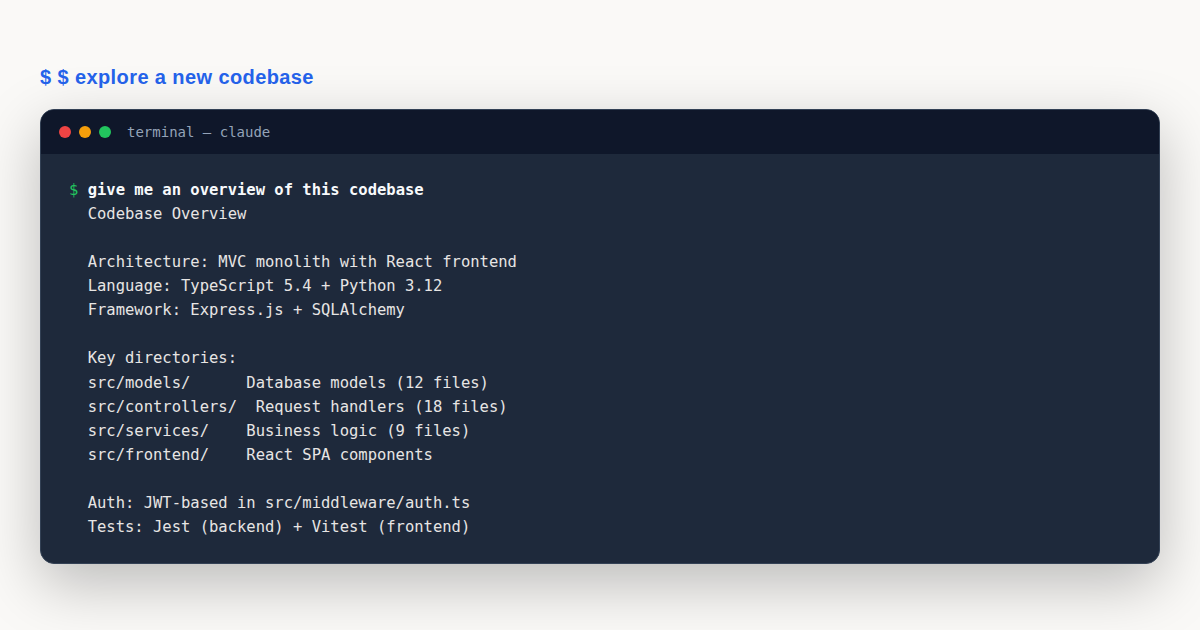
Every developer lands in an unfamiliar repository eventually. The first common workflow worth mastering is the codebase tour. Start broad, then narrow. Claude can hold an entire project in context, but you get better answers when you move from general architecture questions down to specific implementation details.
Open Claude Code in the project root and try these framing prompts in order:
give me an overview of this codebaseexplain the main architecture patterns used herewhat are the key data models?how is authentication handled?The trick is to let each answer inform the next question. If Claude mentions a service layer, your follow-up asks how that layer talks to the database. If it flags a custom ORM, ask where the migrations live. These common workflows reward curiosity.
Once you have the big picture, switch to locating specific code. These prompts help you find relevant files without grepping:
find the files that handle user authenticationhow do these authentication files work together?trace the login process from front-end to databaseThat last prompt is especially useful. Asking Claude to trace a flow across files surfaces the kind of connections that take hours to map manually. If you install a code intelligence plugin, Claude can also answer “go to definition” and “find references” questions, which makes these common workflows even sharper.
One more tip worth mentioning. Ask Claude for a glossary of project-specific terms. Most codebases invent their own vocabulary, and a quick glossary saves you from pretending to understand terms that mean something different here than they do elsewhere.
Recipe 2: Fix Bugs Efficiently
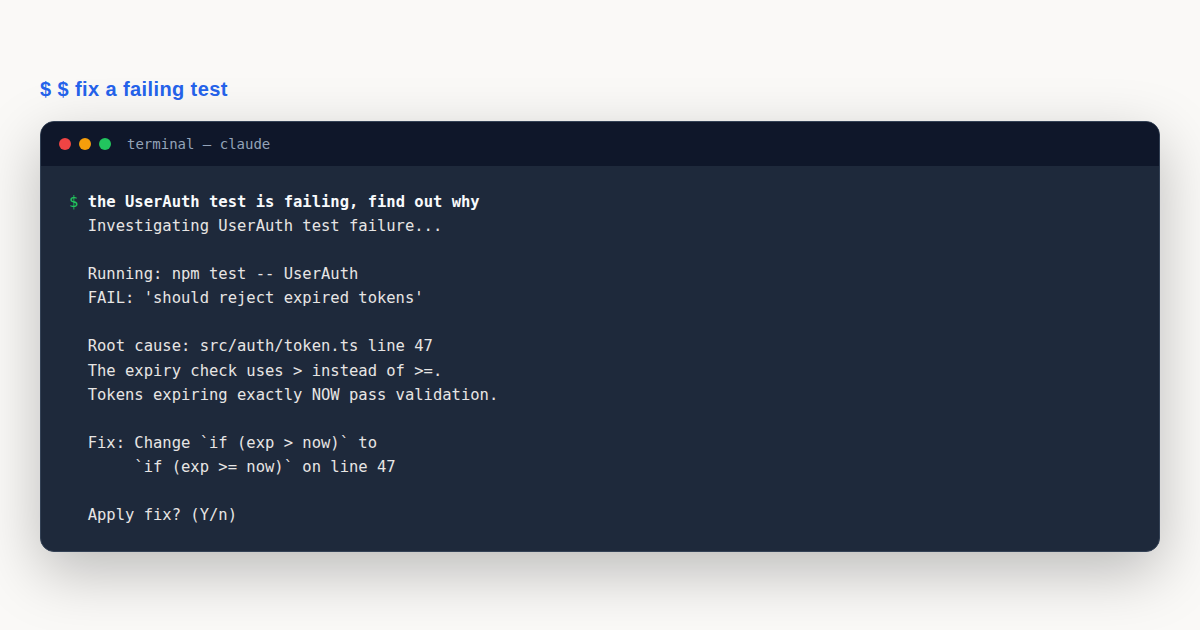
Bug fixing is where most developers first feel the value of Claude Code. The common workflows here revolve around giving Claude enough context to reproduce the issue, then letting it suggest and apply fixes.
Start by pasting the error and the reproduce command:
I'm seeing an error when I run npm testClaude will usually ask for the full error output. Paste it in. Then ask for options before committing to a fix:
suggest a few ways to fix the @ts-ignore in user.tsOnce you pick an approach, ask Claude to apply it:
update user.ts to add the null check you suggestedThis three-step pattern, report, suggest, apply, is the backbone of bug-fixing common workflows. It keeps you in control of the decision while letting Claude handle the typing.
Tell Claude whether the bug is intermittent or consistent. Intermittent bugs often point to race conditions, caching layers, or environment-specific state. Consistent bugs usually trace back to a specific input or code path. Mentioning this distinction early saves a round of back-and-forth.
Also share the exact command that triggers the error. If the bug only appears in staging, say so. If it shows up only on a specific branch, mention the branch name. The more reproduce context you provide, the faster Claude can narrow the search.
Recipe 3: Refactor Code
Refactoring is one of the most satisfying common workflows when done right, and one of the riskiest when done wrong. The key is small, reversible steps. Never ask Claude to “refactor everything.” Scope each request tightly.
Start by asking Claude to find refactor candidates:
find deprecated API usage in our codebaseReview the list. Pick one file or pattern, and ask for a plan before any code changes:
suggest how to refactor utils.js to use modern JavaScript featuresOnce you agree on the direction, ask Claude to execute and then verify:
refactor utils.js to use ES2024 features while maintaining the same behaviorrun tests for the refactored codeTwo habits make refactoring common workflows safe. First, always request backward compatibility unless you are intentionally breaking the API. Second, refactor in small increments. Ten small commits are easier to review and revert than one giant rewrite.
If your project has a test suite, run it after every refactor step. If it does not, write a characterization test first. Refactoring without tests is flying blind, and even Claude cannot guarantee behavior preservation without something to check against.
Recipe 4: Work with Tests
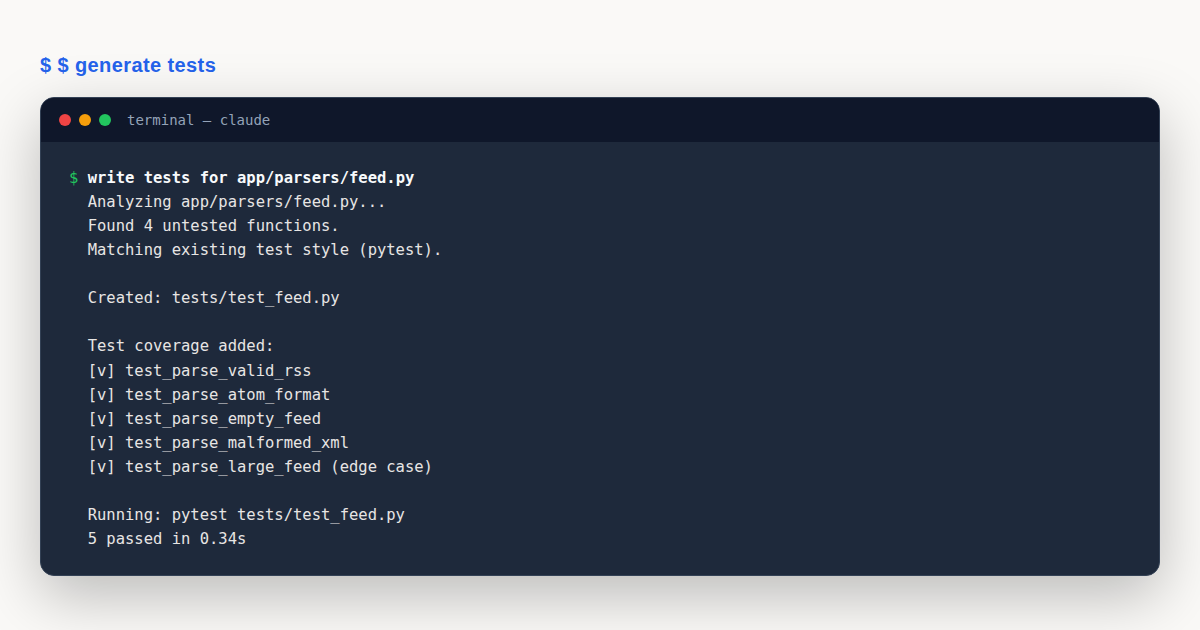
Testing common workflows pair naturally with refactoring. Claude reads your existing test style and matches it, so new tests feel like they were written by the same author. This consistency is a quiet quality boost that adds up over time.
Start by finding coverage gaps:
find functions in NotificationsService.swift that are not covered by testsThen ask Claude to fill them:
add tests for the notification serviceFor extra confidence, ask explicitly about edge cases. Claude will suggest inputs you probably forgot:
add test cases for edge conditions in the notification servicerun the new tests and fix any failuresThat last prompt is important. Claude can run the tests, read the failures, and patch the code or the tests in a single loop. This is one of the common workflows where you genuinely save time, because the edit-run-fix cycle that usually eats your afternoon happens inside one session.
When you ask Claude to match existing test conventions, point it at a representative test file. Say something like “follow the style in @tests/auth.test.js.” Without that pointer, Claude guesses based on the framework it detects, which is usually fine but not always identical to your house style.
Recipe 5: Create Pull Requests
Pull request creation is a common workflow that benefits enormously from Claude’s ability to read your diff and summarize it. Instead of staring at twenty changed files trying to remember what you did, let Claude draft the description.
summarize the changes I've made to the authentication moduleReview the summary. Then ask Claude to open the PR:
create a prClaude runs gh pr create under the hood, and your session becomes linked to that PR. You can refine the description further:
enhance the PR description with more context about the security improvementsOnce the PR is open, you can return to it later with a single flag. This bridges into automation territory covered in our Workflows and Automation guide, but the core command is simple enough to mention here:
claude --from-pr 123This loads the PR context into a fresh session, which is handy for reviewing or extending work after a break. For deeper PR review patterns, see our dedicated Claude Code Code Review guide.
Recipe 6: Handle Documentation
Documentation is the common workflow everyone intends to do and nobody quite finishes. Claude makes it cheap enough that you can document as you go, rather than saving it for a sprint that never arrives.
Find undocumented code first:
find functions without proper JSDoc comments in the auth moduleGenerate the docs:
add JSDoc comments to the undocumented functions in auth.jsThen polish them. The first pass is often correct but dry. A follow-up prompt adds the context that makes docs actually useful:
improve the generated documentation with more context and examplesThese common workflows also work for README files, architecture decision records, and API references. The same pattern applies: find the gap, draft the content, then refine for the audience.
If you are documenting a public API, ask Claude to include usage examples in the doc comments. It reads the function signature and writes realistic call sites, which is more helpful than a bare parameter list.
Recipe 7: Work with Images
Image input opens up a whole category of common workflows. You can paste screenshots of errors, drag in design mockups, or reference local image paths. Claude reads the image and responds in context.
There are three ways to add an image. Drag and drop the file into the terminal. Paste from clipboard with Ctrl+V. Or pass a path directly in your prompt.
What does this image show?Here's a screenshot of the error. What's causing it?Generate CSS to match this design mockupThat last prompt is a favorite among frontend developers. You hand Claude a Figma export or a photographed sketch, and it produces CSS that matches the layout, colors, and spacing. Pair this with the best practices guide for reviewing generated code before shipping.
Error screenshots deserve special mention. Instead of copying the error text by hand, paste the whole screenshot. Claude reads the stack trace, the file path, the line number, and any surrounding UI context that might explain the failure. This often surfaces the fix faster than text alone.
Recipe 8: Reference Files and Directories
The @ prefix is one of the most useful features in Claude Code common workflows. It lets you point Claude at a specific file, directory, or even a GitHub issue, without leaving your prompt.
Explain the logic in @src/utils/auth.jsWhat's the structure of @src/components?Show me the data from @github:repos/owner/repo/issuesHere is the subtle part. When you reference a file with @, Claude also pulls in any CLAUDE.md file in that directory or its parents. This means project conventions, coding standards, and architectural notes travel with the reference automatically.
This behavior makes @ references one of the most valuable common workflows. A single @src/auth/login.ts prompt can bring in the login implementation, the auth module conventions, and the project-wide standards in one shot. No copying, no pasting, no lost context.
Recipe 9: Resume Previous Conversations
Sometimes the most useful common workflow is simply picking up where you left off. Claude Code stores your sessions, and you can return to them without reconstructing context from scratch.
claude --continueThis resumes your most recent session. All the files, decisions, and code you discussed are still there. If you need a specific older session instead, list them and pick:
claude --resumeThis opens a chooser showing your recent sessions with timestamps and summaries. Pick the one you want and continue typing as if you never left.
This common workflow is especially handy for long-running projects. You might investigate a bug on Monday, get pulled into a fire on Tuesday, and return Wednesday. --resume drops you back into the original context without the overhead of re-explaining the codebase.
Recipe 10: Delegate Research to Subagents
Some questions are too sprawling for a single back-and-forth. They need a deep investigation across many files, commits, and tests. This is where subagent delegation enters your common workflows toolkit.
use a subagent to investigate how our auth system handles token refreshClaude spins up a background investigation. It reads files, traces calls, and returns a summary when it finishes. Your main session stays free for other work.
This is one of the common workflows that scales well. Instead of manually opening fifteen tabs and grepping through history, you delegate the research and review the findings. Subagents shine for questions like “how does data flow from the API to the analytics dashboard” or “what would break if we changed the user model schema.”
Note that advanced subagent orchestration, running many agents in parallel, wiring them into CI, or scheduling them on a recurring basis, belongs in the infrastructure territory covered by our Workflows and Automation guide. The recipe here is the everyday version: one focused investigation, one summary, one session.
Recipe 11: Pipe Claude into Scripts
The -p flag lets you feed text into Claude from standard input. This unlocks a family of common workflows where Claude becomes a Unix pipe stage, transforming text in a larger script.
git log --oneline -20 | claude -p "summarize these recent commits"Claude reads the piped input, applies your prompt, and prints the result to stdout. You can chain this into other commands, redirect to a file, or wrap it in a shell function.
Other useful piping common workflows include summarizing failing test output, explaining a stack trace from a log file, or turning a JSON API response into a human-readable summary. Any time you have text that needs interpretation, piping it through Claude is faster than reading it yourself.
For batch processing and CI integration with -p, see our Workflows and Automation guide. This recipe covers the interactive, single-command use case.
Prompt Library: Fifteen More Common Workflows
Beyond the eleven core recipes above, Claude’s official prompt library documents a wider set of common workflows you can adapt. These are shorter patterns, each one or two lines, that fit specific moments in a developer’s day. Group them by intent and keep them handy.
Onboarding and Understanding
give me an overview of this codebaseexplain what @src/payments/stripe.js does and how data flows through itFinding and Tracing
where do we send the welcome email after signup?look through the commit history of @src/auth/login.tsPlanning and Implementing
plan how to refactor the reporting module to use the new event schemalook at how @src/users/create.js is implemented, then build @src/orgs/create.js the same wayread issue #428, implement the fix, and run the testsTesting and Reviewing
write tests for @src/utils/validate.js, run them, and fix any failuresreview my uncommitted changes and flag anything riskyInvestigating and Resolving
users are seeing a blank page on /dashboard. investigateresolve the merge conflicts in this branchReleasing and Remembering
commit these changes with a message that summarizes what I didcompare v2.3.0 to main and draft release notescreate a /lint-fix skill for this projectsummarize what we did this session and suggest what to add to CLAUDE.mdThat last prompt is a quiet favorite. It closes the loop on a session by capturing decisions and surfacing anything worth promoting to permanent project memory. Over weeks, these captured notes make every future common workflow sharper, because CLAUDE.md grows richer with each session.
For the full official set, see the common workflows documentation and the prompt library on the same site.
Tuning Prompts for Better Results
The difference between a mediocre session and a great one often comes down to prompt tuning. A few small adjustments to how you phrase a request can dramatically change the quality of Claude’s response. These common workflows reward clear intent over clever wording.
Be specific about the desired output format. If you want a bulleted summary, say so. If you want a code change applied directly to a file, say that instead. Claude will happily produce a long explanation when you actually wanted a one-line fix, or vice versa, if the format is ambiguous.
Mention constraints up front. If the fix must not change the public API, say so. If the refactor must preserve backward compatibility with version two of your library, name the version. Constraints narrow the search space and prevent suggestions that would technically work but violate your project’s contracts.
Provide examples of the style you want. Point Claude at an existing file that embodies your conventions and ask it to match that style. This is especially useful for test code, where matching the existing assertion style and fixture patterns keeps your suite consistent.
Finally, ask Claude to explain its reasoning before applying changes. A prompt like “walk me through why this fix works before you apply it” gives you a chance to catch misunderstandings early. If the reasoning sounds wrong, you save the round-trip of applying and reverting a bad change.
Reading Claude’s Responses Critically
Claude is a strong pair programmer, but it is not infallible. The common workflows in this guide assume you stay in the loop, reviewing every change before it ships. Treat Claude’s output as a draft from a capable colleague, not as a finished answer.
Watch for plausible-sounding but incorrect API usage. Claude might call a function with arguments that look right but do not match the actual signature in your codebase. The @ reference syntax helps here, because Claude reads the real file instead of guessing from training data.
Be cautious with large deletions. When Claude removes code during a refactor, ask why. Sometimes the removal is correct because the code was dead. Other times it reflects a misunderstanding of the call graph. A quick “what calls this function” check before deletion saves surprises later.
Pay attention to imports and dependencies. A suggested fix might introduce a new dependency that your project does not use, or it might rely on a utility that exists in a different file. These issues are easy to catch on review and painful to debug after merge.
The habit that matters most is running the tests. No matter how confident the suggestion looks, green tests are the only trustworthy signal. Make “run the tests” the last prompt of every code-changing common workflow, every single time.
Building Personal Recipe Variations
As you use these common workflows daily, you will notice patterns that fit your specific project. A generic prompt like “find functions without tests” might become “find controller methods without integration tests” on your codebase. These personal variations are worth collecting.
Keep a scratch file of prompts that worked well. When a recipe produces an especially good result, save the exact phrasing. Over a few weeks you build a customized cookbook that reflects your stack, your conventions, and the quirks of your codebase.
Share useful variations with your team. A prompt that saves you ten minutes a day probably saves your teammates the same. Treat prompt phrasing as a team asset, not a personal trick, and the whole group gets more productive together.
Eventually some of these variations become formal skills. When a prompt sequence stabilizes and you run it the same way every time, that is the moment to promote it from a scratch-file note to a saved slash command. This is the bridge between everyday common workflows and the automation patterns covered in our Workflows and Automation guide.
Composing Recipes into Longer Sessions
The real power of these common workflows shows up when you chain them. A single session might move through understanding, fixing, testing, documenting, and PR creation without you ever leaving the terminal.
Imagine you inherit a bug ticket. You start with Recipe 1 to understand the affected module. You switch to Recipe 2 to reproduce and diagnose the bug. You use Recipe 4 to add a test that captures the broken behavior. You apply the fix. You run the test again to confirm green. You use Recipe 6 to document the edge case you discovered. Finally, Recipe 5 opens the PR with a description that references the whole journey.
None of that requires automation infrastructure. It is just a sequence of common workflows, each one building on the context Claude already holds. This is what separates a tool you use occasionally from one that becomes part of your daily rhythm.
The trick to composing recipes is to narrate the transition. Tell Claude what you are doing next. A prompt like “now that the fix is in, let us add a regression test” helps Claude carry the right context forward instead of starting fresh.
Adapting Recipes to Your Stack
The prompts in this guide are intentionally generic. They work across languages and frameworks because they describe intent rather than mechanics. When you adapt them to your stack, two adjustments matter most.
First, point Claude at the right files with @ references. Generic prompts plus specific file paths beat clever prompts with no context. Second, mention your conventions explicitly. If your team uses Jest with a specific config, say so. If your Python project uses pytest with fixtures, name the fixture style.
Claude infers a lot from the files it reads, but it cannot guess conventions that live in team lore. The more you surface those conventions in your prompts, the better the results. Over time, you will find that your CLAUDE.md file captures most of this for you, which is why the “summarize what to add to CLAUDE.md” prompt from Recipe 11 pays compound interest.
Common Workflows for Code Review
Reviewing code, your own or a teammate’s, is a common workflow that Claude handles well. You can ask it to review uncommitted changes, compare branches, or summarize a diff before you read it yourself.
review my uncommitted changes and flag anything riskyThis prompt gives you a risk filter. Claude highlights the changes most likely to cause problems, so you can focus your attention there instead of reading every line equally.
For reviewing a teammate’s PR, pull the branch and ask Claude to summarize the intent before diving into the diff. Understanding why a change was made makes the code review far more useful than a line-by-line nitpick session. Our full Code Review guide goes deeper on this workflow.
Common Workflows for Git and Releases
Git operations are fertile ground for common workflows. Committing, branching, resolving conflicts, and drafting release notes all benefit from Claude’s ability to read diffs and produce human-readable summaries.
commit these changes with a message that summarizes what I didClaude reads the staged diff and writes a commit message that captures the intent. Review it before accepting, but the drafting work is done.
compare v2.3.0 to main and draft release notesThis is one of the common workflows that saves the most time at the end of a release cycle. Instead of scrolling through a hundred commits, Claude reads the diff between tags and produces a structured set of release notes grouped by feature, fix, and breaking change.
For resolving merge conflicts, point Claude at the conflicted file:
resolve the merge conflicts in this branchIt reads both sides of the conflict and proposes a resolution that preserves intent from both branches. You still review the result, but the tedious part is handled.
Common Workflows for Skill Creation
When you notice yourself running the same sequence of prompts repeatedly, that is a signal to capture them as a custom slash command. This is one of the more meta common workflows, and it pays off forever after.
create a /lint-fix skill for this projectClaude helps you define the skill, including the prompt template, the files it should read, and the steps it should follow. Once saved, you invoke it with a single command instead of retyping the whole sequence.
Building a small library of project-specific skills is how common workflows compound. Each skill encodes a recipe you would otherwise re-derive every time. Over a few months, your project accumulates a set of shortcuts that make the whole team faster.
A Worked Example: From Error to Green Tests
To see how these common workflows fit together, let us walk through a realistic debugging session. Suppose you are working on a Node.js service and a developer on your team reports that the POST /orders endpoint occasionally returns a 500 error in production. You have a stack trace but no reliable reproduce steps.
You start in the project root with Recipe 1, orienting yourself to the affected module:
explain what @src/routes/orders.js does and how it processes a POST requestClaude reads the file, traces the handler through the validation layer, the service layer, and the database access code. It flags that the handler calls calculateTotals before checking whether the order items array is empty. That is your first lead.
Now switch to Recipe 2, bug fixing. You paste the production stack trace, which mentions a TypeError thrown inside calculateTotals. You tell Claude the error is intermittent, which suggests the input varies rather than the code being fundamentally broken.
users are seeing a TypeError on POST /orders intermittently. Here is the stack trace. Investigate whether empty order items could cause this.Claude confirms the hypothesis. When order.items is an empty array, calculateTotals tries to reduce over it and hits an uninitialized accumulator path. The fix is to guard against the empty case.
Before applying the fix, you use Recipe 4 to capture the bug as a test. This is important. You want a regression test that fails before the fix and passes after, so the bug cannot quietly return.
add a test case in @tests/orders.test.js that sends an order with empty items and expects a 400 response, not a 500Claude reads the existing test style in that file and writes a matching test. You run it. It fails, as expected, because the current code throws instead of returning a clean 400.
Now apply the fix:
update @src/routes/orders.js to return a 400 with a clear message when order.items is empty, before calling calculateTotalsClaude makes the change. You run the tests again:
run the order tests and confirm the new case passesGreen. The regression test passes, and the full suite still passes. You have fixed the bug and locked it down in one session.
Now use Recipe 6 to document the edge case for future maintainers:
add a JSDoc comment to the POST /orders handler explaining that empty order items return a 400, with a link to the ticketFinally, Recipe 5 opens the pull request. You ask Claude to summarize the changes:
summarize the changes I've made to the orders moduleClaude produces a summary that mentions the bug, the root cause, the guard added, the regression test, and the documentation update. You refine it:
enhance the PR description with more context about why empty order items were reaching calculateTotals in productionSatisfied, you ask Claude to create the PR:
create a prIn one session, you moved through six recipes: understand, fix, test, apply, document, and ship. This is what composing common workflows looks like in practice. No CI pipeline, no scheduled run, no background agent. Just a focused sequence of prompts that turned a vague production error into a merged fix with a regression test and updated docs.
Notice the rhythm. Each recipe handed off context to the next one. The understanding phase revealed the suspicious code path. The bug-fixing phase confirmed the cause. The testing phase captured the broken behavior. The fix closed the loop. Documentation preserved the lesson. The PR communicated the whole story. That rhythm is repeatable. You will use it on every bug that crosses your desk.
Contrast this with the old way of working. You would grep for the endpoint, open three files, read the handler, notice the reduce call, wonder about the empty case, write a test manually, apply the fix by hand, type a commit message, and draft the PR description from memory. Each step is small, but they add up to a slow, error-prone afternoon. The common workflows approach compresses those steps into a flowing conversation where Claude handles the mechanical work and you handle the judgment calls.
The session also leaves behind a trail you can revisit. The test you wrote documents the bug. The JSDoc comment explains the edge case. The PR description captures the reasoning. If someone asks why that guard exists six months from now, the answer is right there in the commit history, not lost in a Slack thread or a forgotten ticket comment. Good recipes produce artifacts that age well and keep giving value long after the session ends.
Common Workflows: Mistakes That Derail Sessions
Even with good recipes, a few bad habits can turn a productive session into a frustrating one. These are the most common mistakes developers make when running everyday common workflows, and the simple fixes that keep things on track.
- Not scoping the task. Vague prompts like “fix the code” produce vague answers. Fix: name the file, the function, and the symptom. Point Claude at the right surface area before asking for action.
- Skipping the reproduce steps. Bug-fixing common workflows stall without a way to trigger the error. Fix: always share the exact command or input that reproduces the issue, and note whether it is intermittent or consistent.
- Asking for huge rewrites. Requesting “refactor the whole module” in one prompt invites regressions and unreadable diffs. Fix: scope refactors to one file or one pattern at a time, and run tests after each step.
- Forgetting to capture session lessons. Useful decisions evaporate when the session ends. Fix: end with the “summarize what to add to CLAUDE.md” prompt so future common workflows inherit today’s context.
Common Workflows: Best Practices
- Start broad, then narrow. General orientation prompts before specific implementation questions.
- Use
@references to pull in files, directories, and their associated CLAUDE.md context automatically. - Ask for options before applying changes. A suggest-then-apply rhythm keeps you in control of decisions.
- Run tests after every refactor or fix step. Green tests are the only reliable signal that behavior is preserved.
- End sessions with a summary prompt. Capture decisions in CLAUDE.md so the next session starts smarter.
Common Workflows: Frequently Asked Questions
What are Claude Code common workflows?
They are everyday, single-session recipes for tasks like understanding code, fixing bugs, refactoring, testing, and shipping PRs. Each recipe is a short prompt sequence you run during a normal workday, no CI or scheduling required.
How do common workflows differ from automation?
Common workflows are interactive and per-task. You type a prompt, review the result, and decide the next step. Automation runs headlessly in CI or on a schedule. This guide covers the former; our Workflows and Automation guide covers the latter.
Which recipe should I learn first?
Start with Recipe 1, understanding a codebase. It builds the context that makes every other recipe sharper. Once comfortable, move to Recipe 2 for fixing bugs and Recipe 5 for creating pull requests.
Do common workflows work across languages?
Yes. The prompts describe intent rather than mechanics, so they adapt to any stack. Point Claude at your files with @ references and mention your conventions for best results.
How do I remember all these recipes?
You do not need to. Bookmark the decision table above and scan it when a task arises. Over time, the prompts become muscle memory, and your CLAUDE.md captures project-specific variations.
Common workflows are the daily recipes that make Claude Code a genuine pair programmer. Master the framing, narrowing, and applying rhythm. Use the decision table to pick the right recipe fast. Compose recipes into sessions that move from bug to fix to test to PR without leaving the terminal. Build the habit of capturing lessons in CLAUDE.md so every future session starts smarter.