Claude Code Plugins allow developers to bundle skills, subagents, hooks, MCP servers, and LSP configurations into installable packages. Plugins provide a structured way to extend Claude Code’s functionality while maintaining clear manifests and proper namespacing.
The plugin architecture requires a .claude-plugin/plugin.json manifest file, with optional directories for skills, agents, commands, hooks, and configurations. Plugins can be tested locally, distributed through marketplaces, and include features like user configuration, persistent data storage, and security controls for sensitive information.
Claude Code Plugins. Creating Claude Code plugins extends the assistant with custom functionality. Build plugins with hooks, commands, MCP servers, and subagents.
Claude Code Plugins: What You’ll Learn
To understand how plugins fit alongside skills, hooks, and subagents in the broader ecosystem, read our extensibility decision guide.In this guide to Claude Code Plugins, you’ll work through practical, hands-on steps with real examples. Claude Code Plugins is explained from the ground up so you can apply it immediately in your own projects.
Plugins are the highest-level extension mechanism in Claude Code. They bundle skills, subagents, hooks, MCP servers, and LSP configurations into a single installable package. A team installs one plugin and immediately gets everything configured. No manual setup for each component. This lesson covers the plugin structure, manifest format, distribution mechanisms, and how to build your own.
Plugin Architecture
A plugin is a directory with a specific structure. The only required file is .claude-plugin/plugin.json, the manifest that declares the plugin’s identity. Everything else is optional but follows conventions Claude Code recognizes:
my-plugin/
├── .claude-plugin/
│   └── plugin.json       # Required manifest
├── skills/               # SKILL.md files
│   └── my-skill/
│       └── SKILL.md
├── agents/               # Subagent definitions
│   └── specialist.md
├── commands/             # Legacy command files (also work)
│   └── my-command.md
├── hooks/
│   └── hooks.json        # Plugin-scoped hooks
├── .mcp.json             # MCP server configs
├── .lsp.json             # LSP server configs
├── settings.json         # Default settings
└── bin/
    └── helper.sh
The manifest identifies the plugin and its metadata:
{
  "name": "pr-review",
  "description": "Complete PR review workflow with security and test coverage checks",
  "version": "1.0.0",
  "author": {
    "name": "Your Name"
  },
  "repository": "https://github.com/you/pr-review",
  "license": "MIT"
}
Plugin commands and plugin-provided skills are namespaced as plugin-name:command-name to avoid conflicts with project-level configuration. Invoke them with the full namespaced form, such as /pr-review:check-security.
Manifest Features
The manifest supports several powerful fields for configuring plugin behavior. userConfig declares user-configurable options. Fields marked sensitive: true are stored in the system keychain rather than plain-text settings:
{
  "name": "my-plugin",
  "version": "1.0.0",
  "userConfig": {
    "apiKey": {
      "description": "API key for the integration",
      "sensitive": true
    },
    "region": {
      "description": "Deployment region",
      "default": "us-east-1"
    }
  }
}
Plugins get a persistent data directory via ${CLAUDE_PLUGIN_DATA} (v2.1.78+). This survives across sessions, making it suitable for caches, state files, and databases. Use ${CLAUDE_PLUGIN_ROOT} to reference paths relative to the plugin installation directory, essential for hooks and MCP configurations:
{
  "hooks": {
    "PostToolUse": [
      {
        "hooks": [
          {
            "type": "command",
            "command": "node ${CLAUDE_PLUGIN_ROOT}/bin/audit.js"
          }
        ]
      }
    ]
  }
}
Plugin monitors require Claude Code v2.1.105 or later. Declare them under the experimental key in your manifest (experimental.monitors). The top-level form still works but claude plugin validate will warn, and a future release will require the nested form. The monitors manifest key wires the plugin into the Monitor tool. Point it at a JSON file (or inline the config) and its background watches auto-arm the moment the plugin is enabled at session start, or when one of the plugin’s skills is invoked. This is how a plugin ships “watch CI, flag failures” or “tail the dev server log” behaviour without the user having to set it up:
{
  "name": "ci-watcher",
  "version": "1.0.0",
  "experimental": {
    "monitors": "./monitors.json"
  }
}
When the manifest sets a custom monitors path, the default monitors/monitors.json location is no longer scanned. Specify the default explicitly if you still want it loaded alongside your custom file.
LSP support adds real-time language server protocol integration. Put a .lsp.json in the plugin root to configure language servers that provide instant diagnostics, go-to-definition, and symbol search as Claude edits files:
{
  "typescript": {
    "command": "typescript-language-server",
    "args": ["--stdio"],
    "extensionToLanguage": {
      ".ts": "typescript",
      ".tsx": "typescriptreact"
    }
  }
}
Distribution and Development
Test a plugin locally with the --plugin-dir flag before distributing. It loads the plugin for that session only, no installation:
claude --plugin-dir ./my-plugin
# Test multiple plugins simultaneously:
claude --plugin-dir ./my-plugin --plugin-dir ./another-plugin
For plugins hosted as .zip archives, --plugin-url fetches and installs them for the current session without permanent installation. Repeat the flag for multiple plugins:
claude --plugin-url https://example.com/my-plugin.zip
claude --plugin-url https://example.com/a.zip --plugin-url https://example.com/b.zip
Only use --plugin-url with URLs you trust. Loading remote archives executes third-party code on your machine.
Use /reload-plugins to hot-reload plugin files during development without restarting the session. This re-reads all manifests, skills, agents, hooks, and MCP configurations instantly.
The /plugin Discover and Browse screens now show a full inventory of what a plugin will install before you commit to it: commands, agents, skills, hooks, and any MCP or LSP servers it ships. This makes vetting a marketplace plugin a one-screen decision: you can confirm a pr-review plugin isn’t quietly registering MCP servers or hooks you didn’t expect, or check that a deploy plugin actually ships the skill you came for. Browse lists what’s already installed with the same breakdown; Discover does the same for the marketplace catalog. The preview is informational only. The plugin still has to be installed before any of its components run.
Plugin distribution follows a marketplace model. The official Anthropic marketplace is claude-plugins-official. Add additional marketplaces with /plugin marketplace add owner/repo-name. Install plugins with /plugin install plugin-name or claude plugin install plugin-name@marketplace:
# Install from official marketplace
/plugin install pr-review

# Install from GitHub
/plugin install github:username/my-plugin

# Install from local path (for testing)
/plugin install ./path/to/plugin
When a plugin source is a GitHub owner/repo shorthand, Claude Code defaults to cloning over SSH. That breaks in CI runners, containers, or any environment without a configured SSH key for github.com. Set CLAUDE_CODE_PLUGIN_PREFER_HTTPS=1 to force HTTPS cloning instead. The rest of the install flow stays identical:
# Force HTTPS for plugin clones in CI
CLAUDE_CODE_PLUGIN_PREFER_HTTPS=1 claude plugin install owner/repo
For enterprise environments, managed-mcp.json controls which MCP servers plugins can use. The enabledPlugins, extraKnownMarketplaces, strictKnownMarketplaces, and blockedMarketplaces settings in managed policy control which plugins and marketplaces are allowed organization-wide. Plugin subagents have restricted frontmatter. They cannot define hooks, mcpServers, or permissionMode to prevent privilege escalation.
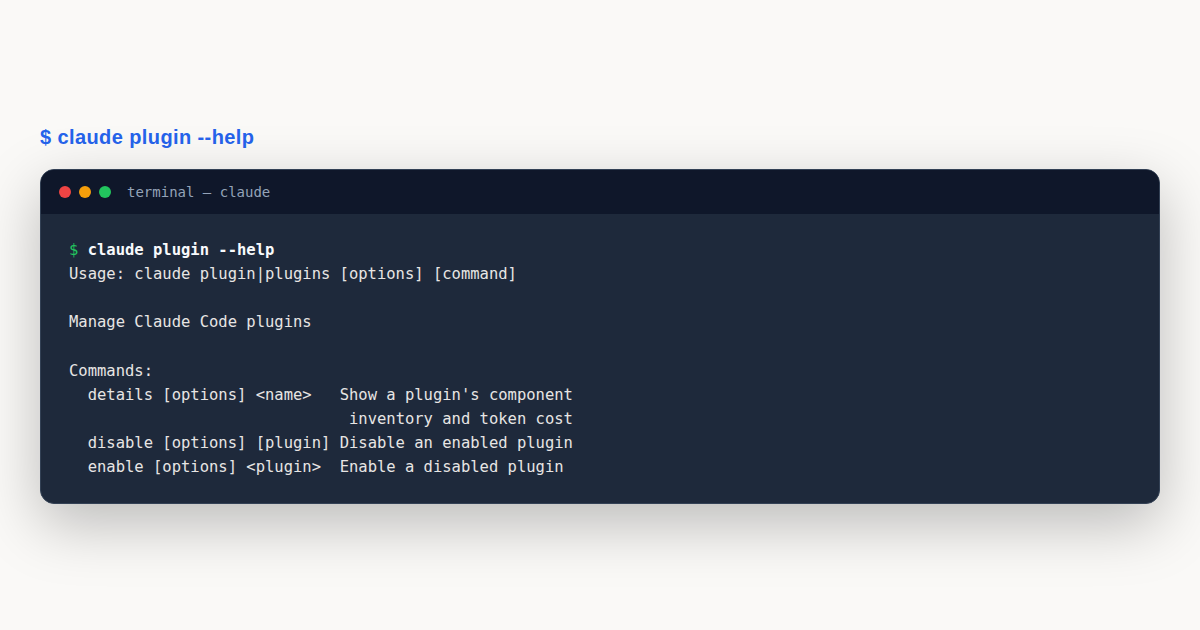
Useful lifecycle commands include claude plugin list, claude plugin enable, claude plugin disable, claude plugin uninstall, claude plugin validate, claude plugin prune (new in v2.1.121, aliased autoremove) which removes auto-installed plugin dependencies that no other installed plugin still requires. Plugins you installed directly are never touched; to uninstall a plugin and clean up its dependencies in one step, run claude plugin uninstall <plugin> --prune. claude plugin details <name> shows a plugin’s component inventory grouped as Skills, Agents, Hooks, MCP servers, and LSP servers, along with an estimate of how many tokens it adds to each session.
And claude plugin tag (new in v2.1.118) creates a release git tag with version validation. Marketplaces can source plugins from GitHub, git URLs, local paths, npm, or other supported package sources.
claude plugin enable and claude plugin disable toggle an installed plugin on or off without removing it. Both accept a <plugin> name (or <plugin>@<marketplace> to disambiguate) and a --scope of user, project, or local (default: user). Disabling at project scope writes the choice into .claude/settings.json so the whole team picks it up; user scope keeps it personal:
# Personal: turn off a noisy plugin just for you
claude plugin disable formatter@anthropics/claude-code-plugins

# Team: keep the plugin in settings but turn it off project-wide
claude plugin disable formatter --scope project

# Re-enable later without touching its install or version
claude plugin enable formatter --scope project
The inline plugin pattern (source: 'settings' in v2.1.80+) lets you embed a plugin definition directly in a settings file without a separate repository. This is useful for small team-internal tools that don’t warrant a full git repository:
{
  "pluginMarketplaces": [
    {
      "name": "internal-tools",
      "source": "settings",
      "plugins": [
        {
          "name": "code-standards",
          "source": "./local-plugins/code-standards"
        }
      ]
    }
  ]
}
Real-World Plugin Examples
Here are production-ready plugin examples you can use as templates:
Example 1: Plugin Manifest
The .claude-plugin/plugin.json file is the core manifest every plugin requires:
{
  "name": "devops-automation",
  "version": "1.0.0",
  "description": "Complete DevOps automation for deployment, monitoring, and incident response",
  "author": { "name": "Community" },
  "license": "MIT"
}
Example 2: Plugin Hook (Pre-Deployment Validation)
Hooks live in hooks/hooks.json within the plugin directory. Here’s a Node.js pre-deployment hook:
#!/usr/bin/env node
// Pre-deployment hook - validates environment before deployment
async function preDeploy() {
  console.log('Running pre-deployment checks...');
  const { execSync } = require('child_process');

  try {
    execSync('which kubectl', { stdio: 'pipe' });
  } catch (error) {
    console.error('kubectl not found. Please install Kubernetes CLI.');
    process.exit(1);
  }

  try {
    execSync('kubectl cluster-info', { stdio: 'pipe' });
  } catch (error) {
    console.error('Not connected to Kubernetes cluster');
    process.exit(1);
  }

  console.log('Pre-deployment checks passed');
}

preDeploy().catch(error => {
  console.error('Pre-deploy hook failed:', error);
  process.exit(1);
});
Example 3: Plugin Command and Directory Structure
Commands live in commands/ and are invoked with namespace syntax (/devops-automation:deploy):
---
name: Deploy
description: Deploy application to production or staging
---

# Deploy Application

Execute deployment workflow:
1. Run pre-deployment checks
2. Build application
3. Run tests
4. Deploy to target environment
5. Run health checks
6. Notify team on Slack
Complete plugin directory structure:
devops-automation/
  .claude-plugin/
    plugin.json          # Required manifest
  commands/
    deploy.md            # /devops-automation:deploy
    rollback.md          # /devops-automation:rollback
    status.md            # /devops-automation:status
    incident.md          # /devops-automation:incident
  hooks/
    hooks.json           # Hook configurations
  agents/
    deployment-specialist.md
    incident-commander.md
    alert-analyzer.md
  scripts/
    deploy.sh
    rollback.sh
    health-check.sh
  mcp/
    kubernetes-config.json
The Plugin Lifecycle: Install, Update, Uninstall
A plugin is not a static artifact; it has a lifecycle, and understanding that lifecycle is what keeps an installation healthy over time. Installing a plugin adds its tools, commands, and skills to the session surface; updating it pulls a newer version that may add features, fix bugs, or change behavior; uninstalling removes it cleanly, which means removing not just the files but also any registered contributions so no dangling references remain. A well-behaved plugin manages all three transitions transparently.
Updates are the lifecycle stage that causes the most trouble. A plugin update can change a tool’s signature, rename a command, or alter a skill’s prompt, and any session that depended on the old behavior may break. Plugins that follow semantic versioning – bumping the major version on incompatible changes, the minor on backward-compatible additions, the patch on fixes – give consumers a signal of risk, and session configurations that pin a plugin to a known version avoid surprise breaks. Treating plugin updates with the same caution as dependency upgrades in production code is the right baseline.
Uninstalling cleanly is the lifecycle stage most often neglected. A plugin that leaves behind configuration, cached state, or registered hooks after removal creates exactly the kind of stale reference that produces mysterious behavior months later. Plugins that ship an explicit uninstall path – removing their settings, clearing their caches, deregistering their contributions – are the ones that can be safely rotated out of a stack without residue.
Plugin Security and the Trust Model
Every plugin you install runs with the permissions of your session, which means the trust question is the security question. A plugin from an unverified source can read your files, run commands, and contact the network under your identity, so the decision to install one is closer to the decision to run a script than to the decision to read a document. Plugins from verified publishers, with reviewable source and a clear permissions declaration, are the baseline for any production or sensitive environment.
The permissions a plugin requests should match its job. A plugin that formats code does not need network access; one that fetches documentation does not need to write to your source tree. Reviewing the declared permissions before install – and revoking or scoping any that seem broader than the plugin’s stated purpose – is the same discipline applied to mobile apps and browser extensions, and it matters here for the same reasons. Plugins with minimal permission scopes are safer neighbors.
For teams, the trust model should be explicit. A short list of approved plugins, reviewed and maintained, gives every teammate a safe default set to draw from. Plugins outside the list require an individual review and an approval record, which slows down adoption of something risky without blocking anything genuinely useful. Treating plugin trust as a documented team policy rather than an individual judgment is how large installations stay defensible.
Plugin Discovery and Evaluation
The ecosystem has more plugins than any one user will ever need, so discovery and evaluation are practical skills. Discovery starts with the problem, not the plugin: knowing what workflow you want to improve lets you search for plugins that address it, rather than browsing an ever-growing catalog and convincing yourself you need things you do not. A clear problem statement filters the catalog faster than any feature comparison.
Evaluation has a short checklist that catches most bad plugins before you install them. Does it have a maintained source you can read? Does it declare its permissions? Does it have recent activity, or has it been abandoned? Does it have a clear, narrow purpose, or does it try to do everything? Plugins that pass these four checks are usually worth a trial install in a sandboxed session; ones that fail any of them are usually not worth the risk, regardless of how appealing the feature list looks.
A trial install in a throwaway session is the right way to evaluate a plugin’s actual behavior. Running it against sample inputs in a sandbox – where it can read but not modify anything real – shows you what it actually does, how fast it is, and whether its output is useful, before you grant it access to anything that matters. Plugins that earn their place in your stack do so by performing well in a trial, not by sounding good in a description.
Plugin Composition and Conflict Resolution
Two plugins that each work well alone may conflict when installed together. The common conflicts are command-name collisions (two plugins register the same command), tool-surface overlap (two plugins expose similar tools with slightly different behavior), and permission interference (one plugin’s deny rule blocks another’s expected action). Anticipating these conflicts is part of composing a multi-plugin setup, and resolving them cleanly is what keeps the composition usable.
Namespacing is the standard solution for command and tool collisions. A plugin that prefixes its commands with a short identifier – so its deploy becomes acme-deploy rather than colliding with another plugin’s deploy – composes without ambiguity. Plugins that follow this convention are good citizens in a shared session; ones that claim generic command names force the user to choose between them, which defeats the point of composing.
When two plugins genuinely overlap in capability, the resolution is usually to pick one and uninstall the other, because keeping both invites inconsistency where the same task produces different results depending on which plugin handled it. Documenting the choice – “we use plugin A for this, not plugin B, because A integrates with our dashboard” – turns an arbitrary preference into a team decision that onboards cleanly. Composition thrives on clarity, and overlapping plugins are the opposite of clarity.
The Plugin Development Workflow
Developing a plugin follows a recognizable software lifecycle: scaffold, implement, test locally, publish, maintain. The scaffold step gets a skeleton with the manifest, the directory layout, and a hello-world tool, which removes the blank-page problem and lets you focus on the plugin’s actual behavior. Plugins built from a scaffold tend to follow conventions consistently, which makes them easier for others to adopt.
Local testing is where most plugin quality is won or lost. A plugin tested only by running it against the happy path breaks on the first unusual input it meets in the wild. A test suite that covers the documented inputs, the edge cases, and the failure modes – and that runs on every change before publish – catches the regressions that would otherwise surface as user reports. Plugins with a real test suite age well; ones without one decay.
Publishing is the commitment step. Once a plugin is in the catalog, other people may depend on it, which means its behavior changes have consequences beyond the author. Treating the published version as a contract – documented, versioned, changed deliberately rather than casually – is the discipline that separates a maintained plugin from an abandoned experiment. A changelog, even a short one, is the minimum commitment a published plugin should make to its users.
Plugin Versioning and Compatibility
Versioning is how a plugin communicates the risk of an update. A patch version bump signals a safe fix; a minor bump signals new, backward-compatible features; a major bump signals that something may break and the consumer should read the changelog before updating. Plugins that follow this convention give consumers the information they need to decide when to update, which is the whole point of versioning.
Compatibility statements go a step further. A plugin that declares which runtime versions it supports – which shell, which platform, which dependencies must be present – saves its users from installing it into an environment where it will not work. Plugins with clear compatibility windows have fewer “it does not work for me” reports, because the report is pre-answered by the manifest.
For consumers, pinning a plugin to a known version is the defensive default. A pinned plugin updates only when the consumer chooses to update it, which means no surprise breaks from an upstream change. The tradeoff is that pinning forgoes automatic fixes and features, so the pin should be reviewed periodically – a plugin pinned a year ago may be missing security fixes that warrant a deliberate update. Pinning is safety; periodic review is what keeps safety from becoming stagnation.
Plugin Performance Impact
Every installed plugin adds to the session’s startup cost and tool-surface size, and at some point the cumulative impact matters. A session with fifty plugins takes longer to initialize, exposes a larger tool list for the model to reason over, and may confuse the model about which tool to use for a given task. Performance and clarity both argue for installing only the plugins you actively use, rather than every plugin that might someday be useful.
Startup time is the most visible cost. Plugins that do work at load time – fetching a manifest, connecting to a service, scanning a directory – add latency before the session is usable. Plugins that defer their work until first use keep startup fast, which is the better default for anything that is not needed on every session. The performance difference between an eager plugin and a lazy one is felt on every single session start, so it compounds.
The tool-surface size affects model quality, not just speed. A model choosing among twenty tools picks more accurately than one choosing among two hundred, because the signal-to-noise ratio is higher. Plugins that contribute a focused, small set of well-described tools help the model; plugins that contribute a sprawling, overlapping set hurt it. Curating the tool surface – installing plugins that each do one thing well, rather than one plugin that does everything – keeps the session both fast and accurate.
Enterprise Plugin Governance
In an enterprise setting, plugin governance is the process that turns individual plugin choices into a defensible organizational posture. The governance artifacts are an approved list, a review process for additions, an owner for each approved plugin, and a periodic audit to retire plugins no one uses. These four artifacts together answer the question every auditor eventually asks: who decided this plugin was safe, when, and is it still needed?
The review process should be lightweight enough that useful plugins get approved quickly and rigorous enough that risky ones get scrutinized. A two-tier process – fast approval for plugins from verified publishers with narrow scopes, deeper review for anything unusual – matches the actual risk profile, where most plugins are low-risk and a few are worth careful attention. A single-tier process that treats everything the same either bottlenecks the easy cases or rubber-stamps the hard ones.
Retirement is the governance step that prevents accumulation. A plugin that was approved a year ago and is used by no one today is still a live part of the attack surface if it stays installed. Periodic audits that flag unused plugins and remove them keep the approved list honest, which keeps the governance claim honest. An approved list that grows monotonically is a list that no longer reflects what the organization actually trusts.
Migrating from Scripts and Skills to Plugins
Many teams arrive at plugins after an earlier phase of ad-hoc scripts and skills, and the migration from the old approach to the plugin model is worth doing deliberately rather than all at once. The trigger for migration is usually pain: the scripts have drifted, the skills overlap, no one remembers which one to use, and onboarding a new teammate means explaining a pile of tacit conventions. When that pain appears, consolidating into reviewed plugins is the cure, but only if the consolidation preserves what actually worked about the old setup.
The safe migration is incremental. Start with the one workflow that caused the most pain – the one everyone runs slightly differently, or the one that breaks most often – and package it as a single plugin, with its tools, its skill, and its documentation together. Migrate that one, let the team use it for a few weeks, and learn what the plugin model does better and worse than the old script. Plugins built from a real workflow, rather than from a blank-slate design, solve a problem the team actually has.
The second and third migrations go faster than the first, because the conventions emerge from the first one. The plugin’s directory layout, its manifest fields, its testing approach, and its documentation pattern all become the template the next plugins follow. By the time the third or fourth plugin ships, the team has a de facto standard that makes every subsequent plugin cheaper to build and easier to review. The investment in the first plugin pays back across all the ones that follow, which is the economic case for doing the migration well rather than rushing it.
The old scripts and skills should be retired explicitly as their plugin replacements land, not left in parallel. Two ways to do the same task – the old script and the new plugin – invite inconsistency, and the team has to remember which is current. A short deprecation window, during which the old approach still works but is documented as superseded, gives everyone time to switch; after the window, removing the old approach is the commitment that makes the migration real. Half-migrated setups, where old and new coexist indefinitely, deliver neither the cleanliness of the plugin model nor the familiarity of the old approach.
Plugin Versus Script Versus Skill: Choosing the Right Form
The choice between a plugin, a script, and a skill is a recurring design question, and the answer depends on what the extension needs. A script is the right form for a one-off, self-contained operation that does not benefit from session context: run it, get a result, done. A skill is the right form for encoding an approach the model should follow when a certain kind of task arises: it steers reasoning, loading on demand. A plugin is the right form when several related capabilities – a tool, a skill, a command, and their documentation – belong together and should be distributed as a unit.
The common mistake is building a plugin when a script would do. A plugin carries packaging overhead – the manifest, the directory structure, the versioning discipline – and that overhead is justified only when the plugin bundles multiple things or is shared. For a single tool that one developer uses, a script in the repository is simpler, faster to evolve, and fully adequate. Plugins earn their overhead when they package a workflow that a team or a community will reuse, at which point the packaging becomes the asset rather than the tax.
The reverse mistake – using a skill where a plugin is needed – appears when the skill starts accumulating related resources. A skill that references a command, a config template, and a documentation page is reaching for plugin territory, because those resources want to travel together. Bundling them as a plugin – so installing one thing brings the skill, the command, and the resources in a consistent, versioned package – is more robust than scattering them and relying on conventions to keep them aligned. The signal that a skill has outgrown its form is when it starts needing companions.
Pro Tips
- Use plugins for bundling, not for single features. If you only need one slash command or one subagent, set it up standalone. Reach for a plugin when you want to bundle multiple components, share with a team, or distribute publicly.
- Test locally before publishing. Use
claude --plugin-dir ./my-pluginto load a plugin from a local path and verify every component works (commands, subagents, hooks, and MCP servers) before submitting to a marketplace. - Hot-reload during development. After editing plugin files, run
/reload-pluginsinstead of restarting Claude Code. It re-reads all manifests and configurations instantly. - Respect plugin subagent security restrictions. Plugin subagents cannot define
hooks,mcpServers, orpermissionMode. This prevents privilege escalation. Design your agents within these constraints. - Version your plugins with semver and tag releases. Use
claude plugin tag v1.0.0to create validated release tags. This ensures reproducible installs and lets users pin specific versions for stability.
Hands-On Challenge
Build, test, and locally install a minimal plugin that bundles a slash command and a subagent.
Task
Create a “lint-fixer” plugin with one slash command (/lint-fix) and one read-only subagent (lint-reviewer), then load it with --plugin-dir and verify both components are available.
Steps
- Create the directory structure:
lint-fixer/.claude-plugin/plugin.json,lint-fixer/commands/lint-fix.md, andlint-fixer/agents/lint-reviewer.md. - Write
plugin.jsonwithname,version,description, andauthorfields. - Write
lint-fix.mdas a slash command that runs the project's linter and auto-fixes issues (use YAML frontmatter withnameanddescription). - Write
lint-reviewer.mdas a subagent withtools: Read, Grepand a prompt focused on code style and lint rule violations. - Launch Claude Code with
claude --plugin-dir ./lint-fixer. - Verify by typing
/lint-fixand asking “use the lint-reviewer subagent to check this file.”
Expected Outcome
A valid plugin directory that loads without errors, a working /lint-fix slash command, and a lint-reviewer subagent visible in /agents, all testable locally before publishing.
Hint
Plugin subagents run in a restricted sandbox. The
hooks,mcpServers, andpermissionModefrontmatter keys are not allowed for security reasons. Test locally with--plugin-dirbefore publishing. After editing files, use/reload-pluginsto hot-reload without restarting the session.
Knowledge Check
Test your understanding of Claude Code plugins:
Q1: What is the core manifest file for a plugin and where does it live?
A) plugin.yaml in the root directory
B) .claude-plugin/plugin.json
C) package.json with a “claude” key
D) .claude/plugin.md
Correct answer: B. The plugin manifest lives at .claude-plugin/plugin.json with required fields: name, description, version, author.
Q2: How do you test a plugin locally before publishing?
A) Use /plugin test ./my-plugin
B) Use claude --plugin-dir ./my-plugin
C) Use claude plugin validate ./my-plugin
D) Copy it to ~/.claude/plugins/
Correct answer: B. The --plugin-dir flag loads a plugin from a local directory for testing.
Q3: What environment variable references the plugin’s installation directory?
A) $PLUGIN_HOME
B) ${CLAUDE_PLUGIN_ROOT}
C) $PLUGIN_DIR
D) ${CLAUDE_PLUGIN_PATH}
Correct answer: B. ${CLAUDE_PLUGIN_ROOT} resolves to the plugin’s installed directory for portable path references.
Q4: A plugin has a command called “check-security” in the “pr-review” plugin. How does a user invoke it?
A) /check-security
B) /pr-review:check-security
C) /plugin pr-review check-security
D) /pr-review/check-security
Correct answer: B. Plugin commands use a plugin-name:command-name namespace.
Q5: Which components can a plugin bundle?
A) Only commands and settings
B) Commands, agents, skills, hooks, MCP servers, LSP config, settings, templates, scripts
C) Only commands, hooks, and MCP servers
D) Only skills and agents
Correct answer: B. Plugins can bundle commands/, agents/, skills/, hooks/, .mcp.json, .lsp.json, settings.json, templates/, scripts/.
Test Your Knowledge
Additional Resources
| Resource | Type | What You'll Learn |
|---|---|---|
| Official Plugins Documentation | Docs | Plugin structure, manifest format, and the full lifecycle from install to update |
| Discover Plugins | Guide | Browsing and installing from the official marketplace |
| Plugin Marketplaces | Guide | Creating private marketplaces, source types (GitHub, npm, pip), and enterprise restrictions |
| Plugins Reference | Reference | Complete field reference for plugin.json, hooks, and bundled components |
| Claude Code Changelog | Changelog | Auto-load without marketplace (v2.1.157), plugin init, dependency enforcement (v2.1.143) |
What should a plugin bundle?
Related hooks, commands, servers, and subagents behind one clear manifest, so users see exactly what it adds.
How do I keep a plugin trustworthy?
Scope its permissions to the minimum the feature needs and document everything it touches.
How do I handle plugin updates?
Version like any dependency, write down breaking changes, and test each release in a throwaway project first.
Putting It All Together
A well-built plugin is a small act of generosity to everyone who installs it. By bundling related features behind a clear manifest, scoping permissions tightly, and versioning changes honestly, you give users something they can adopt with confidence instead of something they have to reverse-engineer before they dare enable it.
Claude Code Plugins: Frequently Asked Questions
What does one actually add to Claude Code?
Plugins bundle related hooks, commands, MCP servers, and subagents behind a single manifest, so anyone installing one can see exactly what it adds and what it is allowed to do before enabling it.
How should permissions be scoped?
Scope permissions to the minimum a feature actually needs. Something that only formats code has no business reaching the network. Tight boundaries make it easier to trust and less likely to cause surprises.
Why does versioning matter?
Treating it like any dependency, with tagged releases and documented breaking changes, lets you test each new release safely. Quietly changing behavior between updates erodes trust faster than shipping fewer features.
What is the most common documentation mistake?
Skipping the required namespace. Commands only work as name:command-name, but docs often show the bare /command form, so new users get “command not found” and assume it is broken.
How can I test one safely before publishing it?
Load it locally with the --plugin-dir flag before sharing it. A two-minute local test catches broken hook paths, missing frontmatter fields, or commands that silently fail to register.
Claude Code Plugins gives you a solid, repeatable workflow. Bookmark this Claude Code Plugins guide and revisit the steps whenever you need them.
Anatomy of a Well-Built Plugin
A good plugin reads like a small, well-organised product. It bundles related hooks, commands, servers, and subagents behind a single clear manifest, so anyone installing it can see exactly what it adds and what it is allowed to do before they enable it.
Scope permissions to the minimum the feature needs. A plugin that only formats code has no business reaching the network, and keeping that boundary tight makes the plugin easier to trust, easier to review, and far less likely to cause surprises in someone else’s workflow.
Version it like any dependency. Tag releases, write down breaking changes, and test each version in a throwaway project before rolling it out widely. A plugin that quietly changes behaviour between updates erodes trust faster than one that ships fewer features but never surprises its users.
Claude Code Plugins: Common Mistakes to Avoid
Most plugin problems trace back to a handful of habits that are easy to fall into while a plugin still works fine on your own machine. Watch for these before you publish or hand a plugin to a team.
- Skipping the namespace when documenting commands. A plugin’s commands only work as
plugin-name:command-name, but READMEs and internal docs often show the bare/commandform copied from a standalone slash command example. New users type it, get “command not found,” and assume the plugin is broken. - Hardcoding absolute paths instead of
${CLAUDE_PLUGIN_ROOT}. A hook or MCP config that references./bin/audit.jsor a fixed local path works on the author’s machine and breaks the moment someone else installs the plugin, because the install directory is different for every user. - Storing secrets in plain settings instead of marking them
sensitive: true. Skipping this inuserConfigmeans an API key ends up in a plain-text settings file that could be committed to a shared repo, instead of the system keychain where sensitive fields belong. - Never testing with
--plugin-dirbefore publishing. A plugin that “should work” based on the manifest alone often has a broken hook path, a missing frontmatter field, or a command that silently fails to register, problems that a two-minute local load withclaude --plugin-dir ./my-plugincatches immediately.
Claude Code Plugins: Best Practices
- Bundle related hooks, commands, MCP servers, and subagents into a single plugin.
- Keep a clear manifest so users know exactly what the plugin adds.
- Version plugins and document breaking changes.
- Scope plugin permissions to the minimum the feature needs.
- Test plugins in a throwaway project before rolling them out widely.