30 sec6 min coredeep dive optional
AI Engineering from Scratch is a free MIT-licensed curriculum that walks you from linear algebra to shipped agent systems in 523 lessons across 20 phases, and every lesson leaves you a runnable artifact.
- 523 lessons, 20 phases, roughly 342 hours of work, in Python, TypeScript, Rust, and Julia.
- Every lesson ships something you keep: a prompt, a skill, an agent, or an MCP server.
- Goal-based routes let working developers skip to Phase 11 or Phase 14 without the math.
- The curriculum is readable on GitHub, on its own site, and in 12 community translations.
Most free AI curricula stop at prompt engineering or stop at theory. AI Engineering from Scratch does neither: it is a complete path from vectors to multi-agent systems, built as one repository you clone and work through by producing evidence. If you have been piecing together a self-taught AI engineering education from scattered courses, this is the map that replaces the pile.
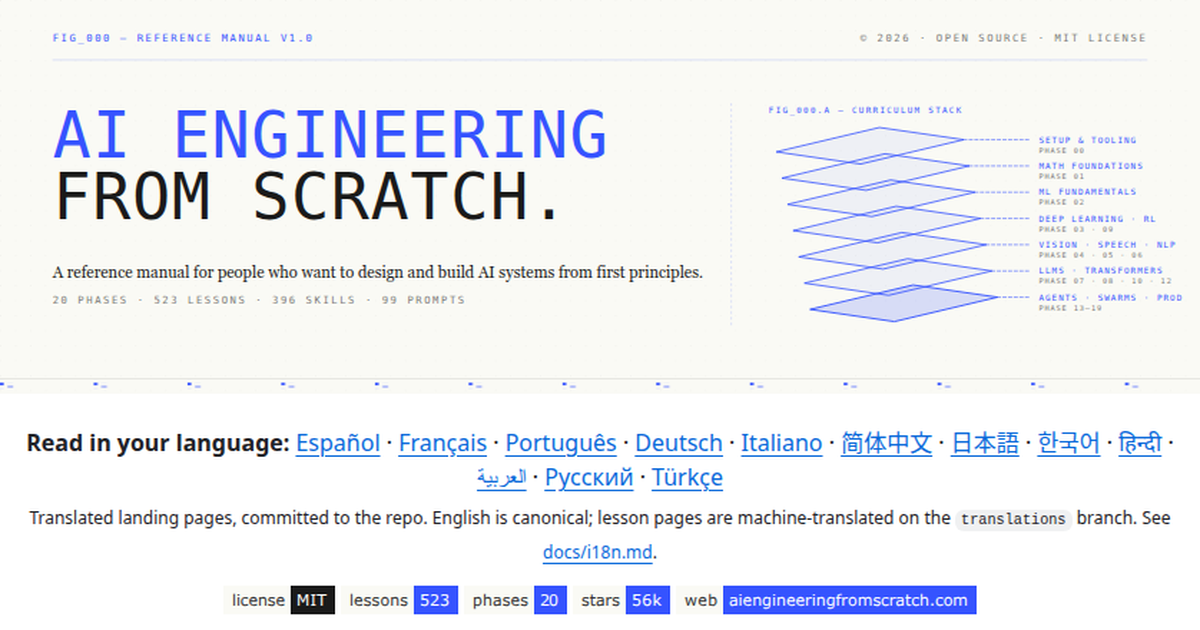
The project, first shared by its author Rohit Ghumare on GitHub, has passed 55,800 stars and updates almost daily. This guide maps what is actually inside, which routes make sense for people who already write production code, and where it overlaps with courses we have covered before.
The map: 20 phases from math to capstones
The curriculum is sequential by design. Phase 1 assumes you can multiply matrices by the end of it, not before. Phase 3 builds a neural network before a framework appears. The full arc splits into five blocks:
| Block | Phases | Lessons | What you build |
|---|---|---|---|
| Foundations | 0 to 3 | 65 | Dev environment, math intuition, classical ML, a neural net from first principles |
| Perception | 4, 6, 12 | 70 | Computer vision, speech and audio, multimodal models |
| Language and LLMs | 5, 7, 8, 10, 11 | 101 | NLP, transformers, generative AI, LLMs built from scratch, production LLM engineering |
| Agents | 13 to 16 | 132 | Tools and protocols including MCP, agent engineering, autonomous systems, swarms |
| Ship it | 9, 17, 18, 19 | 155 | Reinforcement learning, production infrastructure, safety, and 17 capstone products |
Two numbers stand out against every comparable free course. Phase 14 alone carries 54 lessons on agent engineering, more than Microsoft’s entire AI Agents for Beginners series. Phase 19 closes with 85 lessons of capstone work: 17 end-to-end products plus 9 deep-build tracks at 20 to 40 hours each. Phase 10 deserves a mention too, because 24 lessons on building and training language models from scratch is the segment most working engineers skip and most often regret skipping when debugging inference behavior later.
Routes for people who already ship code
You do not walk 523 lessons in order unless you are a student with a clear calendar. The README’s route table is the practical entry point, and it is honest about prerequisites:
- Production LLM apps: enter at Phase 11, LLM Engineering, 17 lessons on prompting, evaluation, and shipping.
- Agents: enter at Phase 14, Agent Engineering, starting from the agent loop lesson.
- MCP: Phase 13 carries a dedicated Model Context Protocol path for tool builders.
- Agent Skills: a fast path through Phase 13 covers writing and shipping skills.
- Claude certification: an onboarding track maps phases to the certification syllabus.
There is also a placement tutor. A skill called start-learning, installable into any skill-capable coding agent, asks what you want to build and returns the phase and lesson to start from. It is a small touch that solves the real problem with mega-curricula: not knowing where you belong.
How a lesson actually works
Every lesson follows the same five-step contract. You read the lesson page, then restate its central concept without looking at it. You key in the code that matters by hand rather than skimming the listing. You execute the lesson script at the repo root. You keep evidence: the command, the working directory, the exit code, the artifact. You continue only when you can make one small change without guessing.
The evidence rule is what turns reading into skill. Because you save the command, the directory, the exit code, and the output for every lesson, you end each phase with an audit trail you can re-run and a habit of demanding proofs that carry over directly into production work. The curriculum is explicit that commands run from the repository root unless a lesson says otherwise, so the evidence stays reproducible months later on a fresh clone.
The first command you run makes the philosophy concrete:
git clone https://github.com/rohitg00/ai-engineering-from-scratch.git
cd ai-engineering-from-scratch
python3 phases/00-setup-and-tooling/01-dev-environment/code/verify.py --route beginner
python3 phases/01-math-foundations/01-linear-algebra-intuition/code/vectors.py
The preflight separates what you need now from what you need later, and every failed check prints a corrective command. The second script needs no dependencies and closes by showing that matrix-vector multiplication is exactly the arithmetic a neural network layer performs. That is the register the whole curriculum keeps: concept, code, evidence, next.
Where it sits next to the courses you may know
The obvious comparison set is the free-course shelf we have already reviewed here. Microsoft’s Generative AI for Beginners covers 21 conceptual lessons with light code. The LLM Course roadmap goes deep on theory and notebooks. AI Agents for Beginners teaches agent patterns across 18 lessons. This curriculum absorbs all three scopes and adds the layers they skip: foundations below and production above.
For readers of our inference series, Phase 17 is the bridge. It carries 28 lessons on the infrastructure and production concerns our LLM inference learning path covers, but with graded exercises rather than curated reading. If you want a projects-first shortcut instead, the five infrastructure projects walkthrough remains the faster start.
Is the 342 hour estimate realistic?
The README quotes roughly 342 hours for the full 523 lessons. That works out to about 39 minutes per lesson, which fits the format: a docs page, one or two scripts, and an evidence-producing run. Working through everything sequentially at 8 hours a week means most of a year, and almost nobody should do that. The realistic patterns are the route entries. A developer who enters at Phase 11 and finishes phases 11, 13, and 14 is looking at 102 lessons, call it 60 to 70 hours, and comes out with working MCP servers, skills, and agents. The capstone tracks are sized separately at 20 to 40 hours each because they are product builds, not lessons. Treat 342 hours as the diploma route and the route table as the working professional’s route.
What does the AI tutor skill actually do?
The start-learning tutor is an Agent Skill, the same format Claude Code and other skill-capable agents load from a repository. Installing it takes two commands if Node.js and npx are present, and a clone is not required. Once installed, your coding agent answers placement questions, points you at the right lesson, and can walk the lesson docs with you. It is a pragmatic use of the skills format: the curriculum is long, and the tutor is the navigation layer. Traditional course platforms solve this with progress tracking and quizzes. A skill solves it with conversation, which fits the audience of developers who already live in a terminal.
What do the four languages actually cover?
The curriculum lists Python, TypeScript, Rust, and Julia, which raises the fair question of whether you need all four. You do not. Python is the spine; nearly every lesson’s reference implementation and verification script is Python, and the lesson commands assume python3. TypeScript appears where the agent and tooling layers live, since much of the skills and MCP ecosystem ships in TypeScript first. Rust and Julia show up in performance-oriented and numerical lessons as alternative implementations when a lesson offers several languages; the README tells you to execute whichever implementation matches the language you are studying. Treat the polyglot claim as depth in optional places rather than a four-language requirement. If you only know Python, nothing blocks you anywhere in the 523 lessons.
What does an artifact look like at the end of a phase?
The claim that every lesson ships a reusable artifact is the curriculum’s differentiator, so it deserves a concrete picture. In the early phases an artifact is a script plus your terminal evidence: the command, the exit code, and the output you saved. From Phase 11 onward the artifacts become things you would genuinely reuse at work: a versioned prompt with its evaluation notes, a structured skill directory with a SKILL.md an agent can load, a working MCP server exposing a tool you built, and in Phase 14 a mission-driven agent workbench setup where lessons 31 to 42 each ship a mission.md that briefs your coding agent before the docs open. By Phase 19 the artifact is the product itself, one of 17 end-to-end builds sized at 20 to 40 hours. The through-line is that your repository of evidence doubles as a portfolio. A hiring manager can read your phase transcripts and see what you can actually run, which is more than most certificates demonstrate.
How do the capstone tracks work?
Phase 19 is structured as 17 end-to-end products plus 9 deep-build tracks, with 4 to 12 lessons per track and 20 to 40 hours per project. A capstone is not a worksheet: you scope the product, build it against the phase contracts, and keep evidence the same way you did in lesson one. The deep-build tracks go further on a single system, closer to a junior engineer’s first quarter on a real product than to homework. Two honest observations from the structure. First, this is where the 342 hour total concentrates; a reader who completes a route and then one capstone has done the equivalent of a solid internship project. Second, the capstones are the part most likely to lag the rest of the curriculum in polish, because product-sized content is expensive to maintain and the project updates daily. Pick a capstone matching a system you actually want to own afterward, and treat rough edges as scope to practice on. Two practical notes for planning: the tracks assume you finished the route they build on, so check the prerequisites line before committing a weekend, and the 4 to 12 lesson span means tracks vary widely in depth, so read the track’s own README before choosing between a short sprint and a month-long build.
Does the Claude certification track matter?
The curriculum ships a certifications directory with an onboarding track for the Claude certification, mapping its phases to the exam syllabus. Treat this as useful scaffolding, not a guarantee. The mapping tells you which phases cover which competency areas, so you are not guessing whether agent engineering or tool protocols carry more weight. It does not make the curriculum an official preparation course, and the README does not claim that. If certification is your goal, the efficient play is the certification onboarding route plus the exam’s own published outline, with the curriculum supplying the hands-on depth the outline assumes you already have. For everyone else, the track is still worth a skim because it doubles as a professionally vetted answer to which phases matter most for applied work.
Is a single-author curriculum at this scale sustainable?
Fair question, and the honest answer is that scale cuts both ways. The project reports over 114,000 readers and around 182,000 page views in a 30 day window as of late August 2026, which for a free repository signals real adoption rather than star inflation. Updates land nearly daily, translations are community-contributed and committed to the repo, and the stats block is generated from a build script rather than hand-edited. The risks are the usual ones for solo projects: bus factor, phase quality varying with the author’s interests, and the possibility of a pivot. The mitigation is structural. Everything is MIT-licensed and clonable, so your evidence and artifacts survive any upstream change, and pinning a commit protects you mid-course. Those are better failure modes than a paid platform sunsetting your cohort’s content, but they are failure modes worth naming.
What if I only care about the MCP and skills material?
Phase 13, Tools and Protocols, is 31 lessons and carries two named fast paths: a Model Context Protocol route and an Agent Skills route. The MCP route covers protocol fundamentals, server design, and the tool surface an MCP server exposes, ending with servers you wrote rather than installed. The skills route covers authoring, packaging, and shipping skills that coding agents load, which is the format the curriculum’s own tutor uses. If your day job is agent tooling, these two routes plus the Phase 14 agent loop lessons form a coherent 90 lesson specialty track that stands on its own. You will miss the evaluation and production material that makes the full curriculum valuable, but nothing in Phase 13 assumes you finished phases 1 through 12, and the route documents say so explicitly.
How does this compare with patchy631’s AI Engineering Hub?
The AI Engineering Hub is a collection of 93 runnable tutorial projects: discrete notebooks and apps you pick from a menu. It is project-shaped. AI Engineering from Scratch is curriculum-shaped: sequenced, prerequisite-aware, with a fixed lesson contract and evidence keeping. They complement rather than compete. Use the Hub when you want a working RAG app or agent demo this weekend. Use the curriculum when the weekend demos stopped teaching you anything and you want the missing fundamentals, especially the math and from-scratch phases most working developers never formally learned.
Where you read it: repo, site, or translation
The same 523 lessons render in three surfaces. GitHub is canonical: lesson docs, code, and commands live in phase directories you can clone and diff. A companion site, aiengineeringfromscratch.com, serves the same lesson code as web pages with prerequisite graphs and progress views. And 12 community translations, from Spanish to Korean to Arabic, ship as committed landing pages, with machine-translated lesson text on a translations branch. English remains the canonical text, and the translation docs state plainly which tier you are reading.
The practical implication: you can read on the site and run from the clone, and the two never disagree about lesson content because both build from the same source. That is unusual. Most free courses either exist as a repo with no reading layer or as a platform that locks the content behind an account.
Who should start and where
Three reader profiles, three honest entry points. The student or career switcher should start at Phase 0 and mean it; the early phases exist precisely for the gaps self-taught developers carry. The working backend or data engineer should enter at Phase 11 and follow the route table. The already-shipping AI engineer should go straight to Phase 14’s agent workbench lessons, where each lesson ships a mission.md briefing for the coding agent before the docs open.
One caveat worth stating plainly. A single-author curriculum at this scale moves fast, and the lesson count, phase boundaries, and hour estimates shift week to week. The numbers here reflect the repository as of late September 2026. Pin a commit if you are halfway through and stability matters to you, and re-check the route table when you return after a break, because the entry points occasionally renumber.
If you already build software, start at Phase 11 and let the route table pull you into phases 13 and 14; that spine alone is a better AI engineering education than most paid bundles. Reserve Phase 0 for the gaps you know you have, not for completionism. The price is right and the artifacts you keep make it stick.